August 16, 2026
Microsoft MarkItDown Has 170K Stars. But It’s the Worst PDF-to-Markdown Converter.
Microsoft MarkItDown leads GitHub stars but ranked last for PDF conversion. See the five-document test, what it lost, and better alternatives.

Jerome
Builder of pdfmarkdown.app
If you have searched for a way to turn PDFs into Markdown, you have probably seen someone recommend Microsoft’s MarkItDown. I kept seeing it in articles and videos too. The recommendation usually came with the same two credentials. Microsoft built it, and an extraordinary number of developers starred it on GitHub.
That worked on me. I wanted to know whether MarkItDown could become the default PDF converter behind an AI workflow, so I spent a day running documents through it, inspecting the output, and burning tokens while I compared the results.
The longer I looked, the less useful the star count became. Most recommendations I found showed how to install MarkItDown or repeated its feature list. Very few put the same difficult PDF through MarkItDown, MinerU, Marker, Docling, and the other serious alternatives, then checked which information survived.
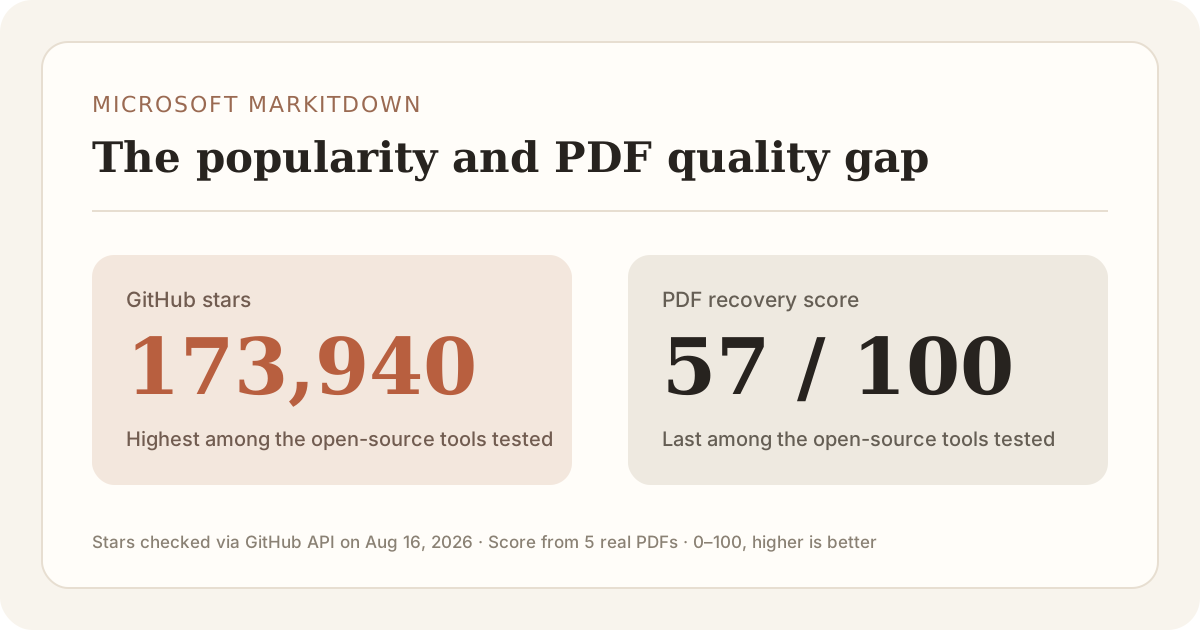
MarkItDown had 173,940 GitHub stars when I checked on August 16, 2026, more than twice as many as MinerU and nearly three times as many as Docling.
Then I tested the PDFs. The winner by stars came dead last by conversion quality.
I ran MarkItDown and eight other converters on five real documents. The set included a two-column research paper, dense government tables, a Japanese financial report, a legal brief, and a scanned report. MarkItDown scored 57 out of 100. MinerU and Marker scored 86, Docling scored 77, and PyMuPDF4LLM scored 76.
Here is the open-source comparison before we get into the individual failures:
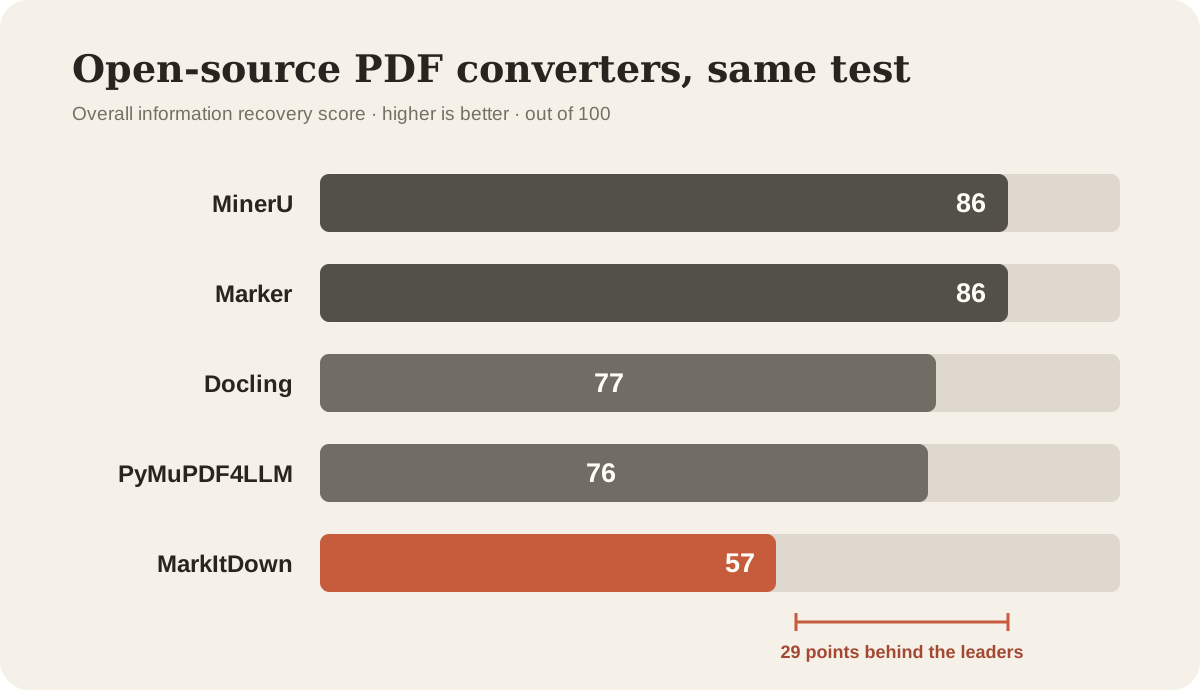
MarkItDown finished 19 points behind the next open-source converter and 29 points behind the leaders.

The radar chart explains the gap. MarkItDown did not have one isolated weakness. Its recovery profile was smaller across every capability we measured.
If you are choosing a PDF-to-Markdown converter and MarkItDown is still on your shortlist, the evidence below should make that decision easier. I will show exactly what it lost, where the token-saving story breaks, and which alternative fits each kind of PDF.
The problem was consistent. MarkItDown extracted plenty of text while losing the structure that made the text useful. Every heading became plain text. Tables lost their relationships. Formulas fell apart. Images disappeared. Scanned pages had no built-in OCR path.
That makes the repeated claim that MarkItDown “saves tokens” especially awkward. Some of those tokens are being saved because useful information never reaches the output. On two of my test documents, MarkItDown did not even produce the smaller Markdown file.
The short answer
MarkItDown is a useful multi-format text extractor. I would keep it for Office files and simple, selectable PDFs in a Python pipeline.
I would not use it when PDF structure matters to the answer. That includes RAG pipelines built around headings, financial tables, academic formulas, figures, scans, and multi-column documents.
For a self-hosted pipeline, I would test MinerU first for maximum recovery or Marker as the balanced default. Docling is a good fit when visible gaps are safer than plausible mistakes. PyMuPDF4LLM is the light option for predictable single-column PDFs. If you want a ready-to-use tool with no installation, pdfmarkdown.app runs locally in the browser.
The code explains why MarkItDown mangled the PDFs
The benchmark result looked less surprising after I read the converter itself.
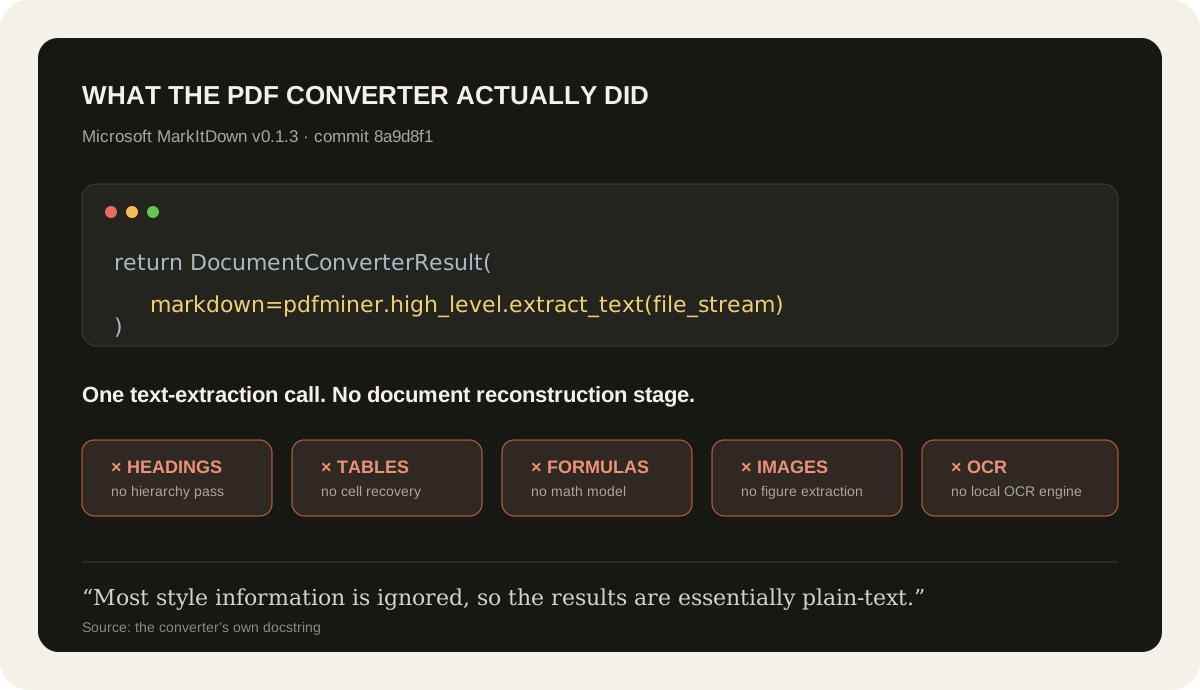
In the MarkItDown source snapshot I reviewed (v0.1.3, commit 8a9d8f1), the PDF converter describes its own output as “essentially plain-text.” The entire default conversion ends with one call:
return DocumentConverterResult(
    markdown=pdfminer.high_level.extract_text(file_stream)
)
That is not a PDF-to-Markdown reconstruction pipeline. It is a PDF text extractor placing its result in a field named markdown.
There is no step in that path to identify heading levels, rebuild table cells, reconstruct formulas, extract figures, or run OCR. MarkItDown cannot preserve information it never tries to model.
The accompanying PDF test was just as revealing. It checked whether one sentence from a sample PDF survived. It did not check for a Markdown heading, a table, a formula, an image, or correct reading order. The implementation and its tests were optimized for getting text out, not for reconstructing a document.
You can inspect the exact converter source and the PDF test vector yourself.
There are two important caveats. First, the benchmark runner did not record the exact MarkItDown package version at execution time, so this source snapshot explains the architecture around the tested implementation rather than proving the installed wheel was byte-for-byte identical. Second, MarkItDown’s current main branch has since added pdfplumber heuristics for some form-like and table-like pages. Ordinary pages and failures still fall back to text extraction, and the default PDF path still has no dedicated formula reconstruction, figure extraction, or OCR engine.
MarkItDown can also hand a PDF to Azure Document Intelligence when a developer supplies a cloud endpoint. That is a separate service, not the default local converter tested here.
This distinction matters because MarkItDown is genuinely useful as a broad multi-format extractor. Word, Excel, and PowerPoint files already contain explicit headings, cells, slides, and text boxes. PDF asks the converter to infer those relationships from objects positioned on a page. A thin extraction layer is enough for the first job. It is exactly why MarkItDown falls apart on the second.
I did not benchmark its Office conversion. My conclusion is narrower and harsher: for structured PDFs, the most-starred option in this comparison had the least serious conversion pipeline and the worst result.
How I tested nine PDF-to-Markdown converters
The test used five documents chosen to expose different failures.
| Test document | What it tests |
|---|---|
| Attention Is All You Need | Two-column reading order, formulas, figures, footnotes, and tables |
| Japanese financial report | CJK text, dense financial tables, and numeric relationships |
| Legal brief | Headings, footnotes, numbers, and multi-column sections |
| Government land-use plan | Five dense data tables |
| Scanned government report | OCR and page-image handling |
Nine converters produced 45 outputs. Before scoring them, I wrote a fixed answer key for every document. Each tool faced the same checks.
The recovery score measures whether a reader who only receives the Markdown can recover the original information. Structure and text carry 45 percent of the score, tables and formulas carry 20 percent each, and images carry 15 percent. Missing categories are removed and the remaining weights are normalized.
I count silent errors separately. A visibly broken formula is annoying. A clean table containing the wrong number can mislead both a person and an AI.
This is a deliberately difficult five-document stress test, not a claim about every PDF in circulation. The useful result is the shape of each failure, not a tiny score difference near the top. The full benchmark write-up, scoring method, answer keys, and raw outputs are public.
Full disclosure. I build one of the tools in the comparison, pdfmarkdown.app. I used the same scoring rules for it and published the evidence so you can audit the result rather than trust my description.
MarkItDown produced zero Markdown headings
MarkItDown generated zero Markdown headings across all five scored documents.
The words used as section titles were usually present. Their role was gone. A title such as “3.2 Model Architecture” came out as another line of ordinary text.
A person looking at the complete output may infer that the line is a title. A Markdown parser, text splitter, or RAG pipeline only sees an unmarked line between two paragraphs.
Headings give a document its outline. They help a retrieval system keep a section title attached to the paragraphs below it. They also give an AI useful context when it receives one extracted chunk instead of the entire document.
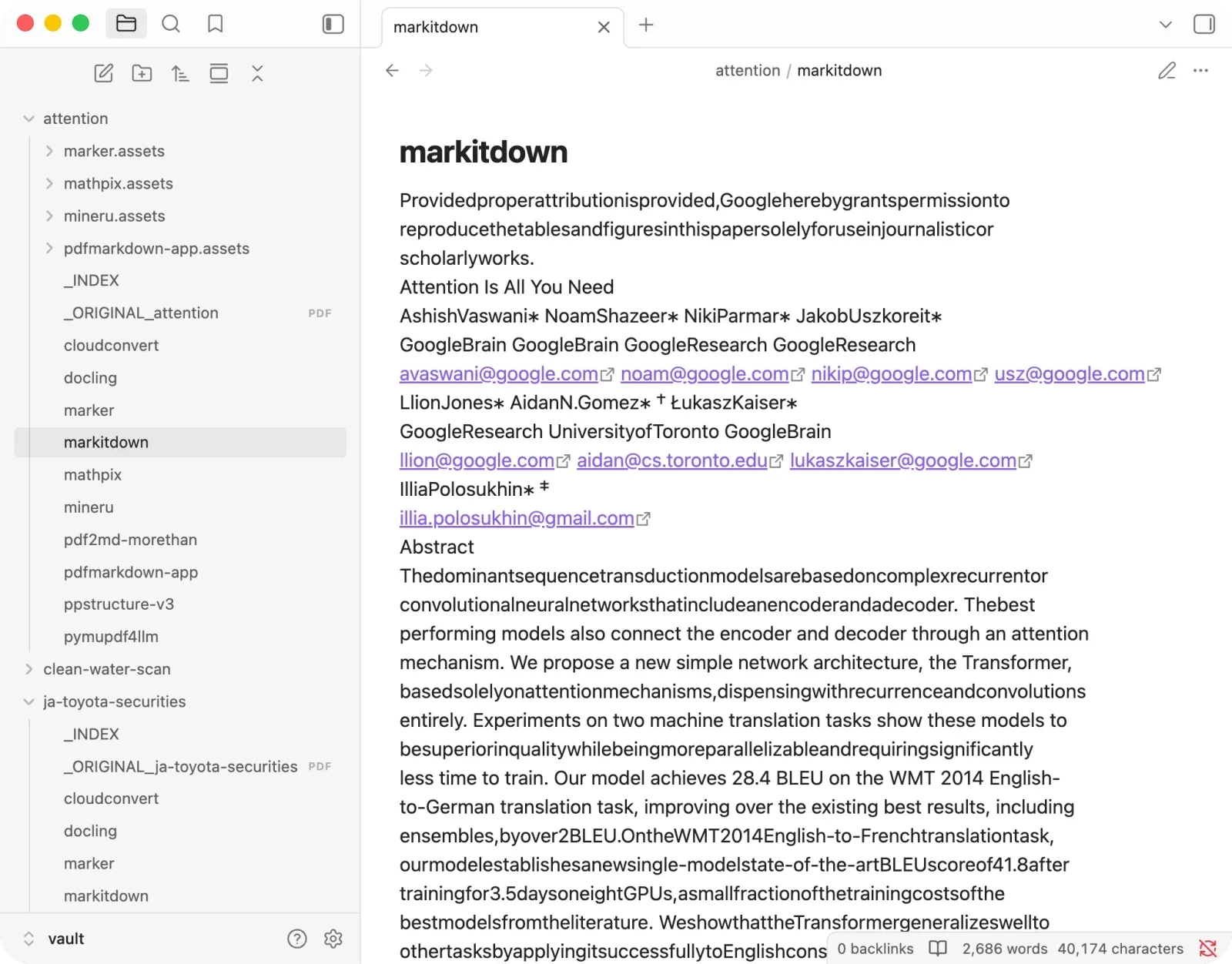
MarkItDown did not lose every title word. It lost the structure that made those words useful.
Tables became text fragments
The government sample contained five real tables. Their column headings, row labels, and values only make sense as relationships.
MarkItDown often returned the characters without preserving those relationships. A list of years might appear first, followed by categories and then a run of values. Every number can survive while the table becomes unusable.
It also failed in the other direction. Spacing inside justified prose sometimes looked enough like columns that MarkItDown generated fake tables from ordinary text.
For an AI workflow, a fake table is worse than an obvious gap. It gives the model a relationship that never existed in the source.
MarkItDown scored 65 on the financial report and 66 on the table-focused document. MinerU scored 95 and 100 on the same files. Marker scored 87 and 96.
Formulas and images disappeared
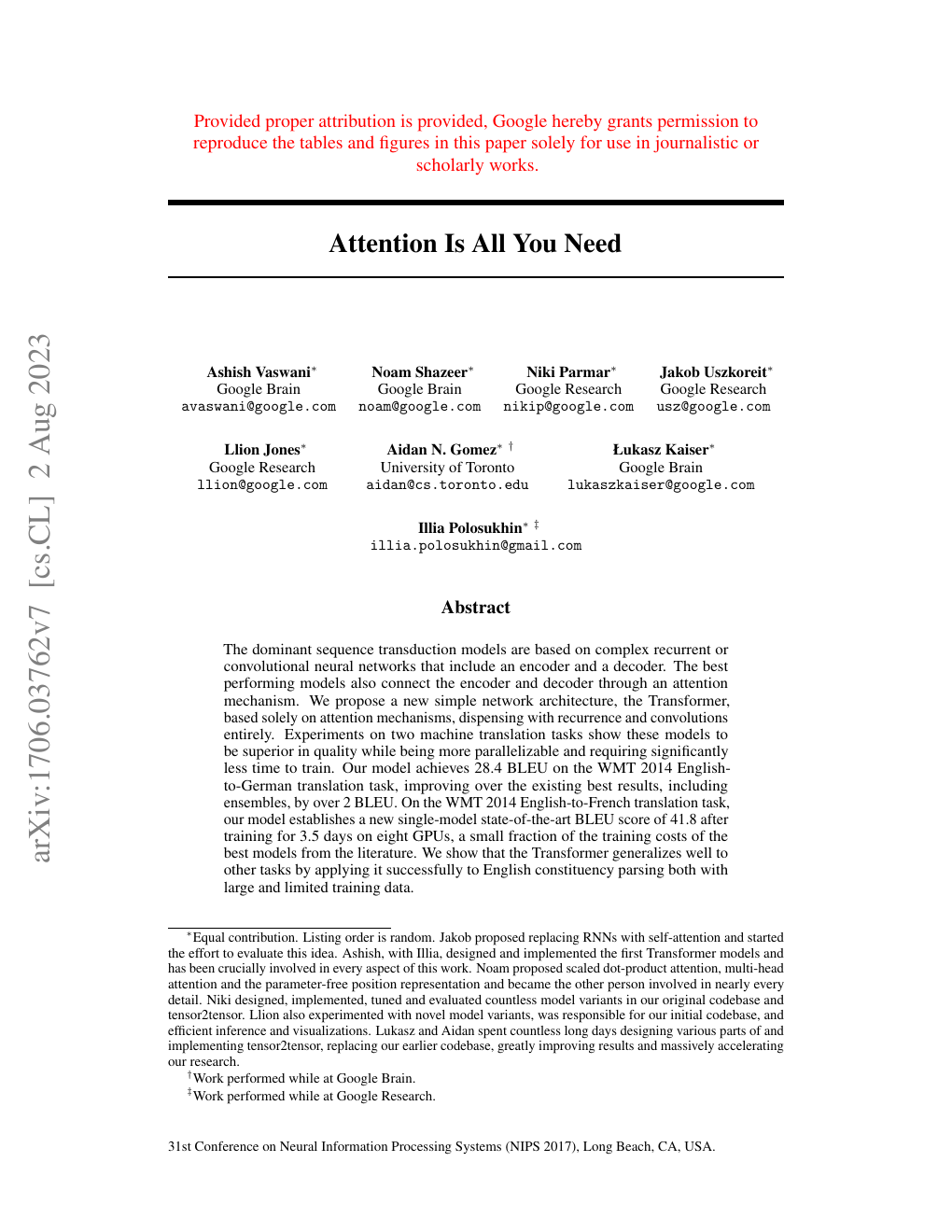
The research paper was Attention Is All You Need. It contains two-column text, figures, tables, and the equations that define the Transformer architecture.
MarkItDown scored 51.
It preserved much of the running text, but the formulas did not survive as usable formulas. Roots, fractions, subscripts, and symbols broke into loose pieces. None of the formula checks passed. The images were dropped as well.
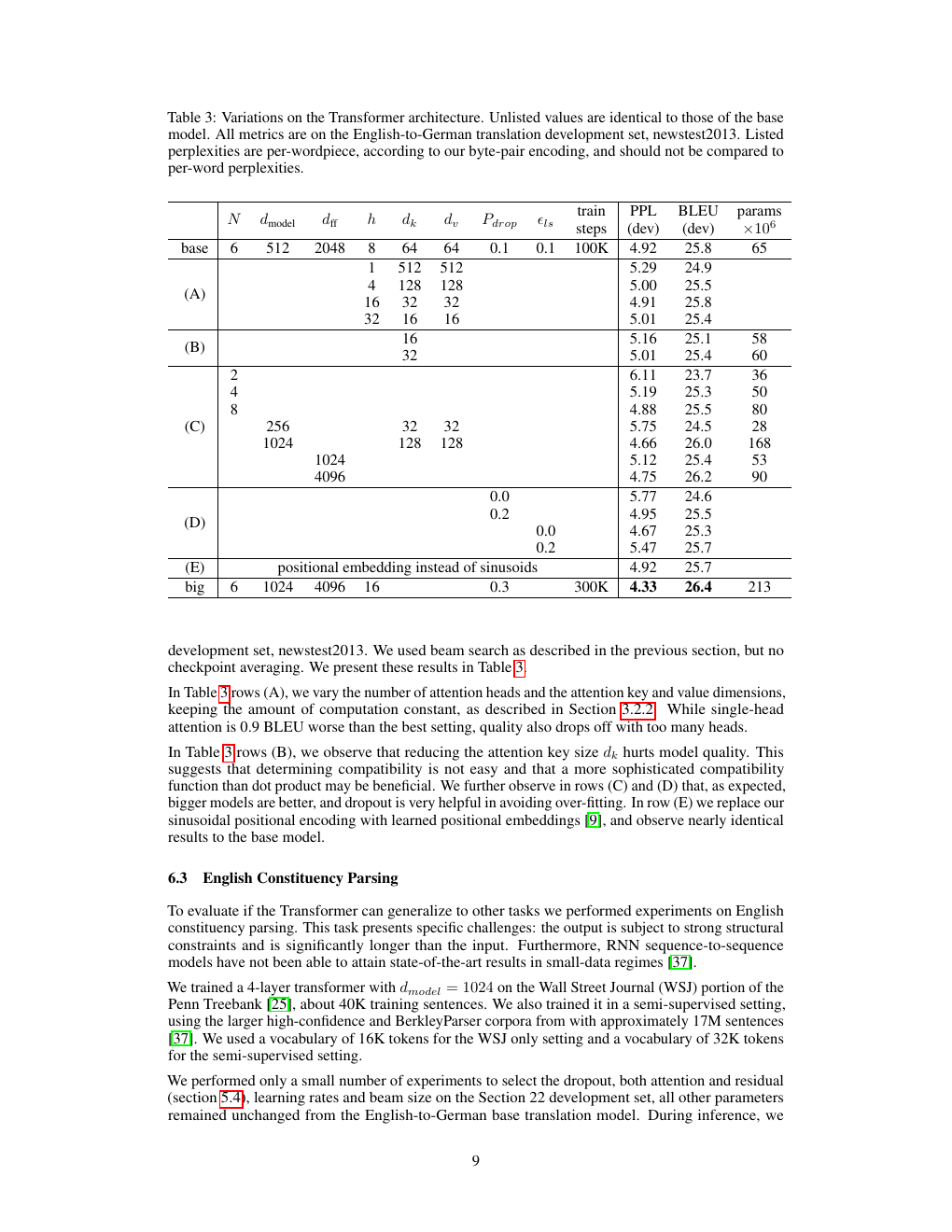
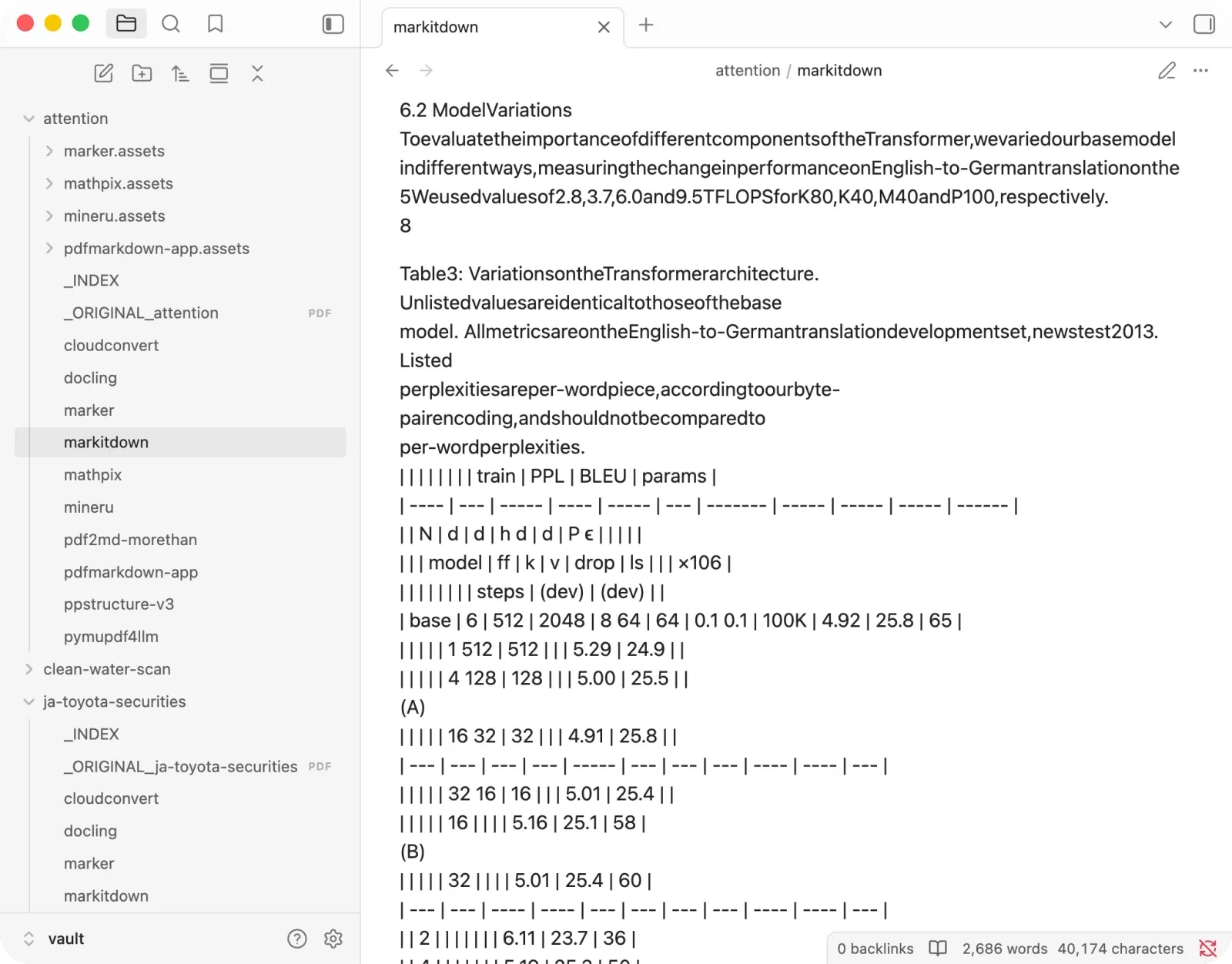
An AI can only reason over information that reaches it. Removing diagrams and breaking equations may change the token count, but the model receives a poorer version of the paper.
Scanned PDFs need another system
The scan test was a two-page government report stored as page images.
MarkItDown scored 33, the lowest scan result in the comparison. Its normal local PDF path does not include an OCR engine. A developer can connect an external vision or OCR service, but that extra system is then doing the part MarkItDown could not do.
This is reasonable for a lightweight library. It is a serious limitation for someone who installed MarkItDown because an article promised clean Markdown from any PDF.
The token-saving claim does not survive a basic check
A popular argument for MarkItDown goes like this. Uploading PDFs to an AI wastes tokens. Convert them with MarkItDown first, reduce the token count, and get better answers.
Converting a repeatedly used PDF into searchable Markdown can reduce AI costs. I do it myself. The converter still has to preserve the information you plan to ask about.
The benchmark counted every output with the same o200k_base tokenizer.
| Document | MarkItDown | pdfmarkdown.app | What MarkItDown lost |
|---|---|---|---|
| Research paper | 11,993 tokens | 11,193 tokens | All headings, images, and tested formulas |
| Government tables | 4,498 tokens | 3,118 tokens | Reliable table relationships |
| Scanned report | 186 tokens | 212 tokens | Headings, images, and much of the page structure |
On the research paper, MarkItDown used about 800 more tokens while keeping zero headings, zero images, and none of the tested formulas. On the government tables, it used about 1,380 more tokens while producing weaker tables.
It was smaller on the scanned report by 26 tokens. That output also contained very little usable structure.
A lower token count helps when the same information survives. Deleting a figure does not compress it. Flattening a table does not optimize it. Removing an outline does not prepare a document for RAG.
It makes the missing information cheaper to process.
The easiest PDFs barely need MarkItDown
MarkItDown remains reasonable for a narrow kind of PDF. The document contains selectable digital text in one column. It has no meaningful tables, formulas, figures, or scans. You do not need its heading hierarchy. You mainly want a local text stream inside a Python workflow.
MarkItDown is fast and convenient for that job.
Selecting the text and pasting it into a Markdown file can already handle much of the same job. MarkItDown automates the step and supports many formats through one interface, which is useful in a pipeline. Its PDF conversion adds much less value once the document requires layout understanding.
The PDFs people struggle with tend to contain columns, tables, formulas, page images, footnotes, and captions whose positions carry meaning.
Better MarkItDown alternatives for PDFs
MinerU for maximum open-source recovery
MinerU scored 86 overall, the highest open-source result alongside Marker. It scored 99 on the research paper and 100 on the table document.
I would start here for academic papers, formulas, and complex tables when conversion quality matters most.
The setup is heavier and its strongest path benefits from a capable GPU. It also made serious mistakes. In the legal document it kept footnote markers while deleting most of the footnote text. It promoted lines from a table of contents into false top-level headings.
Marker as the balanced open-source choice
Marker also scored 86. It handled formulas and figures well and avoided a complete disaster on any of the five document types.
Its weakness was layout. On one document it interleaved two columns. On another it detached numeric values from their row labels.
Marker is the safer default when you want a local library for mixed documents and can accept a model download and slower conversion.
Docling for tables and visible failures
Docling scored 77 overall, including 92 on the table document and 90 on the legal brief.
Its failures tended to be visible. When it could not decode a formula or image, it often left an obvious gap instead of inventing a convincing substitute. I prefer that behavior when a wrong value would be worse than a missing one.
It can run on a CPU and is easier to start with than MinerU. Formula-heavy papers remain one of its weak spots.
PyMuPDF4LLM for simple PDFs at speed
PyMuPDF4LLM scored 76. It is light, quick, and good on straightforward single-column documents.
Its reading order broke around figures in the research paper, and it dropped most display formulas and images. I would use it for large batches of predictable text PDFs, not a mixed archive whose layouts I had never seen.
pdfmarkdown.app when you do not want to install anything
If you want to open a PDF and convert it without Python, models, or a GPU, pdfmarkdown.app runs inside the browser. The file stays on your device.
It scored 92 overall and produced no silent errors in the five-document benchmark. It also shows the original PDF beside the Markdown, so you can inspect a table or formula before giving the result to an AI.
I build it, so treat that recommendation with the appropriate skepticism. It is an interactive tool, not a replacement for MinerU or Marker inside a server pipeline.
Scores and recommendations side by side
| Tool | GitHub stars | Avg recovery | Tables | Scan | Best fit |
|---|---|---|---|---|---|
| MarkItDown | 173,940 | 57 | 66 | 33 | Multi-format text extraction |
| MinerU | 77,700 | 86 | 100 | 71 | Papers and complex tables |
| Docling | 64,800 | 77 | 92 | 61 | Text, tables, and visible gaps |
| Marker | 38,771 | 86 | 96 | 71 | Balanced local PDF pipeline |
| PyMuPDF4LLM | n/a | 76 | 82 | 58 | Fast, simple digital PDFs |
| pdfmarkdown.app | n/a | 92 | 100 | 83 | No-install browser conversion |
GitHub stars were checked through the GitHub API on August 16, 2026. Recovery scores come from the same five-document benchmark. Stars measure project popularity, not conversion quality.
FAQ
Why does MarkItDown produce no headings from PDFs?
MarkItDown’s lightweight PDF path extracts text without reliably rebuilding the heading hierarchy. Across all five PDFs in this test, section titles appeared as plain text and the output contained zero Markdown headings.
Is MarkItDown good for RAG?
It can work when your inputs are simple text documents and your pipeline only needs a text stream. It is a weak choice when RAG chunks depend on headings, tables, reading order, formulas, figures, or OCR. Those were the areas where it lost the most information in this benchmark.
What is the best open-source MarkItDown alternative for PDFs?
MinerU and Marker had the highest open-source recovery scores at 86. MinerU was strongest on formulas and difficult tables. Marker was the more balanced default. Docling is worth considering when you prefer a visible missing item over a plausible wrong value.
Does MarkItDown reduce PDF token usage?
Sometimes, but a shorter output can reflect missing information. In this test MarkItDown actually produced more tokens than pdfmarkdown.app on the research paper and government table sample while preserving less structure. Compare information recovery alongside token count.
Does MarkItDown OCR scanned PDFs?
Its normal local PDF conversion does not include a built-in OCR engine. You need to connect another OCR or vision system. MarkItDown scored 33 on the scanned document in this benchmark.
Is there a MarkItDown alternative that does not upload files?
MinerU, Marker, Docling, and PyMuPDF4LLM run locally. pdfmarkdown.app processes files inside the browser without uploading them. Mathpix and CloudConvert send files to their servers.
Test the file that matters to you
Do not choose a converter from a star count or one benchmark score. Run one document where you already know the important numbers. Check whether its headings became real headings, whether table values stayed attached to their labels, and whether one formula and one image survived.
That check took MarkItDown from the most popular option in my list to the last one I would choose for structured PDFs.
Try pdfmarkdown.app on your own PDF. It runs in your browser with no signup and no file upload.