PDF → Obsidian
Make the PDFs in Obsidian actually searchable
Obsidian can't search inside a PDF, and AI has to read the whole thing. Convert it to a note and make it searchable, linkable and AI-friendly.
Drop a PDF here
or click to browse. Scanned notes welcome.
Convert to Obsidian NotesPDF · up to 500MB · no signup
No file handy?
Need image understanding?
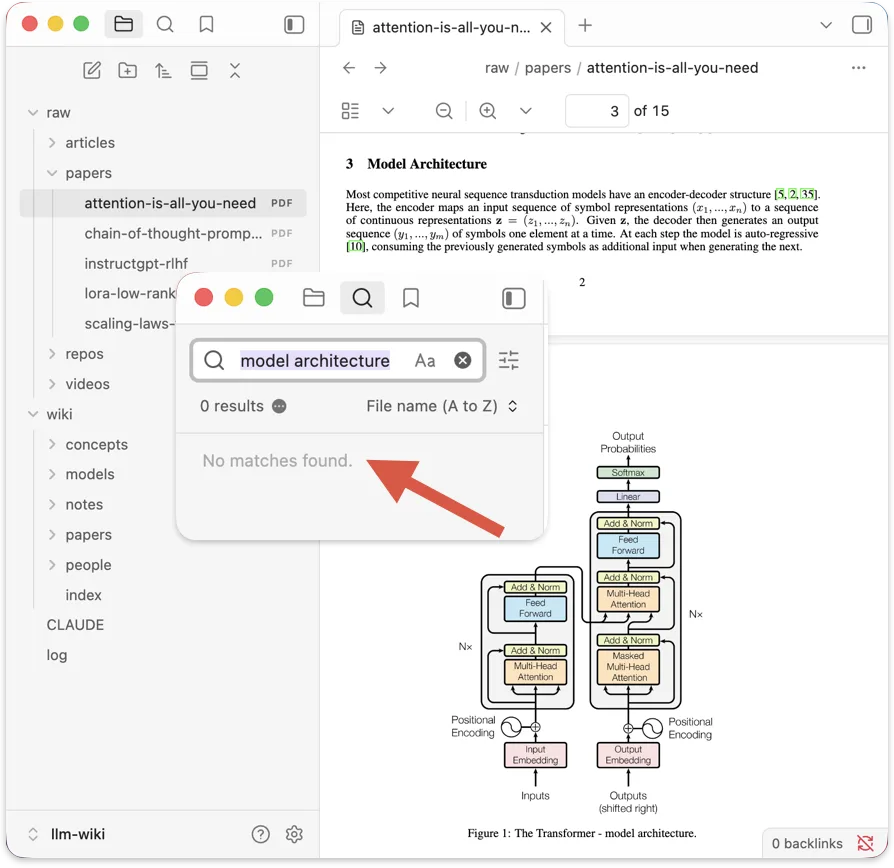
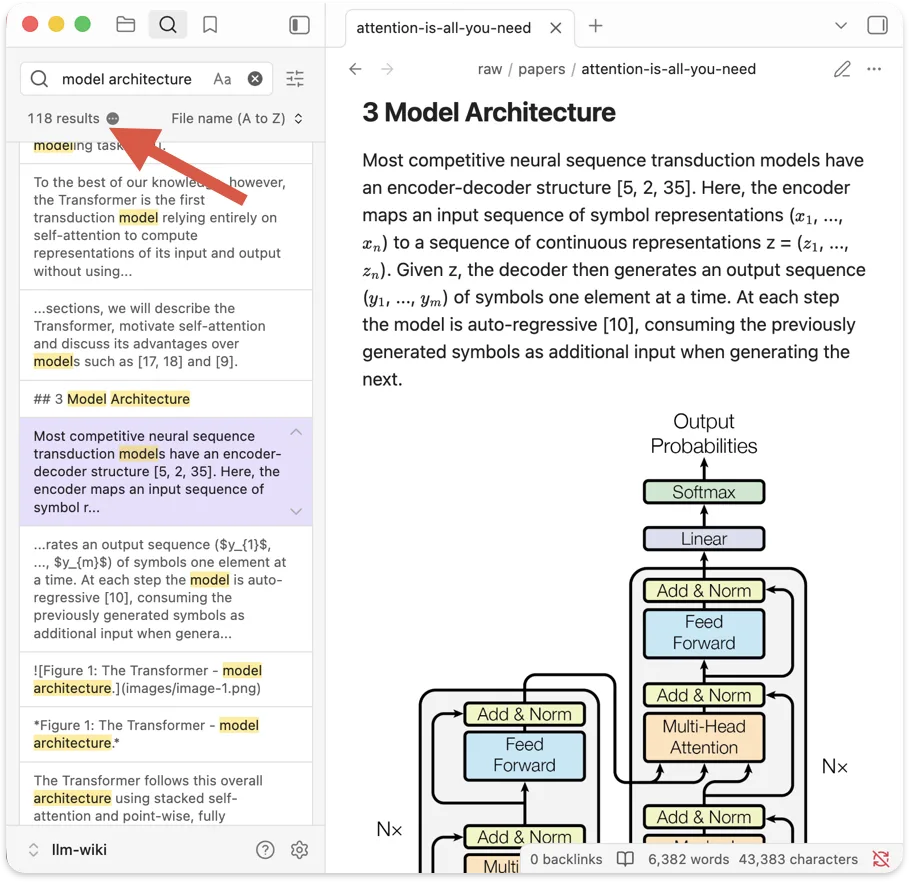
Why Obsidian can't find them
A PDF in Obsidian is a dead end
Its text never gets indexed, so search finds nothing. Convert it to a note and every word turns up.
Three simple steps
From PDF to note in 3 steps
01
Drop your PDF
Drag it in or click to choose. It opens right here, nothing is uploaded to a server.
02
It converts in your browser
Digital PDFs are read directly; scanned notes go through in-browser OCR. Headings, tables and lists are kept.
03
Into Obsidian
Copy the Markdown into a new note, or download the .md file with its images and drop them into your Obsidian folder. Images come across too. No plugin required.
How it compares
How it compares.
If you keep notes in Obsidian, you have a few ways to get a PDF into them. Here is an honest look at the trade-offs.
| pdfmarkdown.appTHIS TOOL | Copy-paste from PDF | Obsidian PDF plugins | Online converters | |
|---|---|---|---|---|
| Keeps headings, tables & lists | Yes | No structure is lost | Limited varies by plugin | Limited |
| File stays on your device | Yes in-browser | Yes | Limited some call an API | No uploaded to server |
| Reads scanned notes (OCR) | Yes | No | Limited often needs API key | Limited |
| No install, no API key | Yes | Yes | No plugin + often a key | Yes |
| Clean Markdown out | Yes | No raw broken text | Limited | Limited varies |
| Free allowance | Yes up to 1,000 pages | Yes | Limited | No daily limit |
Community plugins like obsidian-extract-pdf and pdf-to-md do good work inside Obsidian, and some wrap strong OCR (Marker, Mistral) — but they usually need setup or an API key. This tool trades that away for a zero-setup, in-browser flow: convert here, paste into Obsidian. Last checked July 2026.
Frequently asked questions
Can Obsidian search inside PDF files? +
Not on its own. Obsidian indexes your Markdown notes, not the text inside PDF attachments, so a search for a phrase that only appears in a PDF returns nothing. Converting the PDF to a Markdown note puts its full text into Obsidian's search, backlinks and graph, so it turns up like any other note.
How do I get a PDF into Obsidian as Markdown? +
Drop the PDF on this page (or click to choose a file). It converts right here in your browser. When it is done, copy the Markdown into a new note, or download the .md file and drop it into your Obsidian folder. The figures and images from the PDF come out too, so they save into your vault alongside the note and show up right in your Markdown. No plugin needed.
Does my PDF get uploaded anywhere? +
No. Everything runs inside your browser on your own device, including OCR for scanned pages. Your PDF never leaves your machine. That is the right default for research notes, contracts, and anything you would not want to paste into an upload box.
Do I need an Obsidian plugin for this? +
No. This is a web tool: you convert here and paste the result into Obsidian. There are community plugins that do PDF-to-Markdown inside Obsidian, but they usually need setup or an OCR API key. This needs neither, so it is the fastest way to get a one-off PDF into a note.
Will it keep my headings and tables? +
Yes, and that is the whole point. Headings become Markdown headings, so Obsidian's outline view, search and links all see them. Tables come out as real table syntax, and lists stay lists. You get a note you can link and tag, not a flattened wall of text.
Will the PDF's images and figures come into Obsidian too? +
Yes. Figures, charts and images are pulled out of the PDF alongside the text. Drop the note and its image files into your vault and they show up right in the Markdown, so the converted note looks like the original instead of a wall of text with the pictures missing.
Does it work on scanned PDFs or handwritten notes? +
Scanned and image-only PDFs are read with in-browser OCR, so you get text out even when there is no selectable text. Clean printed scans come through well. Dense math and messy handwriting are hit or miss, and the output shows you every page so you can check.
Can I convert a whole research paper into a note? +
Yes. Section headings, tables and reference lists are preserved, so a paper becomes a structured, linkable note instead of one long block. Figures come out as images. If you want AI-readable descriptions of charts and diagrams too, there is a visual-model beta. Join the beta.
Is it free? +
Yes. The first 1,000 pages are free, with no account, signup or credits.
Try it now
Make your Obsidian PDFs searchable.
Convert it and drop the note into Obsidian. Free, no signup, no plugin.
Working with scanned documents? Extract text from PDF →