July 19, 2026
Mathpix Alternatives: 5 PDF-to-Markdown Tools, Tested (Free and Paid)
Mathpix has the cleanest formulas but its free plan allows 10 PDF pages a month, and it twice changed numbers silently. I tested 5 options on real docs.

Jerome
Builder of pdfmarkdown.app
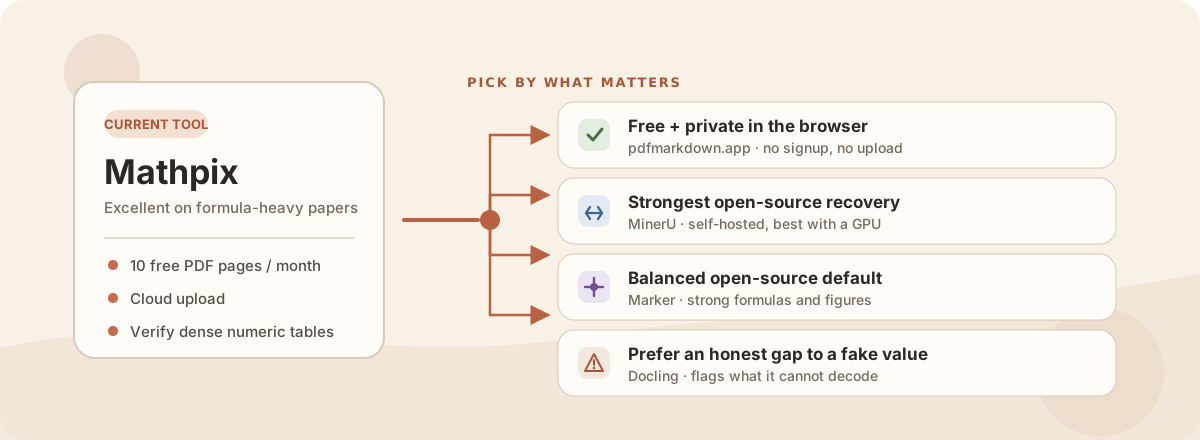
Mathpix produced the cleanest formulas of any tool in my nine-tool PDF-to-Markdown benchmark. Its free plan allows 10 PDF pages a month, PDF conversion uploads your file, and twice in my test it changed numbers in a way you can’t see. If any of those is your reason for leaving, here’s what I’d switch to, tested on the same five real documents.
The short version
- Best free, private swap: pdfmarkdown.app (mine). Runs in your browser, converts up to 1,000 pages free with no signup, and uploads nothing. A hair behind Mathpix on pure formula polish, but zero silent errors.
- Best free, open-source, formula-strong: MinerU, if you can self-host and have a GPU.
- Safest open-source all-rounder: Marker.
- Most immediate reason people leave: the free plan allows 10 PDF pages a month. Fine for one short paper, not for a report or a batch.
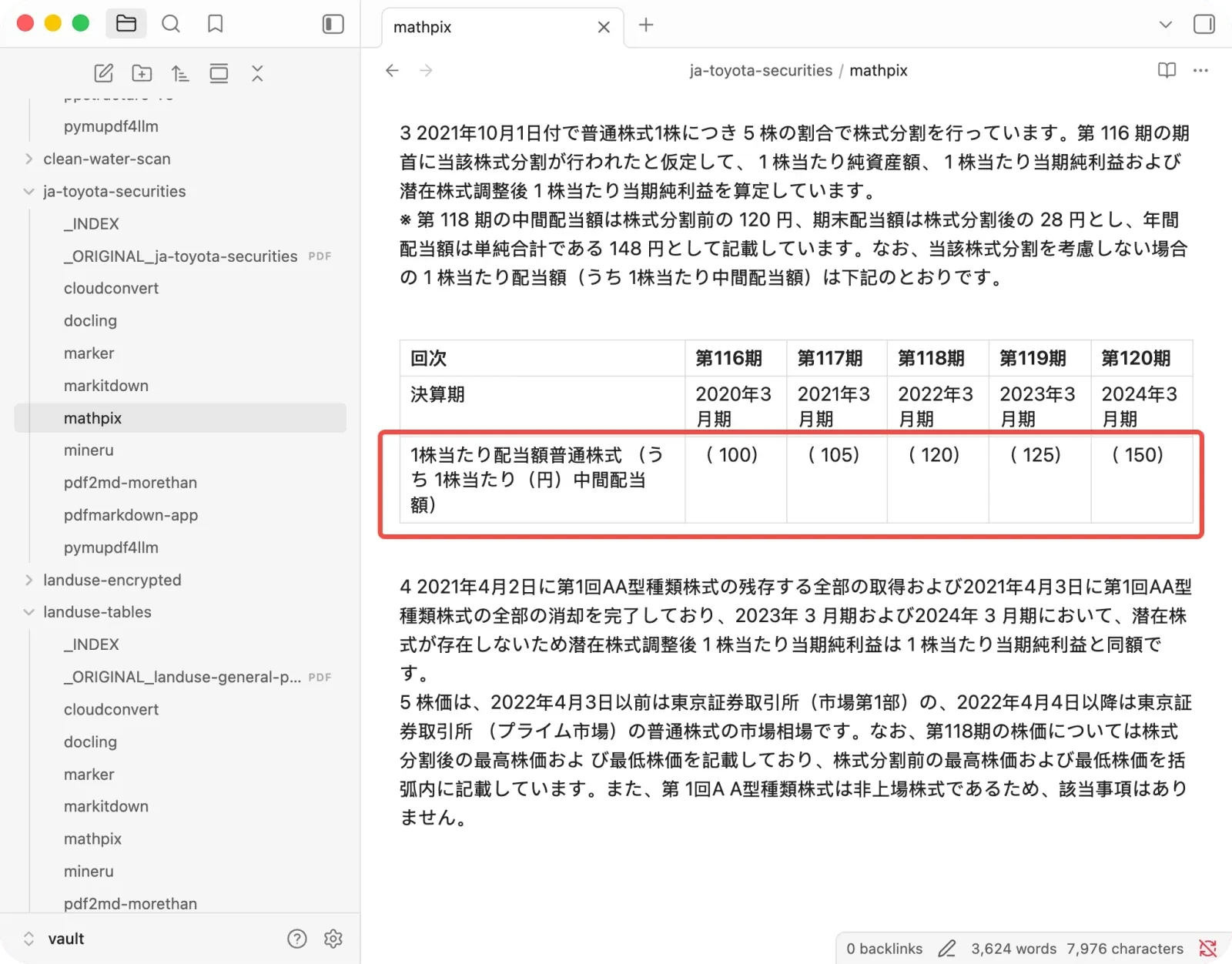
- Scariest reason: on dense tables Mathpix silently altered numbers (it read a dividend of 220 as 100), and the output looked perfectly normal.
- When Mathpix still wins: short, formula-heavy papers you’ll proofread anyway, budget aside.
How they compare
Every number is a measured recovery score from the test (0–100, higher is better). “Silent errors” counts numbers changed to look right but wrong, the only failure a reader can’t catch.
| Tool | Paper | Tables | Avg recovery | Silent errors | Cost | Privacy |
|---|---|---|---|---|---|---|
| Mathpix | 100 | 80 | 82 | 2 | free: 10 PDF pages/month | uploads file |
| pdfmarkdown.app | 97 | 100 | 92 | 0 | free | browser, no upload |
| MinerU | 99 | 100 | 86 | 0 | free (self-host) | local |
| Marker | 95 | 96 | 86 | 0 | free (self-host) | local |
| Docling | 63 | 92 | 77 | 0 | free (self-host) | local |
Below is the same five tools as capability profiles, so you can see each one’s shape at a glance. Center is 0, outer edge is 100.
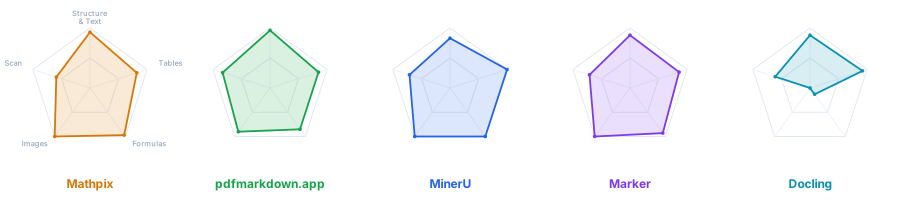
Full method and per-document scores are in the main benchmark write-up, and every raw output is in the benchmark repo. Full disclosure: one of these tools is mine (pdfmarkdown.app), and I’ll be straight below about where Mathpix still beats it.
Are you looking for a Snip replacement?
Mathpix is really two things. Snip screenshots an equation and hands you the LaTeX, and the PDF converter turns a whole document into Markdown or LaTeX. If you’re after the first one, a screenshot-to-LaTeX tool, this isn’t the article for that. Everything here is about the second job: converting entire PDFs to Markdown, especially for feeding an AI.
What Mathpix does best
Credit where it’s due. On a research paper it scored a perfect 100, with the cleanest formulas and figures of anything I tested. If your workflow is short papers you’ll eyeball anyway, that per-page polish is genuinely hard to beat.
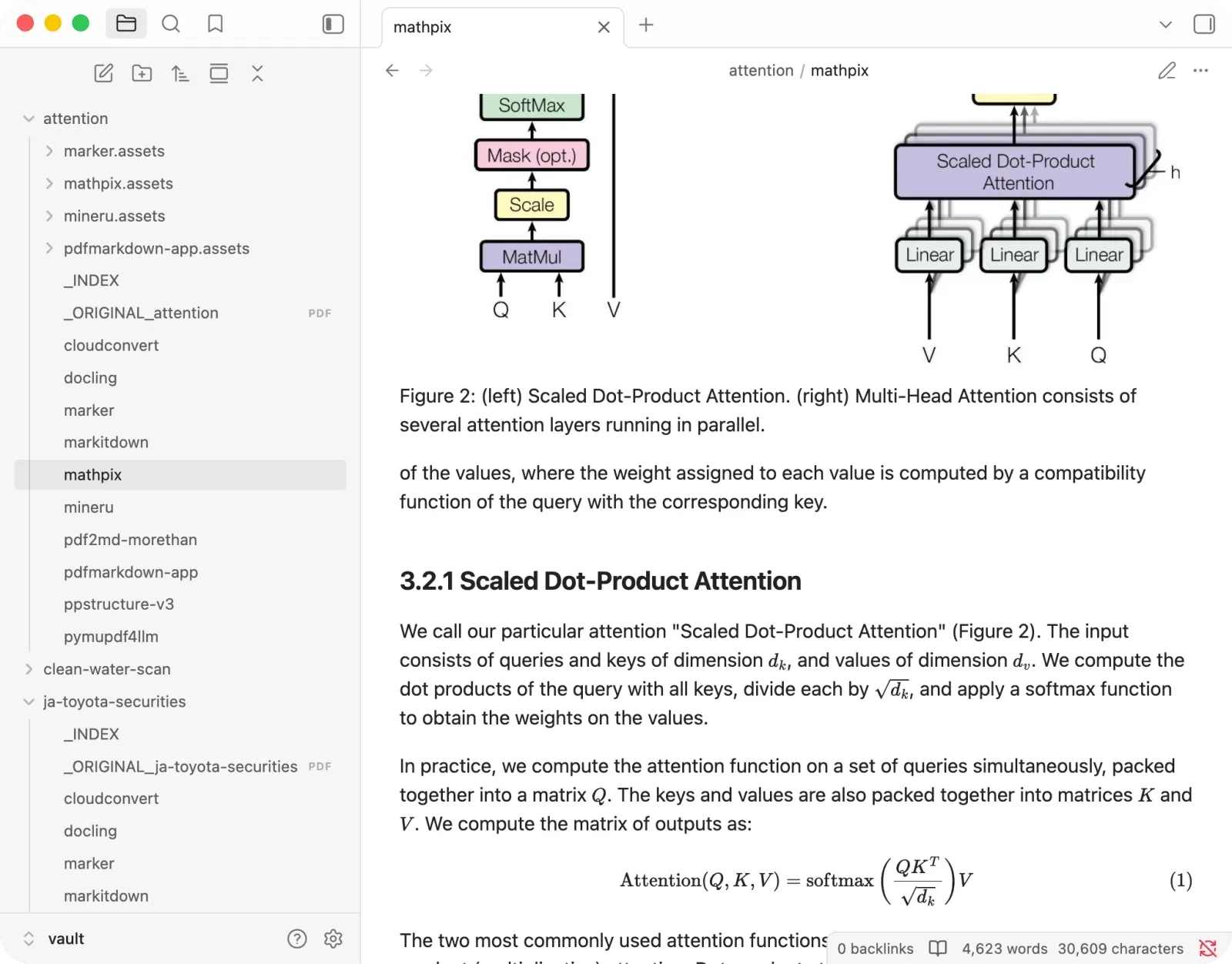
The trouble starts on the documents where you won’t catch a mistake.
The catch that matters most: it changes numbers silently
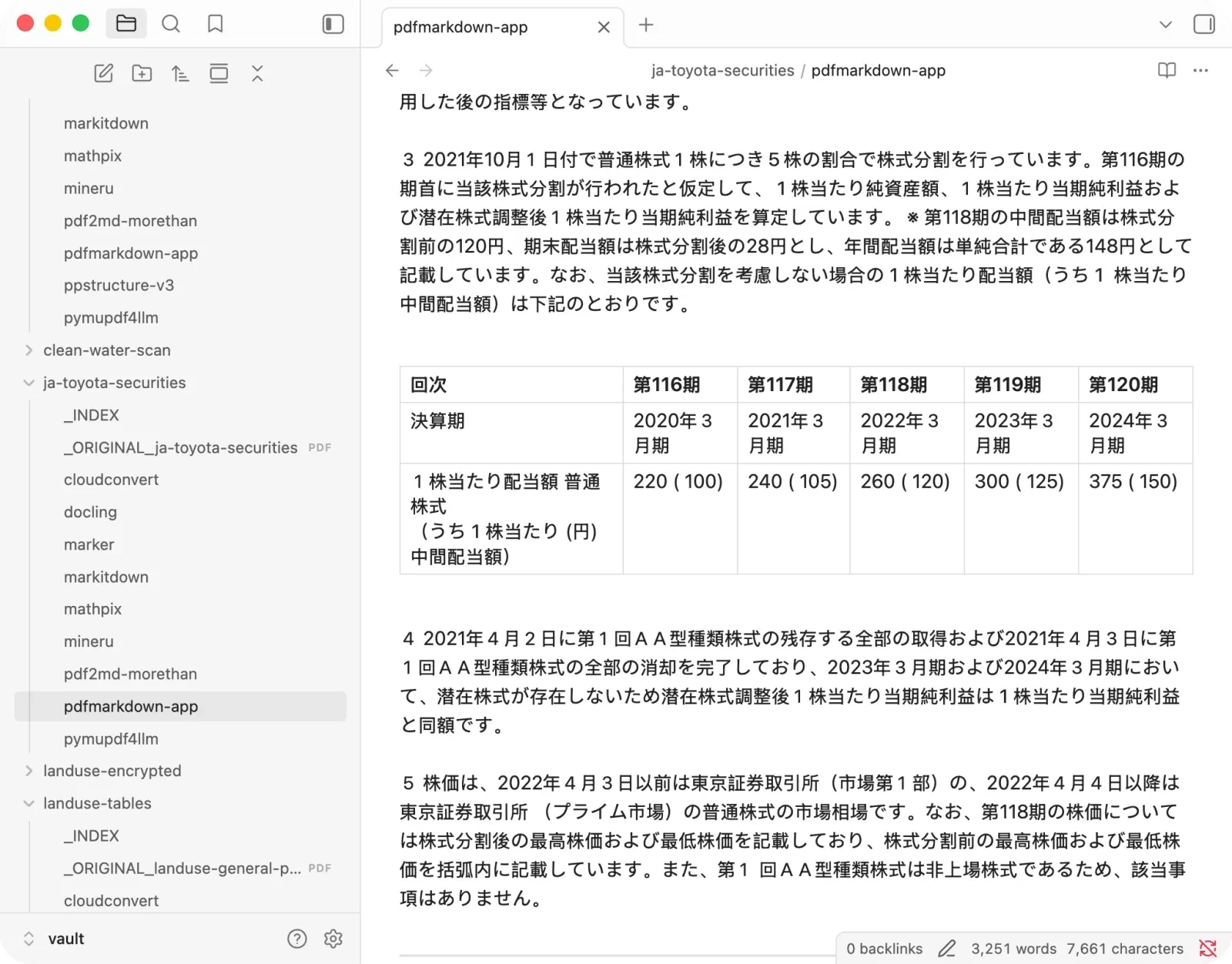
This is the one I’d want to know about. On a Japanese financial report, Mathpix dropped the real annual dividend figures (220, 240, 260, 300, 375 yen) and kept only the interim dividend in parentheses. An AI now reads 100 where the true number is 220. Here it is, original then Mathpix:
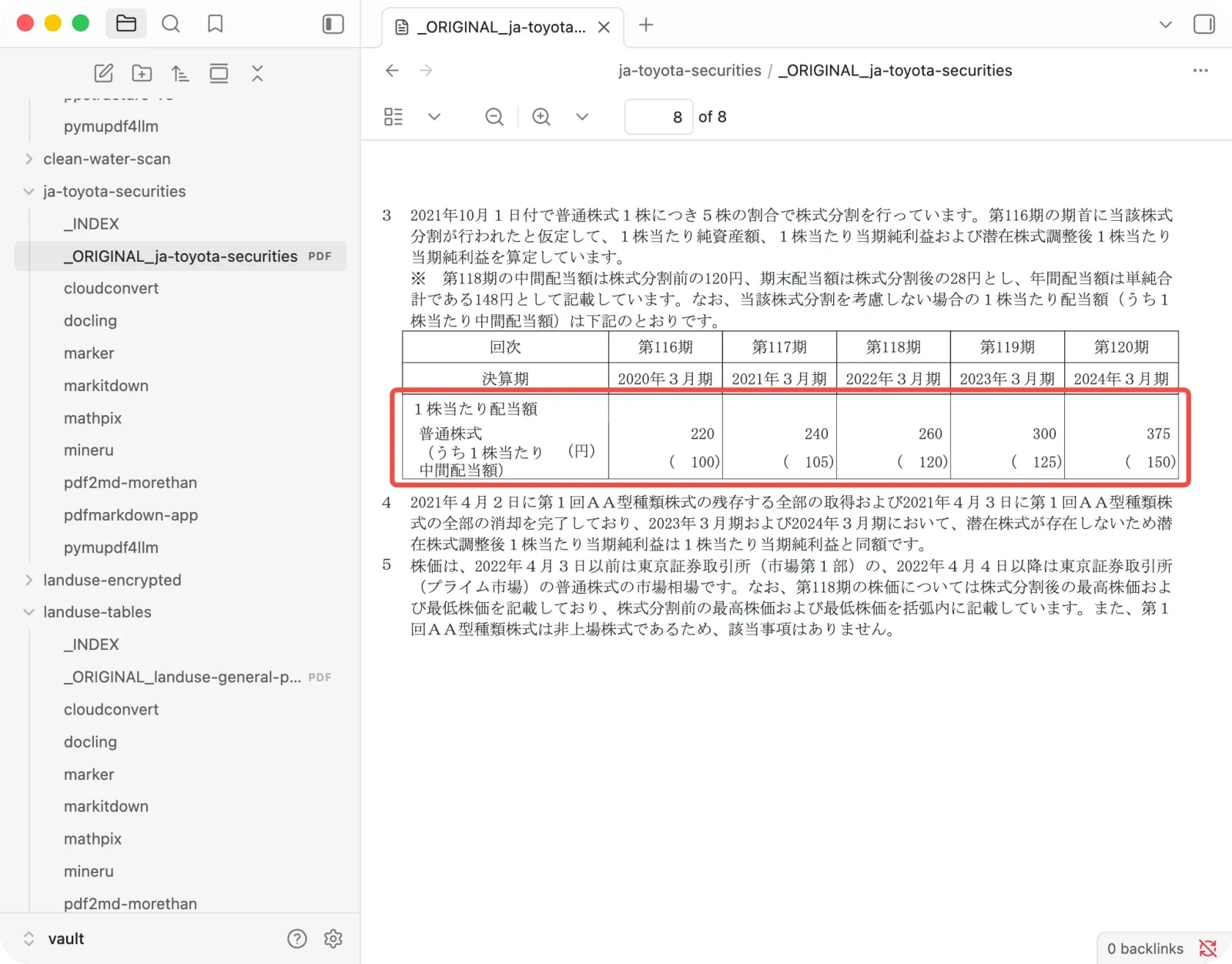
It did the same thing on a data table, replacing a total of 87,416 with 100.0%. Both files look perfect: no dangling comma, no obvious break, nothing to flag. It was the only cloud tool in my test with a silent-error count above zero. On the exact same table, pdfmarkdown.app kept every figure intact:
If you feed financial or statistical PDFs to an AI and trust the output, this is the failure mode to design around.
The other catches: the page allowance, the price, the upload
- The free plan includes 10 PDF pages per month. It’s enough to try one short paper, not a report, a book chapter, or a stack of files. The Pro plan was $4.99 a month when I checked on July 19, 2026, with 1,000 PDF pages per month.
- PDF conversion uploads the document. Mathpix says uploaded source documents and page images may be retained for up to 30 days, while Markdown and other text outputs may be retained for up to 90 days. For a contract, a medical record, or unpublished research, that may rule it out. Check the current Mathpix pricing and retention documentation, since service terms can change.
The alternatives, by what you need
Free, private, no signup → pdfmarkdown.app
The direct swap if the sticking point is cost, the page cap, or the upload. It’s mine, so weigh that, but the honest comparison: on the research paper Mathpix edged it 100 to 97, so Mathpix is a touch cleaner on pure math. Everywhere that matters for trust it goes the other way. pdfmarkdown.app was the most consistent tool overall (92 average), produced zero silent errors across all five documents, runs entirely in your browser with nothing uploaded, and has no page cap or signup.
Catch: it’s a tool, not a code library, so it’s not for automated server pipelines, and on deeply nested LaTeX it’s not as sharp as Mathpix or MinerU yet.
Open source, formula-strong, self-hosted → MinerU
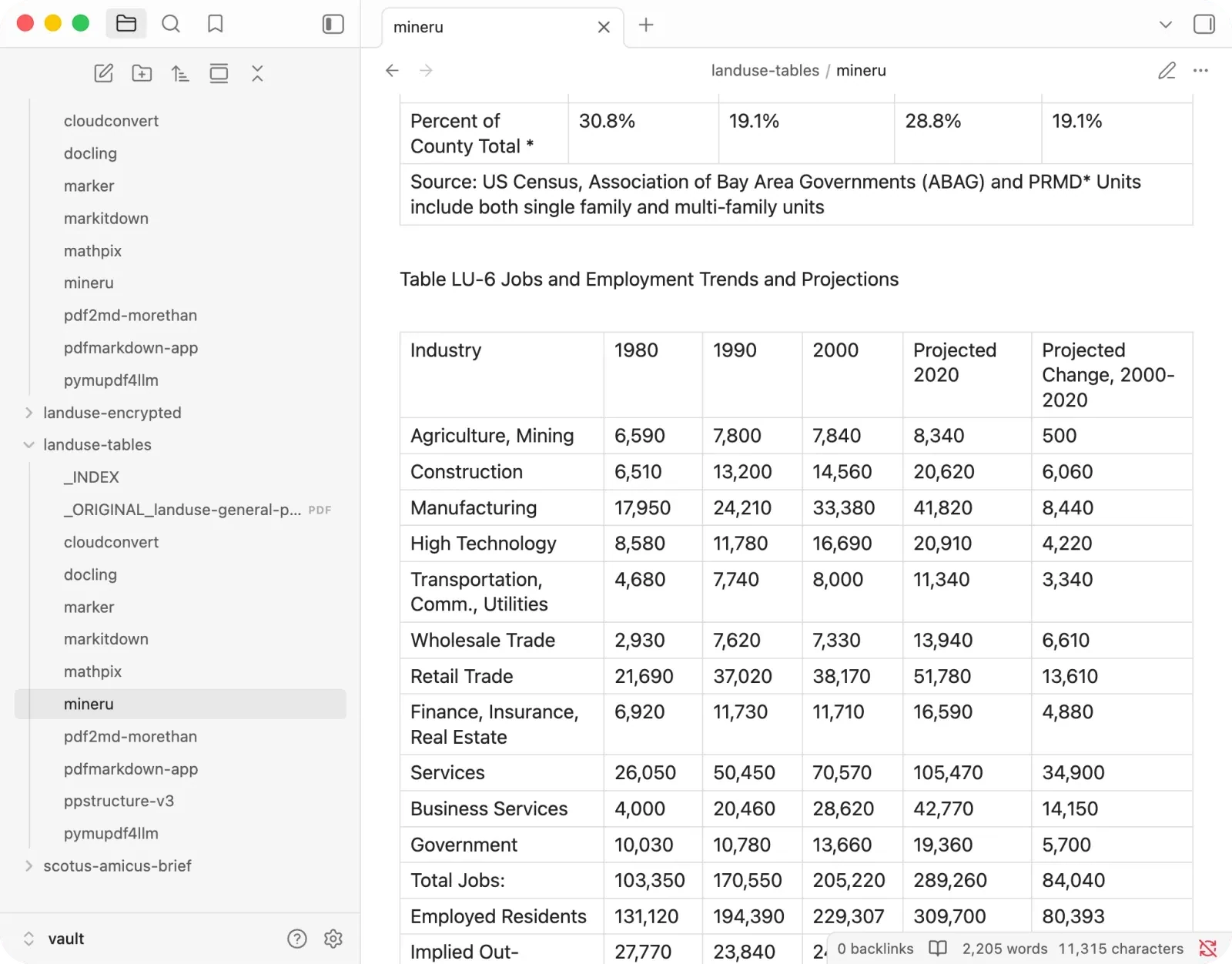
If you want Mathpix-grade math without the bill and can self-host, MinerU is the strongest open-source engine I tested (86 average). It kept every formula on the paper and nailed a brutal 26-row financial table with all the minus signs and bracketed figures intact.
Catch: it deletes footnote text (ten of eleven legal citations pointed at nothing), turns some contents lines into fake headings, and its top quality comes from a heavier VLM engine that wants a real GPU.
A safer open-source all-rounder → Marker
Marker is the balanced default (86 average): strong on formulas and one of the only tools that pulled every figure out cleanly, and it never produced a disaster. It stumbles on multi-column layouts and citation lists, and once stripped the row labels off a table.
You’d rather see a gap than a wrong value → Docling
If Mathpix’s silent errors are exactly what scares you, IBM’s Docling is the opposite temperament. Clean text and tables (77 average), and when it can’t handle something it marks it undecoded instead of faking it. Zero silent errors in the whole test.
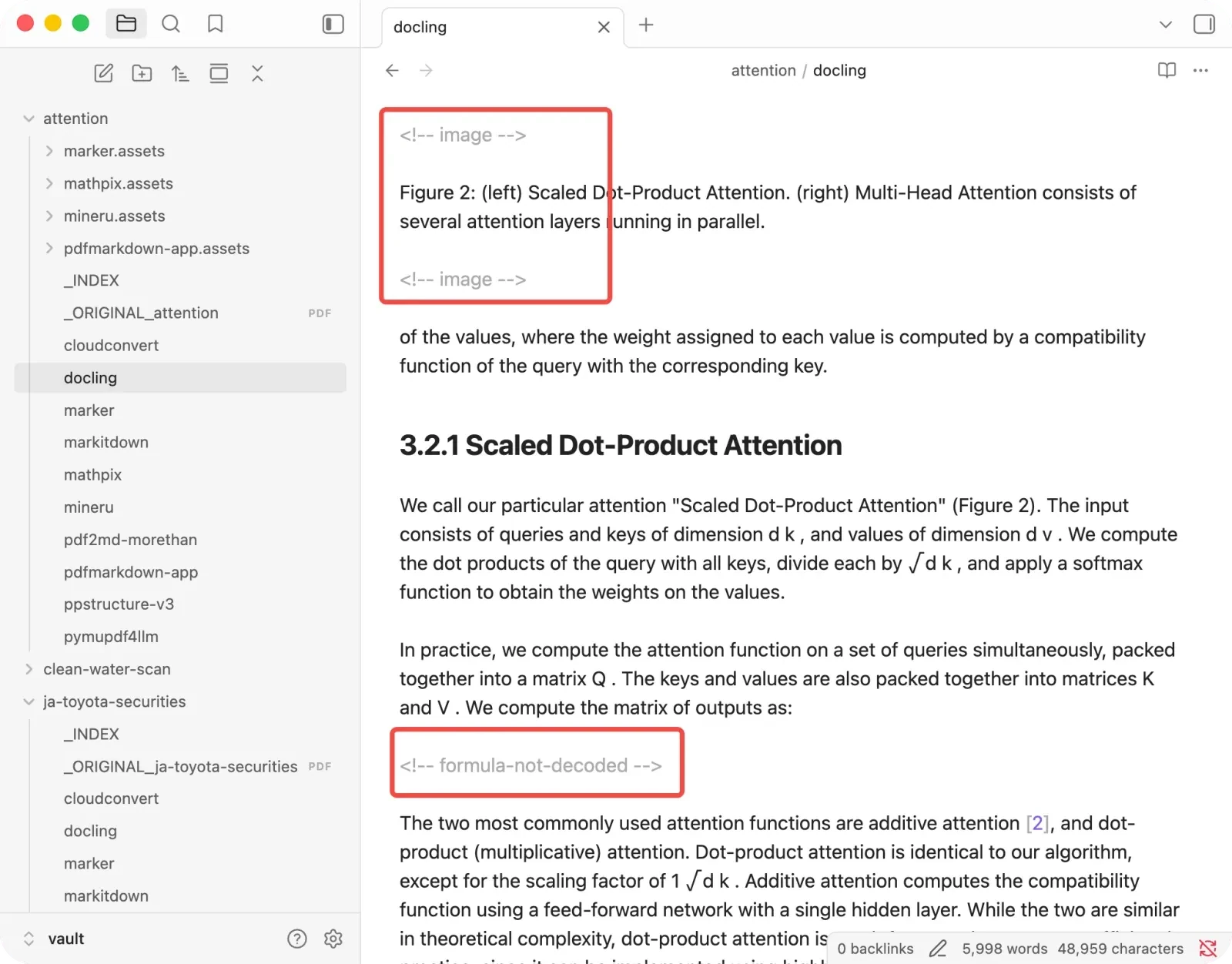
Catch: it drops formulas and images outright, so it’s a poor fit for the math-heavy work that probably put you on Mathpix in the first place.
How to pick
- You want Mathpix’s polish but hate the price, cap, or upload: pdfmarkdown.app, free in your browser.
- You self-host and want strong math for free: MinerU, with Marker as the safer default.
- You’re most afraid of silent wrong numbers: Docling, or pdfmarkdown.app (both zero silent errors here).
- Short papers you’ll double-check anyway, budget aside: Mathpix is still hard to beat on pure formula polish.
FAQ
Is there a free alternative to Mathpix?
For converting whole PDFs to Markdown, yes: pdfmarkdown.app is free and runs in your browser, and MinerU, Marker and Docling are free open-source libraries you run locally. (If you specifically want the Snip screenshot-to-LaTeX tool, that’s a different kind of tool than the PDF converters I tested here.)
What is Mathpix’s page limit?
As of July 19, 2026, the free plan includes 10 PDF pages per month. Pro includes 1,000 PDF pages per month for $4.99 a month. Check Mathpix’s current pricing before deciding, since plans can change.
Is Mathpix accurate?
Its per-page quality was the best I tested, a perfect score on a research paper. But it twice altered numbers silently on dense financial and data tables, keeping a wrong figure while the output looked normal. On clean papers it’s excellent; on messy numeric tables, verify it.
Does Mathpix upload my files?
Yes, it’s a cloud service, so your document goes to its servers. If you need to convert something confidential, a browser tool like pdfmarkdown.app or a local library keeps the file on your machine.
What’s the best Mathpix alternative for RAG?
One that keeps headings, reading order and tables intact, and doesn’t change numbers. In my test pdfmarkdown.app was the most consistent with zero silent errors, and among open source MinerU had the highest recovery, with the caveat that it drops footnote text.
Test it on your own PDF
Don’t take my word for the scores. The fastest way to trust any converter is to run it on a document where you already know the numbers, then search the output for those numbers before feeding it to an AI. It’s the five-minute check that would have caught the dropped dividend.
Try pdfmarkdown.app on your own PDF — it runs in your browser, no signup, nothing uploaded for conversion.