June 11, 2026
Why AI Can't Read Your PDFs (and How Clean Markdown Fixes It)
AI looks like it reads your PDFs, but text scrambles, tables collapse, formulas break and figures vanish. Why it happens, and how clean Markdown fixes it.

Jerome
Builder of pdfmarkdown.app
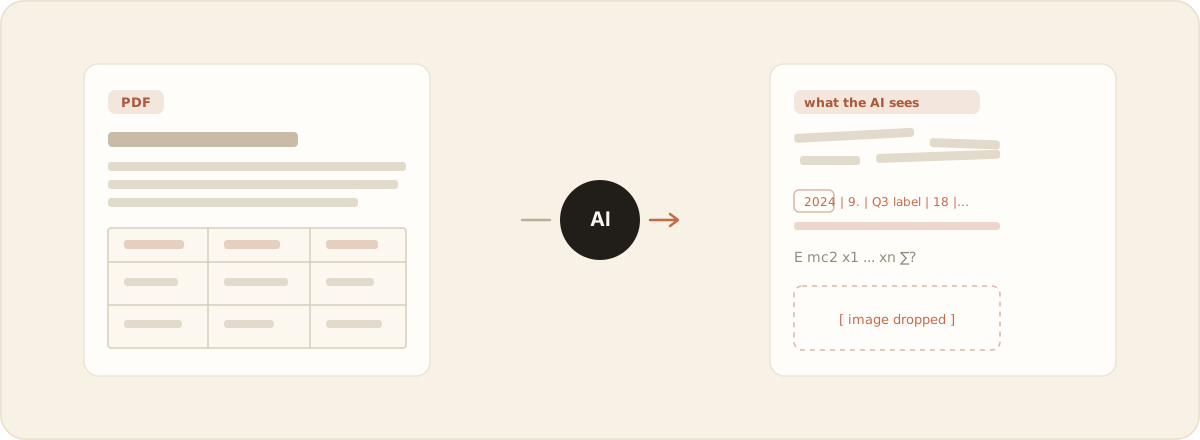
You drop a PDF into ChatGPT, Claude or NotebookLM, ask a question, and get a confident answer. It looks like the AI read your document. Often it didn’t. Not really: it read a smeared, out-of-order version of it, and answered from that.
That gap is the whole problem. Below is why it happens, why a smarter model doesn’t make it go away, and how to actually make a PDF something AI can read.
Disclosure: I build pdfmarkdown.app, an in-browser PDF→Markdown converter, so I have a horse in this race. I’ve tried to keep the explanation honest and the claims checkable, so test anything here yourself.
A PDF is a picture, not text
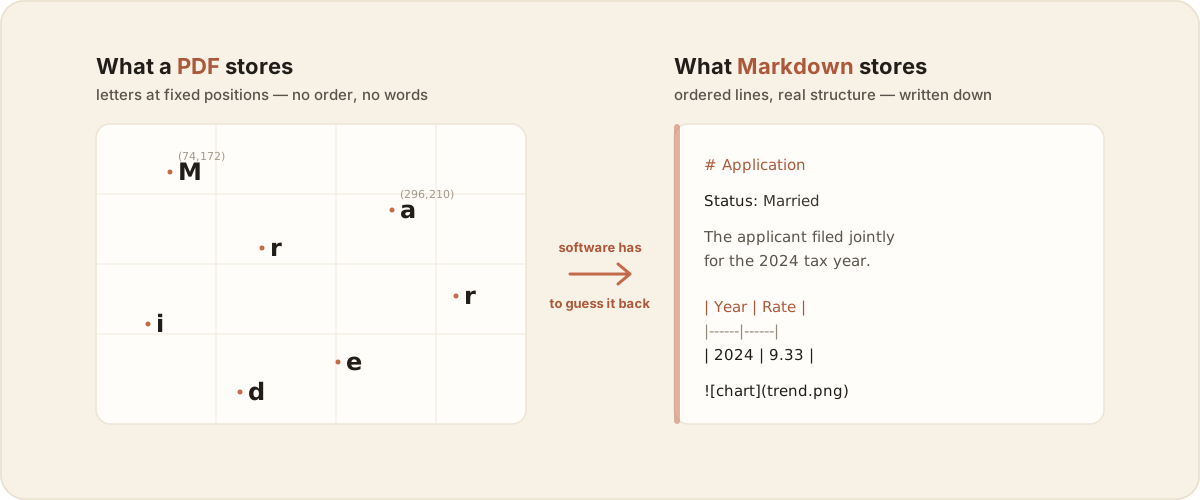
It took me a while to really get this: a PDF doesn’t store your sentences. It stores where each letter sits on the page. “Married” might be saved as seven glyphs at seven coordinates, with no record that they form a word, that the word belongs to that paragraph, or that the left column should be read before the right one.
A human eye reassembles all that instantly. Software has to guess it back, and that guessing is where things break.
The five places it breaks
When AI tools (or free converters) take that guess, five things tend to fall apart, and they’re the parts that carry the actual meaning:
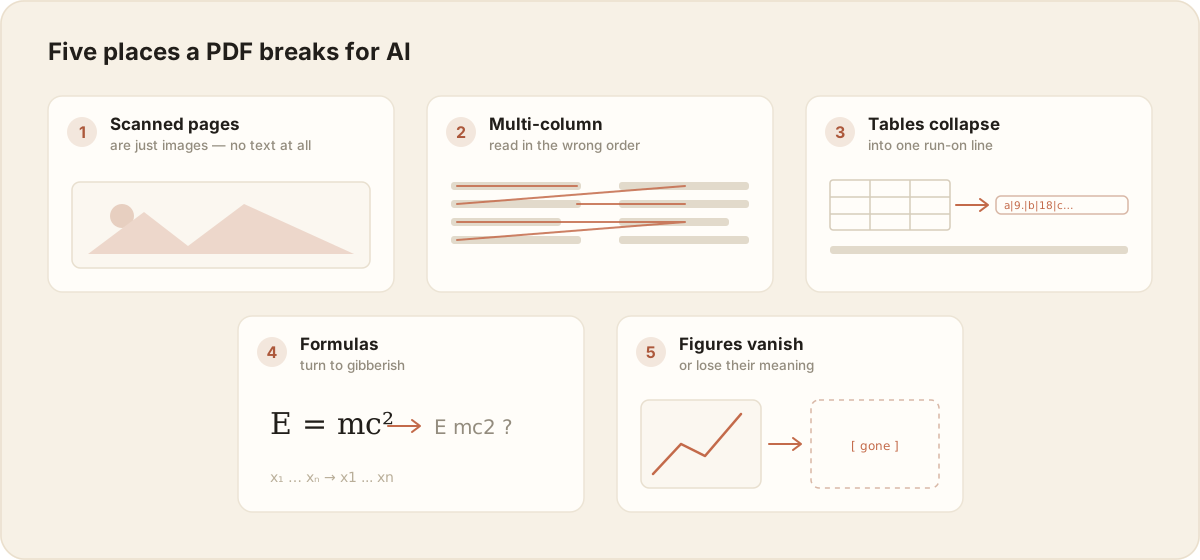
- Scanned pages are just images. No text layer at all. Without OCR, the model “sees” a photo and quietly makes things up.
- Multi-column pages read in the wrong order. A two-column paper gets stitched left-half-line then right-half-line, so sentences interleave into nonsense.
- Tables collapse. Rows and columns flatten into one run-on line. The number that was under “2024” is now floating next to a label from a different row.
- Formulas turn to gibberish.
E = mc²becomesE mc2, subscripts and superscripts drift, and an equation the paper is about becomes unreadable. - Figures vanish, or lose their meaning. Charts and diagrams either get dropped entirely (not even a placeholder) or, at best, get pulled out as a bare image the model still can’t understand. A trend chart it can’t see is a trend chart it can’t reason about.
The fix: clean Markdown is the format AI actually reads well
Markdown is plain text with light, explicit structure: # for headings, real rows and columns for tables, fenced blocks for code. The plainness is the whole point:
- The structure is stated, not guessed. The reading order, the table shape and the hierarchy are all written down.
- It’s token-cheap. No binary cruft, no layout metadata the model has to wade through.
- Models were trained on mountains of it (every README, every wiki, every docs site), so they parse it natively.
It’s also what models write: ask ChatGPT anything and the answer comes back in Markdown. Going that way, Markdown to PDF, is the easy, solved direction. This post is about the hard one.
Convert the PDF once into clean Markdown and you’ve done the hard guessing a single time, deliberately, instead of making every tool re-guess it (badly) on every query.
Where llms.txt fits in
This is also the idea behind llms.txt, an emerging convention where a site publishes a plain-Markdown map of its important content so AI tools can read it directly, instead of fighting through rendered HTML or PDFs. Same principle, one level up: if you want AI to read something, hand it clean Markdown. A PDF sitting on your drive and a webpage an AI crawls have the exact same problem, and the exact same fix.
Turning a PDF into AI-ready Markdown: what to watch
If you convert a PDF, judge the result on the parts that actually break, not on whether the first paragraph looks fine. Check four things:
- Did the tables survive as real rows and columns?
- Did the formulas survive as readable math?
- Were scanned pages recognized, or silently handed back as garbage?
- Did the figures make it into the output at all?
These four are the same yardstick I used to compare the popular PDF to Markdown tools, if you’re picking one.
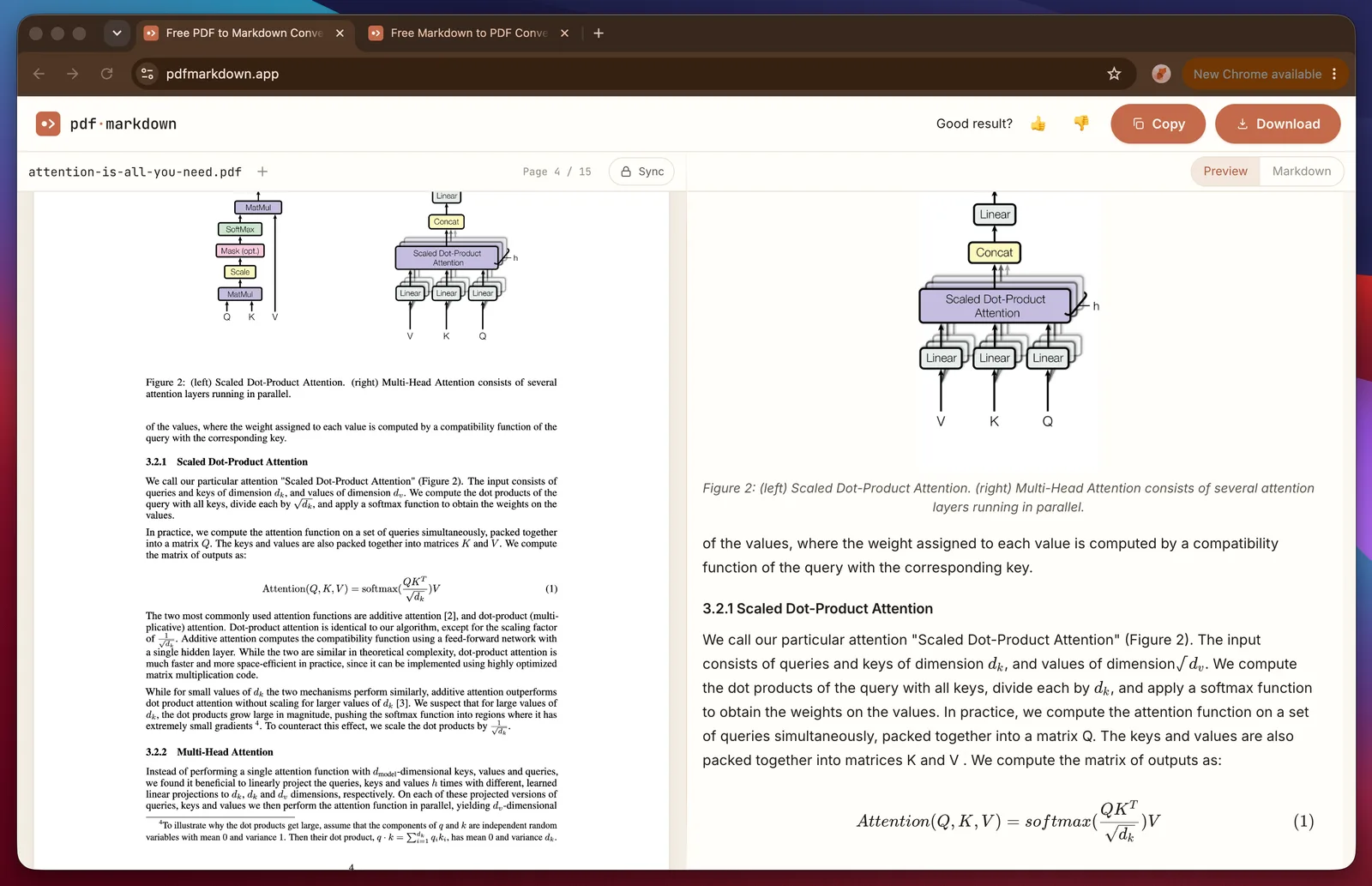
This is the bar I hold pdfmarkdown.app to: it runs in your browser, shows you the original PDF and the Markdown side by side so you can check those four things before you trust the output, and when a page is genuinely hard (a scan with no text layer) it says so up front instead of faking it. It’s a floor I can show you, not a “perfect conversion” promise, because nobody can honestly make that one.
”But models keep getting smarter, won’t this just go away?”
Maybe the accuracy improves. Two things don’t go away, though, and they get more important as AI gets better, not less:
1. Tokens are the real cost. Even a perfect model has to re-ingest and re-parse the entire PDF every single time you ask it something. Convert once to Markdown and it’s cheap to search and cheap to ask about, for good. The bill and the latency are a property of the format, not the model.
2. Agents read on demand, and PDFs can’t be. Coding agents like Claude Code and Codex don’t slurp whole files into context; they use tools like grep and search to pull only the few lines they need, when they need them. Plain text and Markdown let them do that. A PDF can’t be grepped. An agent has to decode the whole thing into context first before it can do anything with it.
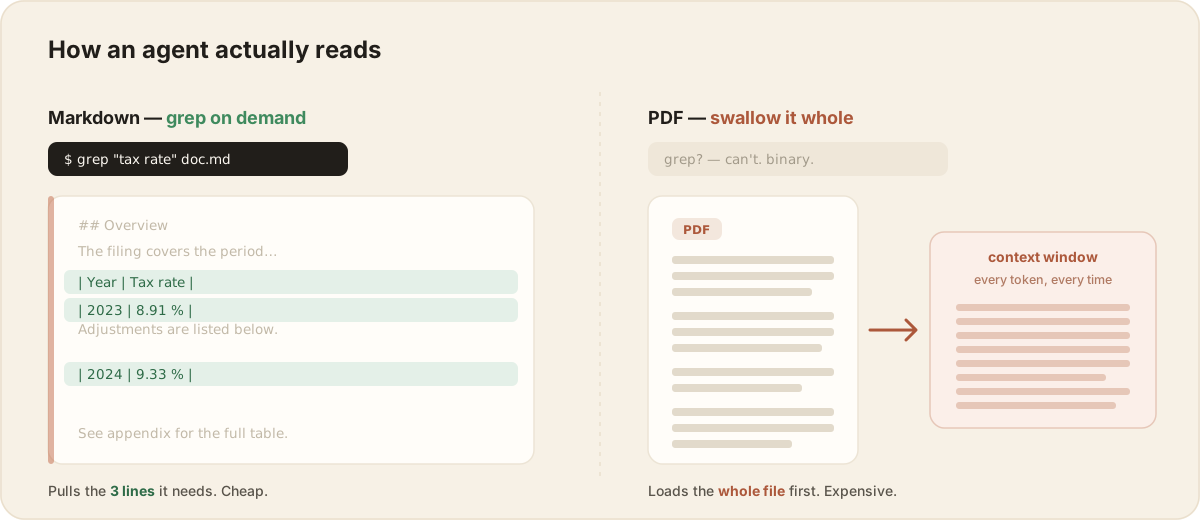
So the trend runs opposite to the intuition. As AI shifts from chatting with one document to agents navigating a whole library of knowledge, the PDF becomes a bigger bottleneck, not a smaller one. Better models make the agent pattern more common, which makes clean Markdown more necessary, not less.
”I just keep my PDFs in Obsidian, do I still need this?”
Especially then. A note vault lives or dies on what you can search, link and fold into other notes, and a raw PDF sitting in your vault is a dead end: you can’t [[link]] to a heading inside it, can’t pull one paragraph into a daily note, can’t even grep it. Convert it to Markdown and the PDF becomes a first-class note like everything else, readable by you and by any AI you point at your vault. Researchers and Obsidian users tend to hit this wall first, which is why they’re usually the ones who care most about getting the conversion clean. If that’s you, converting a PDF into a searchable Obsidian note is exactly what this tool is built for.
The short version
- A PDF stores where letters sit, not what they say in what order, so AI has to guess, and it guesses worst on tables, formulas, multi-column pages, scans and figures.
- Clean Markdown states the structure explicitly, costs fewer tokens, and is what models read natively.
llms.txtis the same idea for the web. - Smarter models don’t retire the problem. Token cost and agent-style on-demand reading make converting-once-to-Markdown more valuable over time.
A couple of things I’ve come to believe from building one of these tools. Your files shouldn’t have to be uploaded to a server just to be made AI-readable; that work can happen right on your own device. And an image isn’t really “converted” until its meaning survives, not just its pixels. Both are still rough edges for everyone in this space, me included.
But the everyday version of this is simple. Convert a PDF to clean Markdown once, glance over it to confirm the tables and formulas actually came through, and from then on every tool and model you hand it to reads the real thing instead of guessing at the original. The confident answer you get back is finally based on what the document actually says.