July 25, 2026
PDF2MD Alternatives: 5 Tools Tested on Real PDFs
Looking for a PDF2MD alternative? I tested five PDF-to-Markdown options on real tables, formulas, scans, and reports, and found the best fit for each.

Jerome
Builder of pdfmarkdown.app
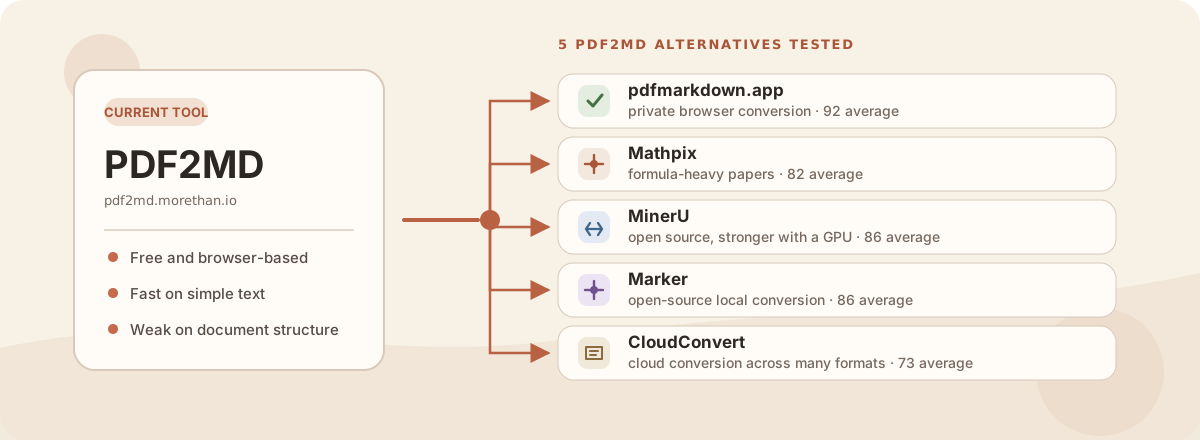
PDF2MD is quick, free, and runs entirely in your browser. If it works on your file, staying with it is perfectly reasonable. I would switch when the PDF has tables, formulas, figures, scans, or reading order that matters. I tested five alternatives on the same set of real documents, including a research paper, a financial report, a legal brief, dense planning tables, and a 1973 scan.
The short version
- For most people, I would use pdfmarkdown.app. It runs in your browser, converts up to 1,000 pages free with no signup, and uploads nothing for conversion. It also preserved the most structure overall in this test.
- If academic formulas matter more than anything else, use Mathpix. It produced the cleanest research-paper output. The tradeoff is cloud upload and paying once you use up the limited free PDF pages.
- If you want an open-source engine and have the hardware to run it, use MinerU. Its heavier VLM produced the strongest open-source recovery in the test.
What PDF2MD does well
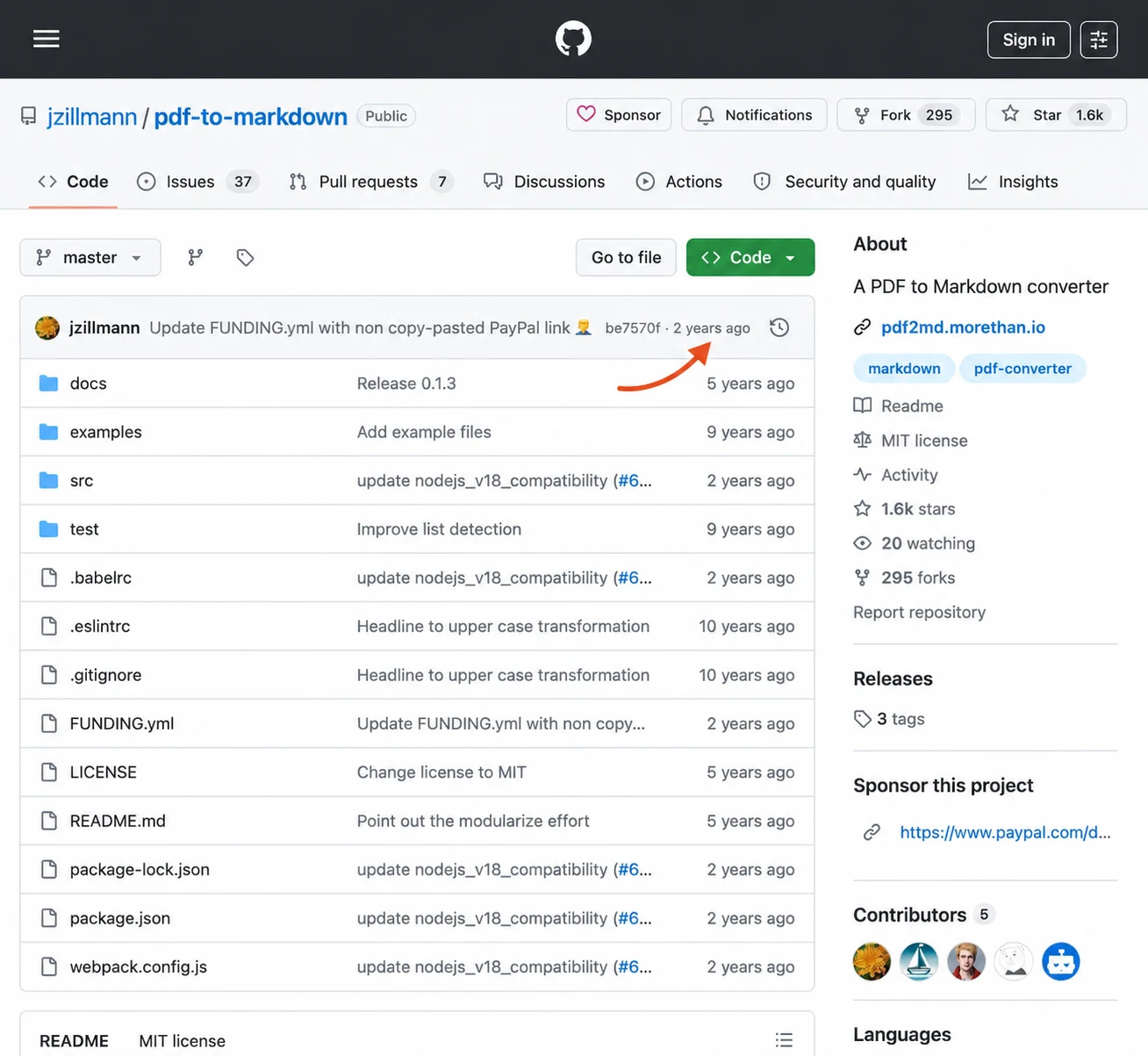
PDF2MD is one of the older sites that has spent years near the top of searches for converting PDF to Markdown. That visibility makes sense. The site is backed by the open-source jzillmann/pdf-to-markdown project, whose README dates the initial release to April 2017. At the time of this review, the repository had 1.6k GitHub stars.
It is small, fully local, and built around PDF.js. There is no account or upload step, which makes it a useful throwaway text extractor for ordinary selectable PDFs.
On simple text it was quick. On structured documents it scored 62 out of 100 on average, produced no real tables or images, and registered one silent numeric error. That is the version behind the failure examples below.
The age is also the catch. The repository’s latest commit was on March 25, 2024, more than two years before this review. The last code change was a Node 18 compatibility update six days earlier; the final commit only corrected a funding link. That does not make PDF2MD unusable, but newer capabilities such as OCR, table reconstruction, and layout-aware reading order are not part of the tool.
How the tested alternatives compare
These are measured recovery scores from my nine-tool PDF-to-Markdown benchmark, not feature claims copied from homepages. Higher is better. “Silent errors” means a value changed while the output still looked plausible.
| Tool | Avg recovery | Tables | Paper | Scan | Silent errors | Runs where? |
|---|---|---|---|---|---|---|
| pdf2md.morethan.io | 62 | 79 | 55 | 46 | 1 | browser |
| pdfmarkdown.app | 92 | 100 | 97 | 83 | 0 | browser |
| MinerU | 86 | 95 | 99 | 71 | 0 | local |
| Marker | 86 | 87 | 95 | 71 | 0 | local |
| Mathpix | 82 | 84 | 100 | 59 | 2 | cloud |
| CloudConvert | 73 | 90 | 62 | 55 | 0 | cloud |
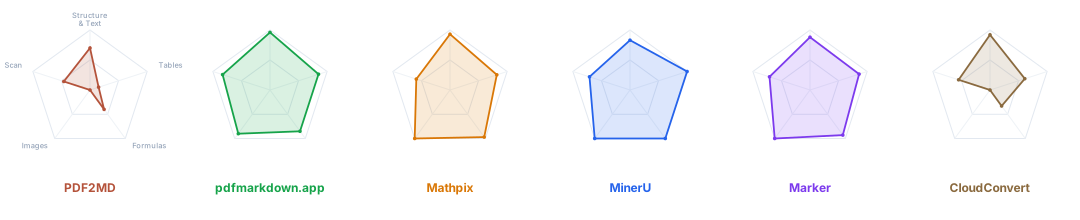
The averages hide what each converter is good at. These profiles use the same benchmark ledger across structure and text, tables, formulas, images, and scans. The center is 0 and the outer edge is 100. PDF2MD’s gap is not basic text extraction. It is the document structure around that text, especially tables and images.
The full method, answer keys, and raw outputs are in the benchmark write-up and public benchmark repository. Full disclosure: I build pdfmarkdown.app. I kept it last in the scoring table and used the same checks for every tool.
Why I would replace PDF2MD on important files
The clearest example was a land-use data table. The source had values such as 546,030 and 87,416. PDF2MD removed the table structure and cut numbers off at the comma, leaving 546, and 87,.
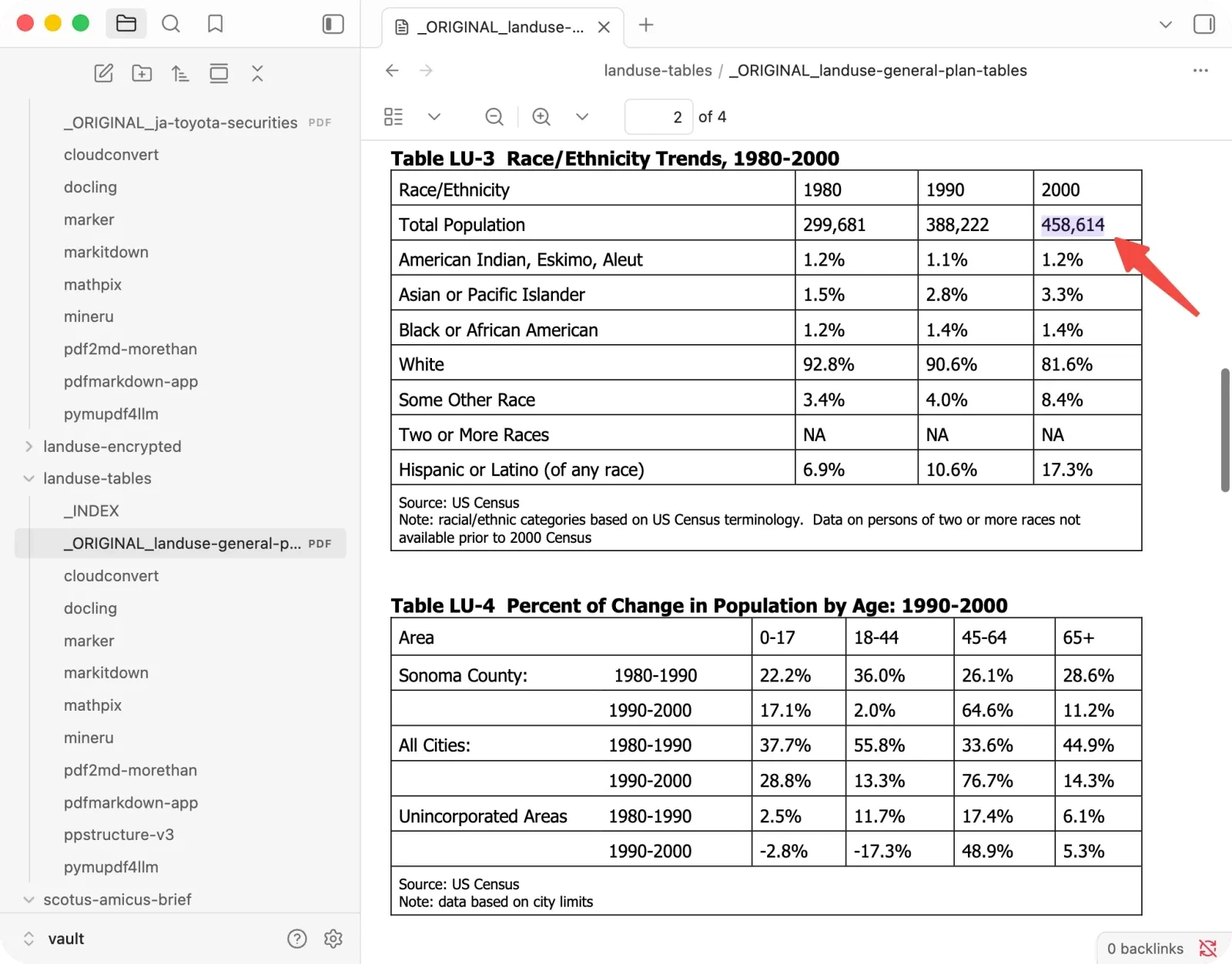
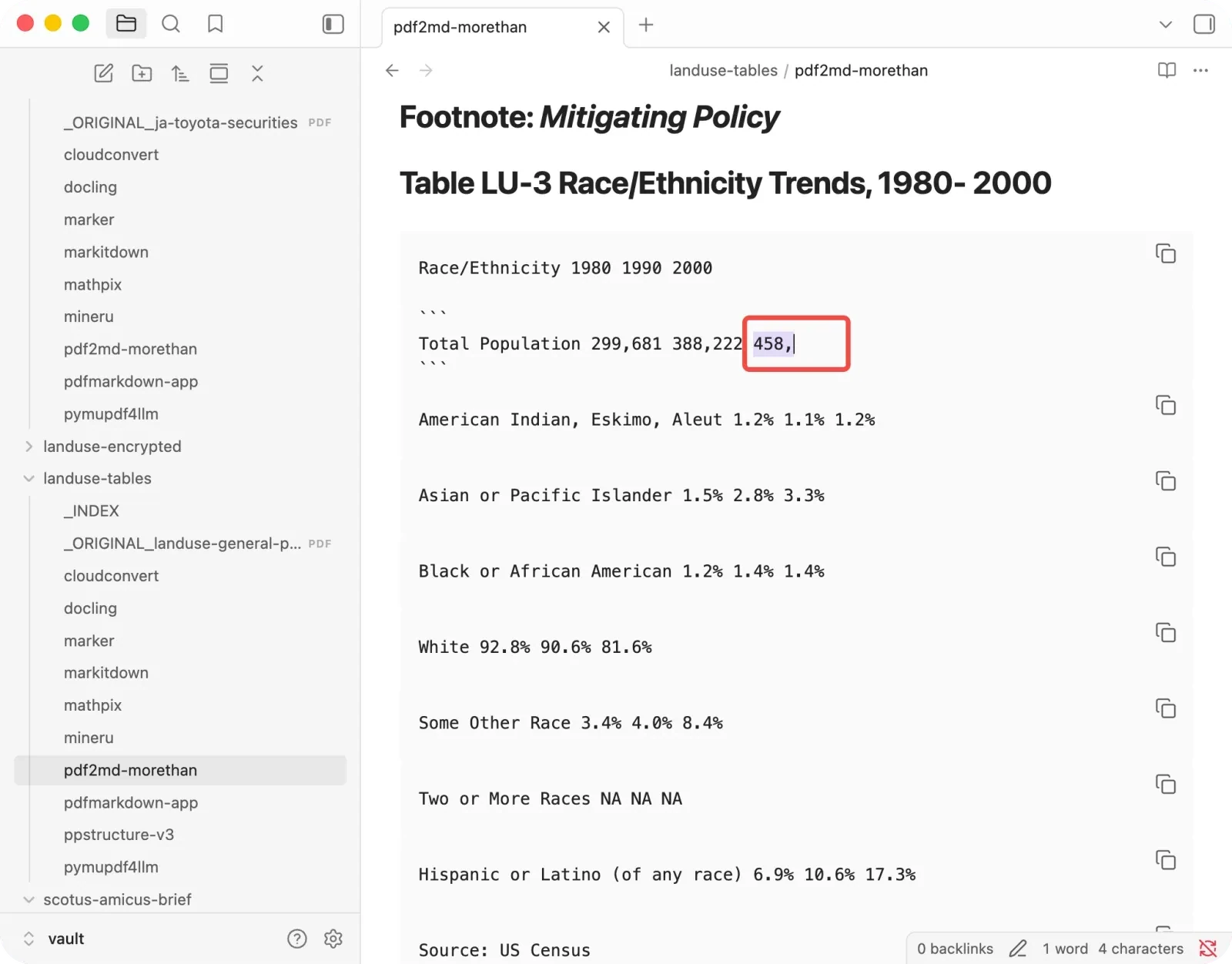
That dangling comma is visible if you inspect the Markdown. It is much easier to miss after the text is pasted into an AI chat or indexed for retrieval. The same converter also:
- turned formula fragments, watermarks, and a copyright notice into more than 30 headings;
- broke the research paper’s equations across headings and code blocks;
- extracted none of its figures;
- could not open the password-protected sample.
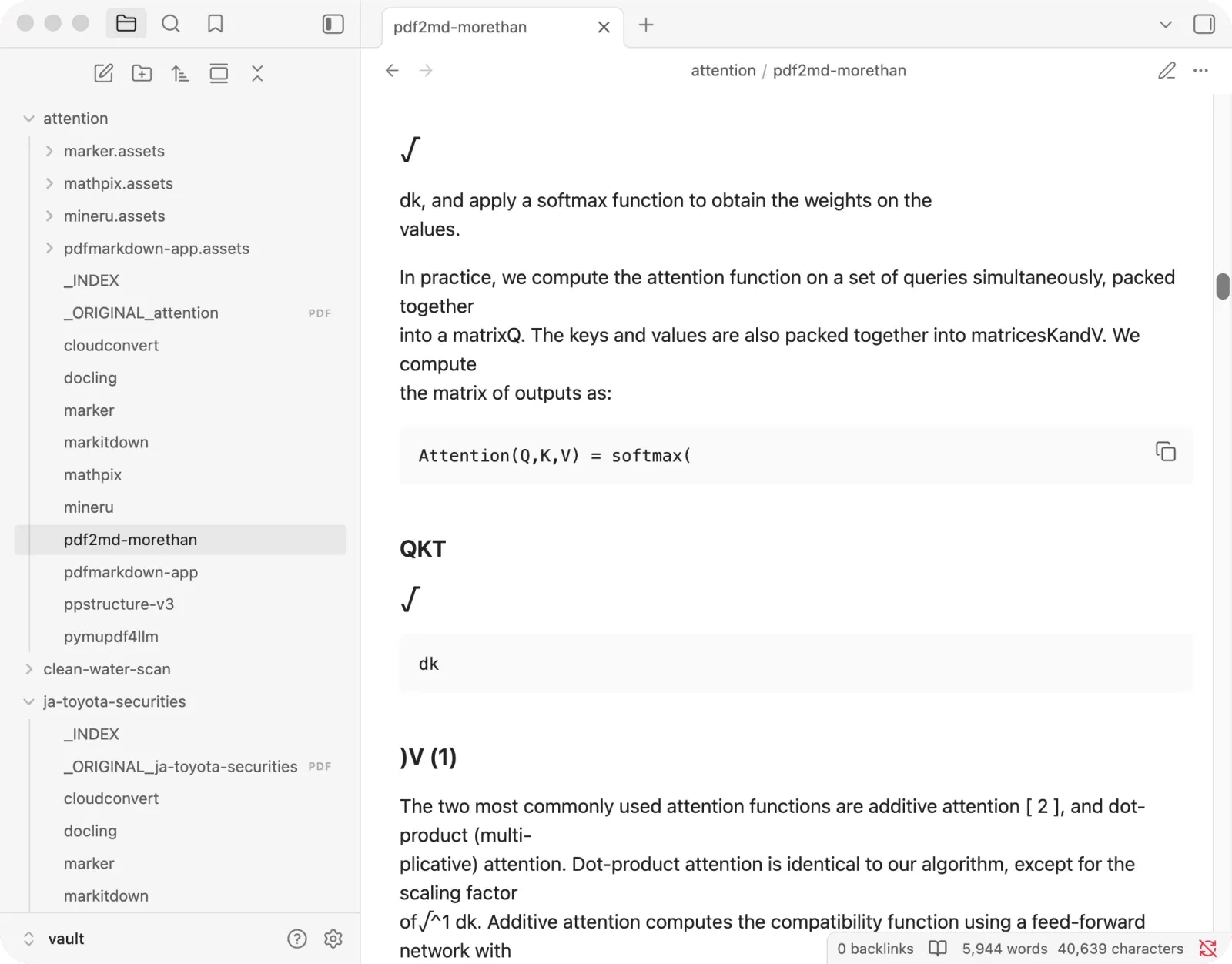
This does not make PDF2MD useless. It makes it a text extractor rather than a safe default for documents whose structure carries meaning.
The alternatives, by what you need
Private, browser-based, and stronger on structure: pdfmarkdown.app
pdfmarkdown.app is the closest direct replacement if you want to keep the “open a webpage and drop in a PDF” workflow. Conversion runs in your browser, with no signup or page allowance, and it supports OCR when a page has no usable text.
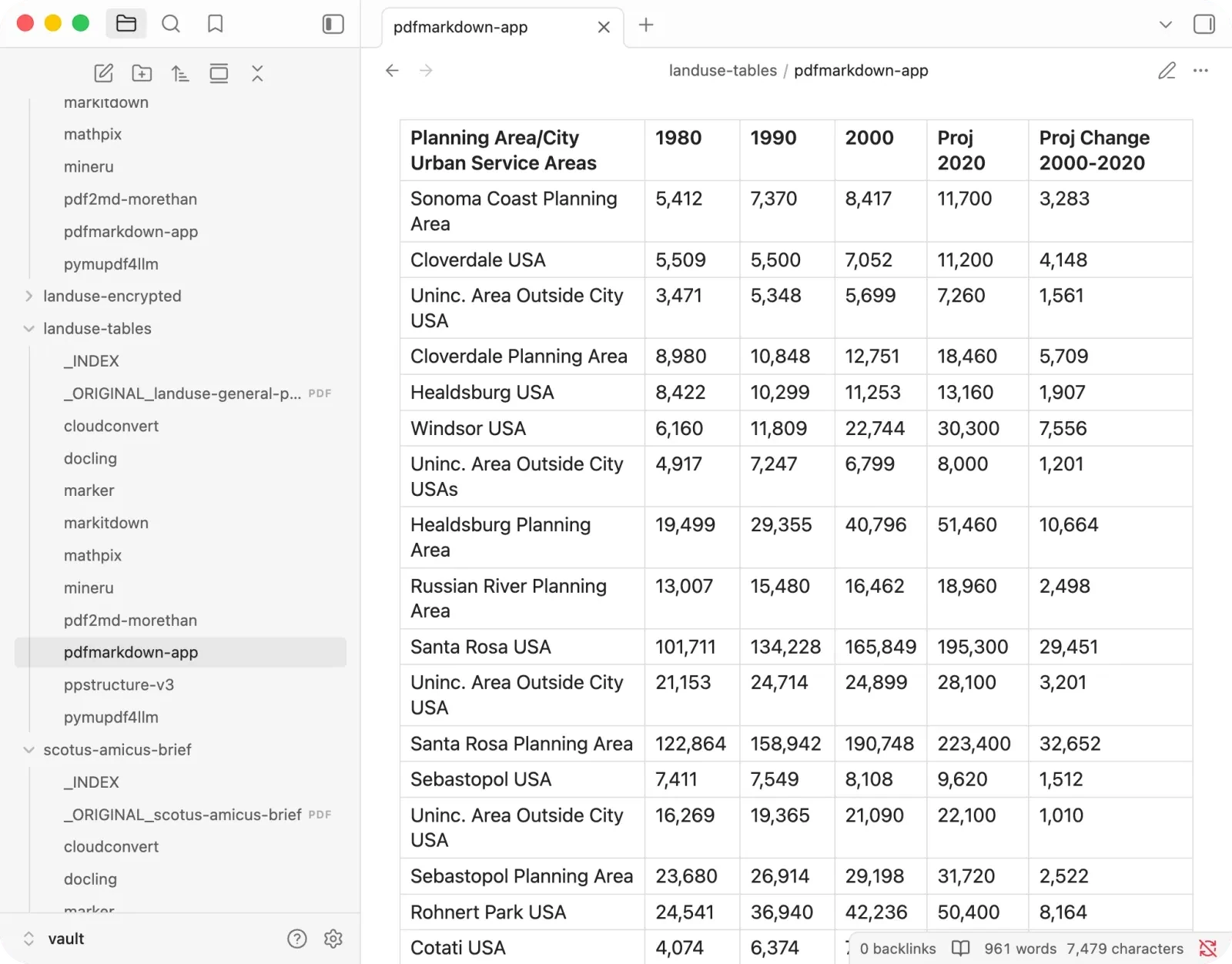
It averaged 92 across the five documents and produced zero silent errors. On the same land-use file, it kept all five tables and 100 answer-key rows intact.
Where it loses: Mathpix and MinerU were a little cleaner on the pure research paper. It is also an interactive tool, not a server API, so it is not the choice for an automated backend pipeline.
Formula-heavy papers: Mathpix
Mathpix made the cleanest research-paper output in the test, with every tested formula and figure recovered. If the job is a short paper you will proofread, its polish is hard to beat.
Where it loses: it uploads the PDF, its free plan allowed 10 PDF pages a month when I checked on July 19, and it silently changed two values in dense numeric tables. I would not use it unattended for financial data. I wrote a separate Mathpix alternatives comparison with the original and incorrect values side by side.
Open source with the strongest recovery: MinerU
MinerU is my pick when you want strong tables and formulas and can run the software yourself. It scored 99 on the paper and 95 on the dense tables, without a silent error.
Where it loses: the best result came from its heavier VLM engine, which wants a capable GPU. It also kept footnote markers in the legal brief while deleting the footnote text, so it is a poor fit for citation-heavy law and academic material unless you check the notes.
A balanced open-source default: Marker
Marker matched MinerU’s 86 average and was consistently good rather than spectacular in one narrow area. It preserved formulas and figures well and never produced a disaster.
Where it loses: it interleaved some multi-column text, damaged citation lists, and once kept a row’s numbers while detaching the labels that explained them.
Many formats, simple PDFs: CloudConvert
CloudConvert is convenient when PDF is only one of many formats moving through your workflow. It is a mature cloud converter and needs no local setup.
Where it loses: on the dense land-use file, it merged several rows into a single Markdown table cell. The syntax was valid, but the relationship between labels and values was gone. It also dropped figures and mangled the research paper’s formulas. Files are uploaded for conversion.
Which one should you choose?
For most PDFs, I would start with pdfmarkdown.app. It had the highest overall recovery here, kept the file on-device, and did not put a page allowance or signup in the way.
I would choose Mathpix instead only when academic formula polish is the priority and I am comfortable uploading the file and paying after the limited free PDF pages are used. It was the best tool on the pure research paper, but its two silent table errors make it a poor unattended choice for numeric reports.
For a self-hosted pipeline, I would choose MinerU if I had the GPU for its stronger VLM. Marker and CloudConvert are included above because I tested them, not because they beat those three recommendations.
FAQ
What is the best free PDF2MD alternative?
For a browser tool, pdfmarkdown.app is free, needs no signup, and keeps conversion on your device. MinerU and Marker are also free and open source, but you need to install and run them.
Which alternative keeps tables?
In this five-document test, pdfmarkdown.app recovered every answer-key row from the dense table sample. MinerU and Marker were the strongest self-hosted options. Test your own PDF, because a clean two-column table and a dense financial statement are very different problems.
Which alternative handles formulas?
Mathpix produced the cleanest formulas in the benchmark. MinerU was the strongest open-source choice, followed closely by Marker. pdfmarkdown.app was slightly behind those specialists on the paper but stronger across the full mixed set.
Does PDF2MD upload files?
PDF2MD runs the conversion locally in your browser and has no conversion backend, so the PDF is not uploaded. Privacy is one reason to keep using it. The reason to switch is output structure, not file handling.
Is PDF2MD good for RAG?
It is fine for simple text. For RAG, headings, table relationships, reading order, and complete numbers matter because they determine what gets retrieved later. PDF2MD broke all four in at least one test document, so I would use a structure-aware alternative for a production knowledge base.
Test the number you already know
The fastest converter check is not a generic demo. Pick a PDF with one number, table, or formula you already know, convert it, and search the Markdown for that exact value. Then check whether its row label and heading survived too.
Try that check with pdfmarkdown.app. It runs in your browser, needs no signup, and uploads nothing for conversion.