June 24, 2026
Why can't I copy text from a PDF? (Garbled text, gibberish, and how to fix it)
Copy text from a PDF and it won't paste, or comes out as garbled symbols. Here are the four reasons PDF text copies wrong, and how to fix each one.

Jerome
Builder of pdfmarkdown.app
You highlight a paragraph in a PDF, hit copy, paste it somewhere, and out comes nonsense. Random symbols. Words jammed together. Sometimes nothing highlights at all.
I hit this constantly, and for a long time I figured I was doing something wrong. I wasn’t, and neither are you. A PDF doesn’t store text the way you’d expect, and “copy” is asking it to do something it often isn’t set up to do.
Copying text from a PDF is usually simple: select it, press Cmd or Ctrl + C, and paste. This post is about the times it doesn’t work, when nothing highlights or what you paste comes out as gibberish.
The short answer
If you just need the text out, stop fighting the PDF. Convert it to Markdown (plain, selectable text) and copy from there instead:
- Convert the PDF to Markdown, so it becomes clean text instead of a locked-up page layout.
- Copy any part, or all of it, select a sentence or grab the whole document from the converted view.
- Scanned or image PDF? OCR reads it, so there’s real text to copy.
I build pdfmarkdown.app to do exactly this, in your browser with nothing uploaded. It converts to Markdown, shows the result next to the original page so you can select and copy any piece (or copy the lot) and check it came out right, and it OCRs scanned pages. If you’d rather know why copy-paste breaks and fix it without converting, the rest of this post is that.
There are four common reasons copied PDF text comes out garbled, and each has a different fix. Here’s how to tell which one you’re hitting.
Which one are you hitting?
- Nothing highlights → the PDF is a scan (an image of text). You need OCR.
- It highlights but pastes as gibberish or weird symbols → the font’s character map is broken (a “lying” font).
- It pastes jumbled or out of order → a multi-column or complex layout.
- Copy is greyed out → the PDF is locked.
Now the why, and the fix for each.
”Nothing highlights” means your PDF is a scan
If your cursor won’t grab a single word, or it just selects one big box, the page is an image. Someone scanned a paper document, or exported a photo to PDF. There’s no text in there at all, only a picture of text.
The fix is OCR (optical character recognition): software reads the pixels and turns the letter shapes back into real, selectable text. Without it, you can stare at a perfectly readable page and still not be able to copy a word of it.
”It pastes as gibberish” means the font is lying about its characters
This is the strange one, and it’s the most common cause of garbled PDF text.
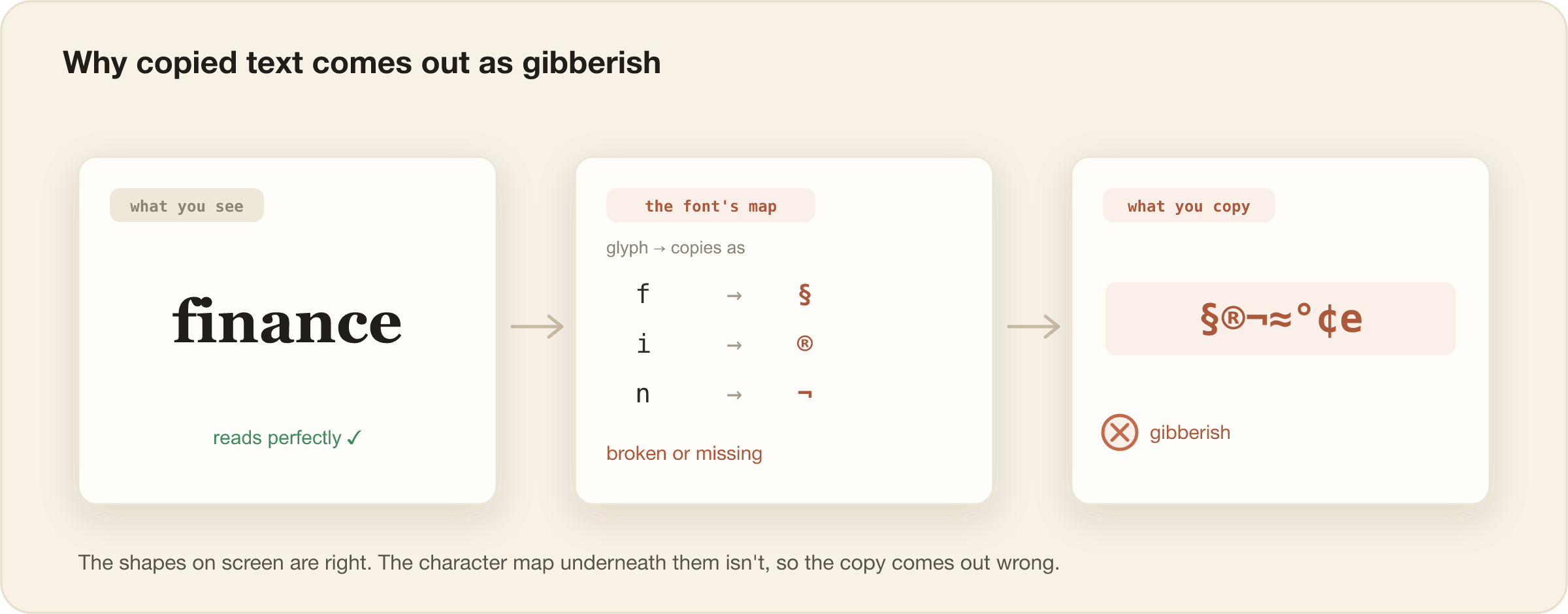
A PDF draws letters as shapes, called glyphs. To let you copy them back out, it keeps a hidden table that maps each glyph to a real character. When that table is missing or wrong, the letters look perfect on screen but copy as the wrong thing. You get gibberish, little boxes, random symbols, or accented letters where there shouldn’t be any. The font is, in effect, lying about what it says.
It shows up most in math and symbol fonts, in subsetted fonts, and in a lot of PDFs built from LaTeX. The page is fine to read. The copy is garbage.
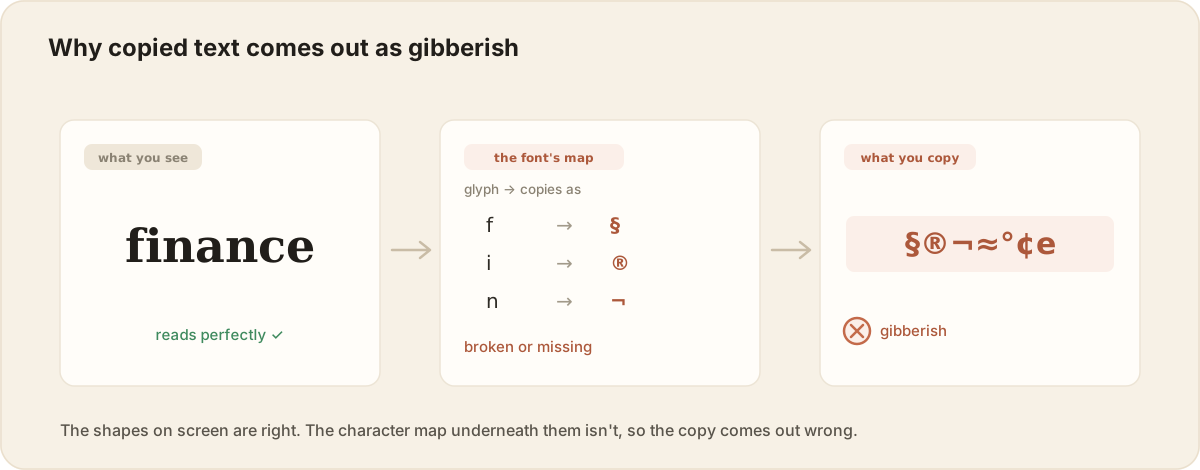
Two smaller cousins live here too. PDFs often don’t store the spaces between words at all, the viewer fakes them from the gaps, so copied text can run together or sprinkle in stray spaces. And ligatures like “fi” or “fl” sometimes copy as a single odd character or vanish entirely.
You can’t fix a broken character map by trying harder. The reliable move is to ignore the broken text layer and OCR the rendered page, reading the shapes fresh. Worth being honest: heavy math and dense symbols are exactly where OCR struggles most, so check the result rather than trusting it.
”It pastes out of order” means a multi-column layout
A PDF stores where each chunk of text sits on the page, not the order you’re supposed to read it in. When you copy, it grabs the chunks in storage order. On a two-column page that often means it stitches a line from the left column, then a line from the right, into something that reads like nonsense. Footnotes, sidebars, and tables make it worse.
The fix is a tool that detects the layout and rebuilds the reading order. Converting the page to Markdown does exactly this: it writes the reading order down explicitly instead of leaving every tool to guess it.
”Copy is greyed out” means the PDF is restricted
Some PDFs carry a permissions flag that disables copying, and most viewers respect it. The text is there, you just can’t select it.
For your own documents, the simplest fix is to re-export or print the file to a fresh PDF, or to OCR the rendered page, since OCR reads pixels and doesn’t care about the flag. If the document isn’t yours, respect the restriction.
So how do I actually get clean text out?
Two tools cover almost all of it:
- OCR handles scans and lying fonts. It ignores whatever broken text layer exists and re-reads the page as an image.
- Converting to clean Markdown handles reading order, and gives you text you can actually reuse, search, and hand to other tools instead of fighting copy-paste every time.
This is the reason I build pdfmarkdown.app, so take the pitch with the usual salt. It runs in your browser (the file never gets uploaded), OCRs scanned pages (in beta), rebuilds the reading order, and puts the original page next to the extracted text side by side. That last part matters most for this problem. Garbled text from a lying font is genuinely hard, and no tool nails every case. The side-by-side is how you catch what came out wrong before you trust it, instead of finding out later when you’ve already pasted gibberish into something that matters.
I won’t tell you it perfectly un-garbles every PDF. Nobody honestly can. What it gives you is text you can check with your own eyes, and a clean copy you only have to make once.
The short version
- Copied PDF text comes out wrong for four reasons: it’s a scan (no text to grab), the font’s character map is broken (gibberish), the layout scrambles the order, or copying is locked.
- “Nothing selects” means OCR. “Selects but pastes as gibberish” means a broken font map, and the fix is to OCR the page fresh.
- Out-of-order text is a reading-order problem, and converting to Markdown writes the order down.
- For anything you’ll reuse, convert once to clean text and check it, rather than re-fighting copy-paste every time.
FAQ
Why is text I copy from a PDF garbled? Usually the font’s character map is broken. A PDF maps each letter shape to a character code so you can copy it, and when that map is missing or wrong (common in math, symbol, and LaTeX fonts) the text looks fine on screen but copies as gibberish or weird symbols. OCR the page to re-read the shapes instead of the broken codes.
How do I copy text from a scanned PDF? A scanned PDF is an image, so there’s no text to select. Run it through OCR, which reads the pixels and turns them into real, selectable text.
Why does copied PDF text have weird characters or extra spaces? PDFs often don’t store the spaces between words, viewers fake them from the gaps, and ligatures like “fi” can copy as odd characters. So copied text can run words together, add stray spaces, or drop characters. Converting the page to clean text usually normalizes this.
Why does PDF text paste out of order? PDFs store where text sits, not the order to read it. On multi-column or complex pages, copy grabs the pieces in the wrong order. A tool that reconstructs the reading order, or converts the PDF to Markdown, fixes it.
How do I copy text from a protected PDF? If it’s your own document, re-export or print it to a new PDF, or OCR the rendered page (OCR reads pixels and ignores the copy flag). Respect the restriction on documents that aren’t yours.
Can gibberish text from a PDF be fixed? Often, yes. Re-OCR the page so the text is read from the shapes, not the broken font map. Heavy math and symbols are the hardest cases, so always check the result against the original.