July 8, 2026 · updated July 14, 2026
Best PDF to Markdown Tools in 2026: 9 Converters Tested on Real Documents
We tested 9 PDF to Markdown converters (Marker, MinerU, Docling, Mathpix, pdfmarkdown.app and more) on five real documents. See what breaks and what wins.

Jerome
Builder of pdfmarkdown.app
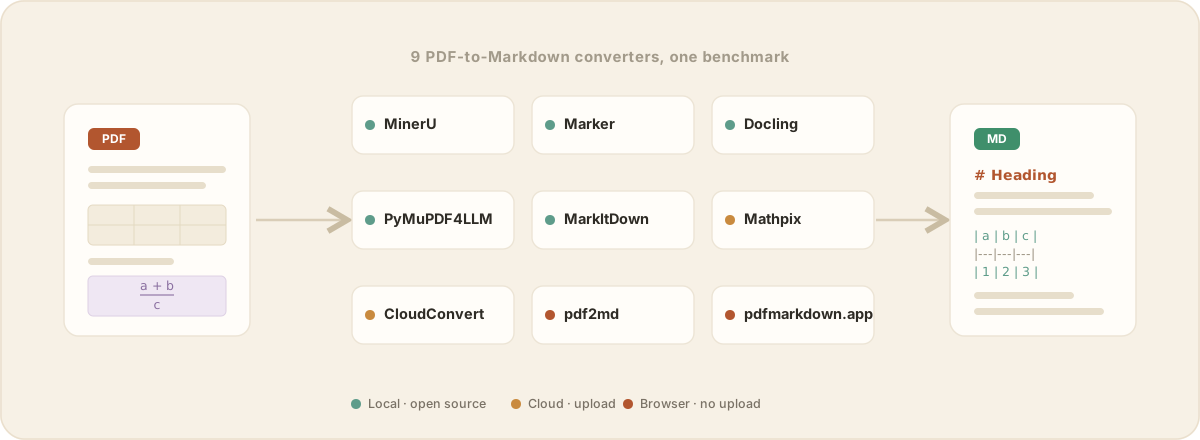
There is no single best PDF to Markdown converter. The right one depends on what’s in your PDFs and how you work. A researcher with formula-heavy papers, a lawyer who can’t upload a confidential file, and a developer batch-processing ten thousand documents each need a different tool.
So I did the tedious part for you. I ran nine of the most popular converters through five real documents that tend to break them, judged them all the same way, and wrote down where each one shines and where it falls apart, in plain language. Full disclosure: I build one of them, pdfmarkdown.app. No one paid to be included.
You probably already know your situation. So let’s start with the decision, and you can read the evidence after.
How to pick
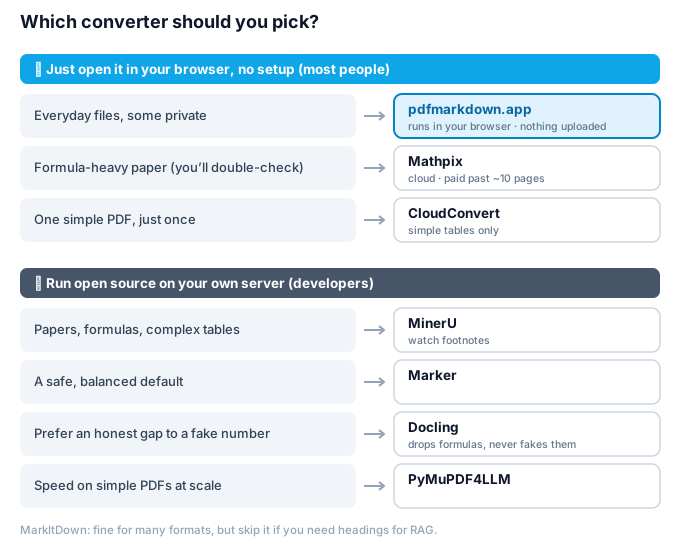
In short:
- Everyday files, private, nothing to install: pdfmarkdown.app, which opens the file right in your browser.
- Formula-heavy academic papers: Mathpix for the cleanest output, or MinerU if you can self-host.
- A developer running a pipeline: MinerU for papers and complex tables, Marker as a safe default, Docling if you would rather see an honest gap than a convincing wrong value, PyMuPDF4LLM for speed on simple PDFs.
- Avoid pdf2md for anything with numbers (it truncates them), and MarkItDown if you need headings for RAG (it produces none).
Where your file goes matters as much as the score for anything confidential. pdfmarkdown.app and pdf2md run entirely in your browser, the open-source libraries run on your own machine, and Mathpix and CloudConvert upload your file to a server. For contracts, client files, or unpublished research, check that before anything else.
Here is the same thing as a table, with each tool’s real strengths and weaknesses side by side.
| Tool | Strengths | Weaknesses | Runs |
|---|---|---|---|
| MinerU |
|
| Local, open source |
| Marker |
|
| Local, open source |
| Docling |
|
| Local, open source |
| PyMuPDF4LLM |
|
| Local, open source |
| MarkItDown |
|
| Local, open source |
| Mathpix |
|
| Cloud, paid |
| CloudConvert |
|
| Cloud, upload |
| pdf2md |
|
| Browser, local |
| pdfmarkdown.app |
|
| Browser, no upload |
Every tool has a shape. Here are the same nine as capability profiles, so you can see at a glance who is an all-rounder and who is a specialist with a cliff.
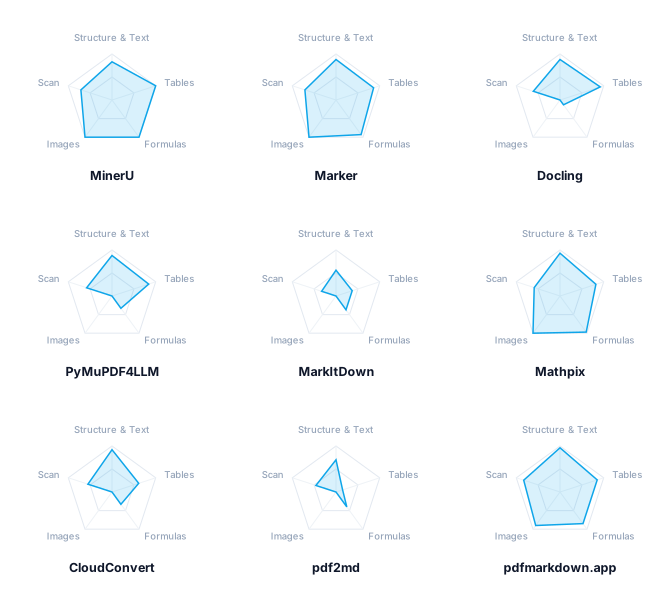
Center = 0, outer edge = 100. A bigger, rounder shape means a better all-rounder; a dent means a weak spot (Docling and CloudConvert on formulas, most tools on images). It's a rough capability profile aggregated across the documents that stress each dimension, not the same thing as the per-document scores further down. Near the top, a few points either way is noise, so read the shapes, not fine rankings.
That is the pick. The rest of this piece is the evidence: what each tool actually did on these documents, how I scored it, and the full table of numbers at the end.
The tools, one by one
MinerU: the strongest open-source engine, with two blind spots
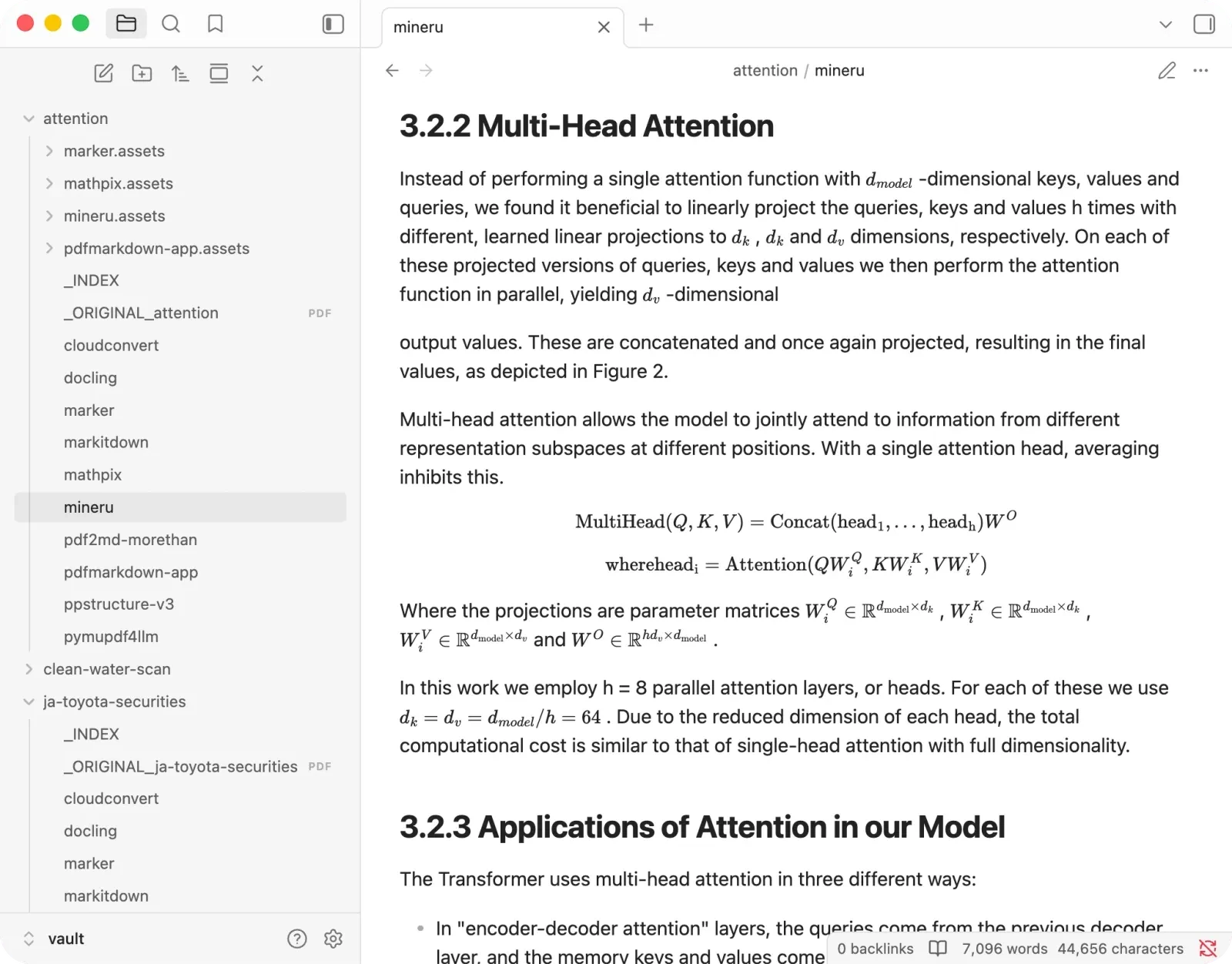
MinerU had the highest recovery of any open-source tool. On the paper and the financial report it was genuinely excellent:
- Tables: clean, including a brutal 26-row one, with every minus sign and bracketed figure intact.
- Formulas: fully preserved.
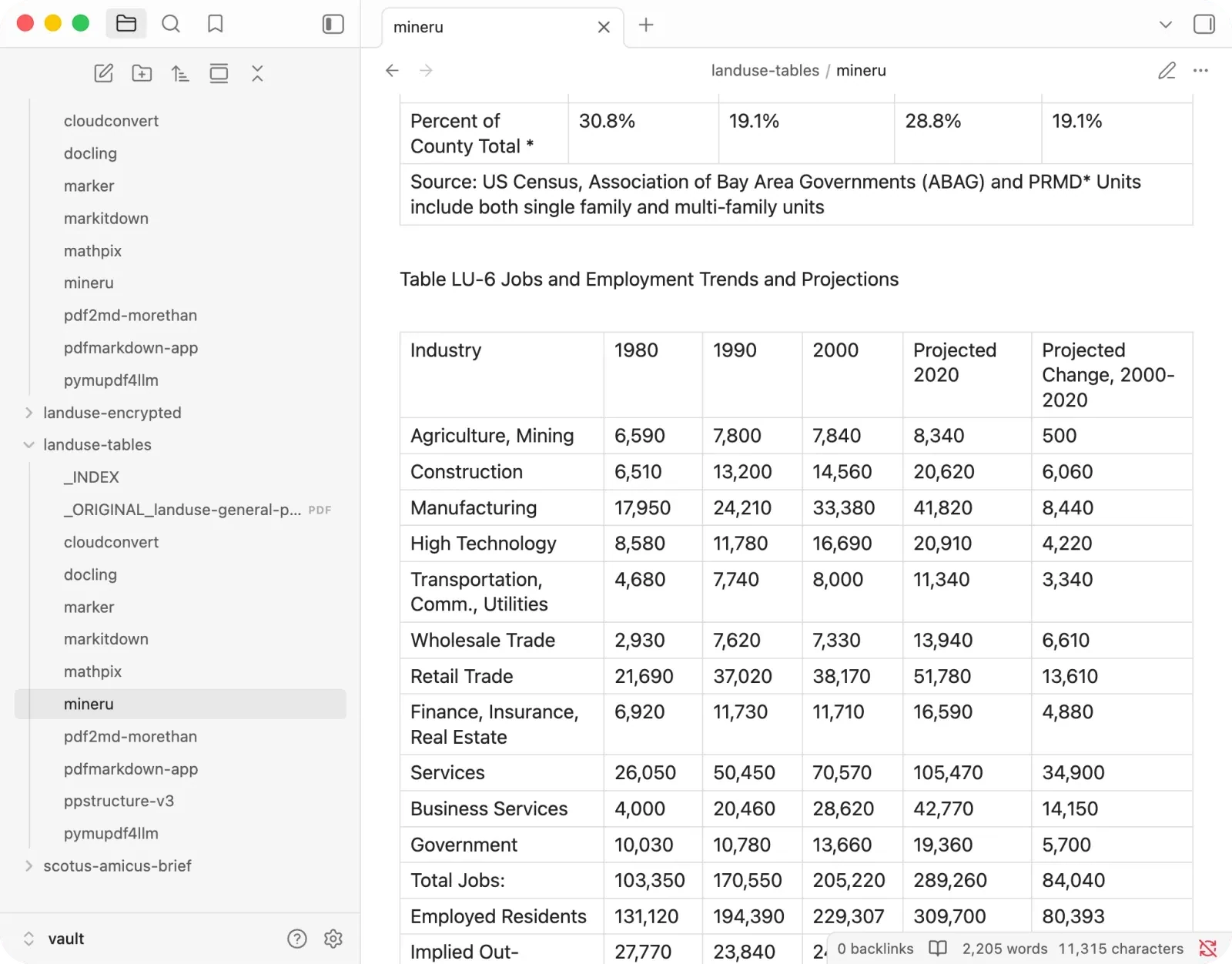
Two habits undercut it, both on the documents you would least want them on:
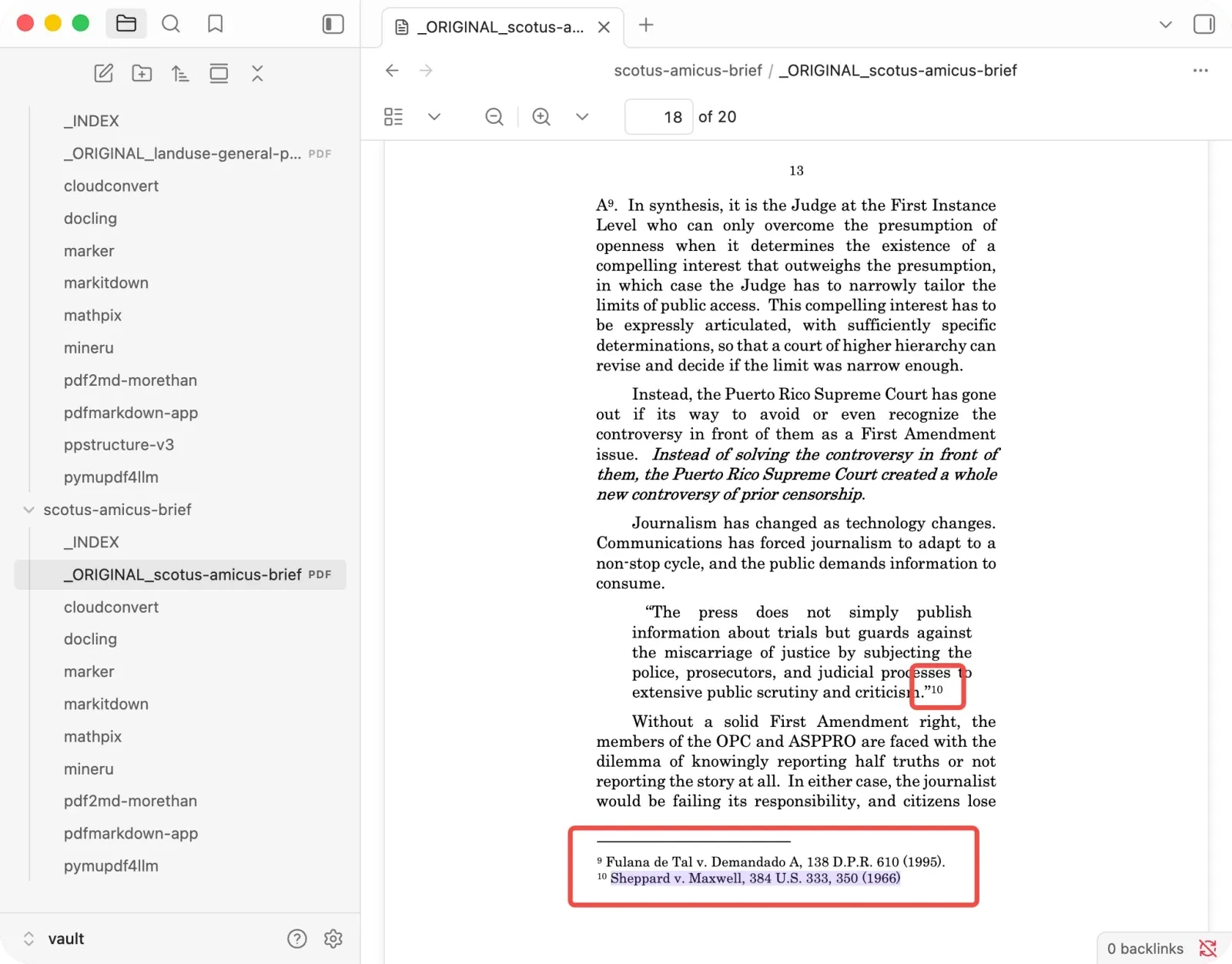
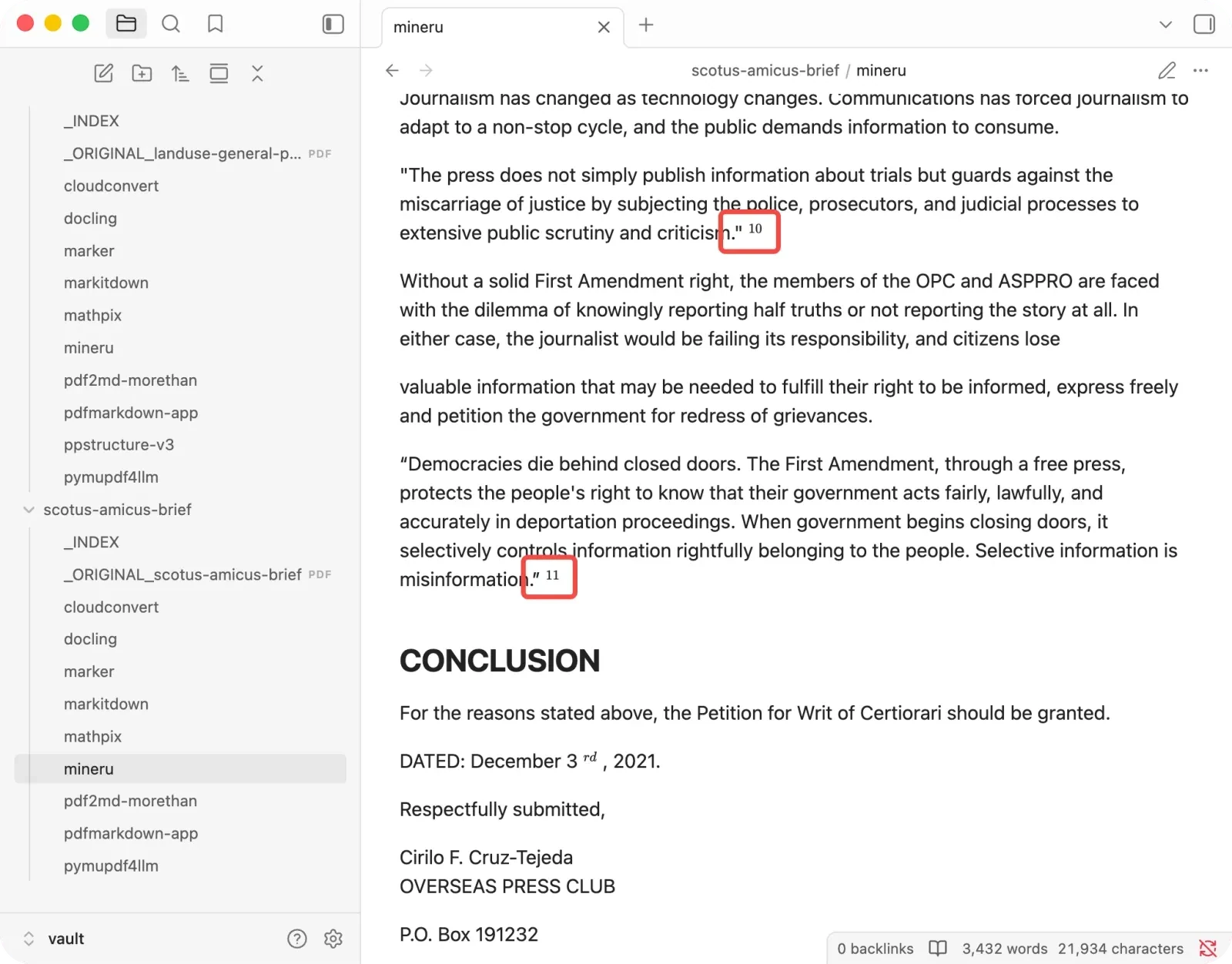
- Legal footnotes: it keeps every footnote marker in the body but deletes the footnote text, so ten of eleven citations point at nothing.
- Financial contents: it promotes about thirteen table-of-contents lines into fake H1 headings.
One practical note if you self-host it: MinerU ships two engines, a lighter pipeline and a heavier VLM, and I ran the top-end VLM, which is where this quality comes from. On MinerU’s own OmniDocBench numbers the VLM scores a few points above the pipeline (about 91 versus 86), so if your machine can’t run the VLM you’ll be on the lighter engine and should expect a small step down from what you see here. The GPU matters enormously, and on a weak one the conversion time balloons.
+ Best for papers, formulas, and complex tables, when you can self-host.
− Watch out for footnote-heavy legal or academic text.
Marker: the balanced default
Marker was consistently good, never the disaster and rarely the winner. Its real strength is the corner where many tools fall down, formulas and figures: it kept the paper’s math almost intact and was one of the only tools that pulled every figure out cleanly.
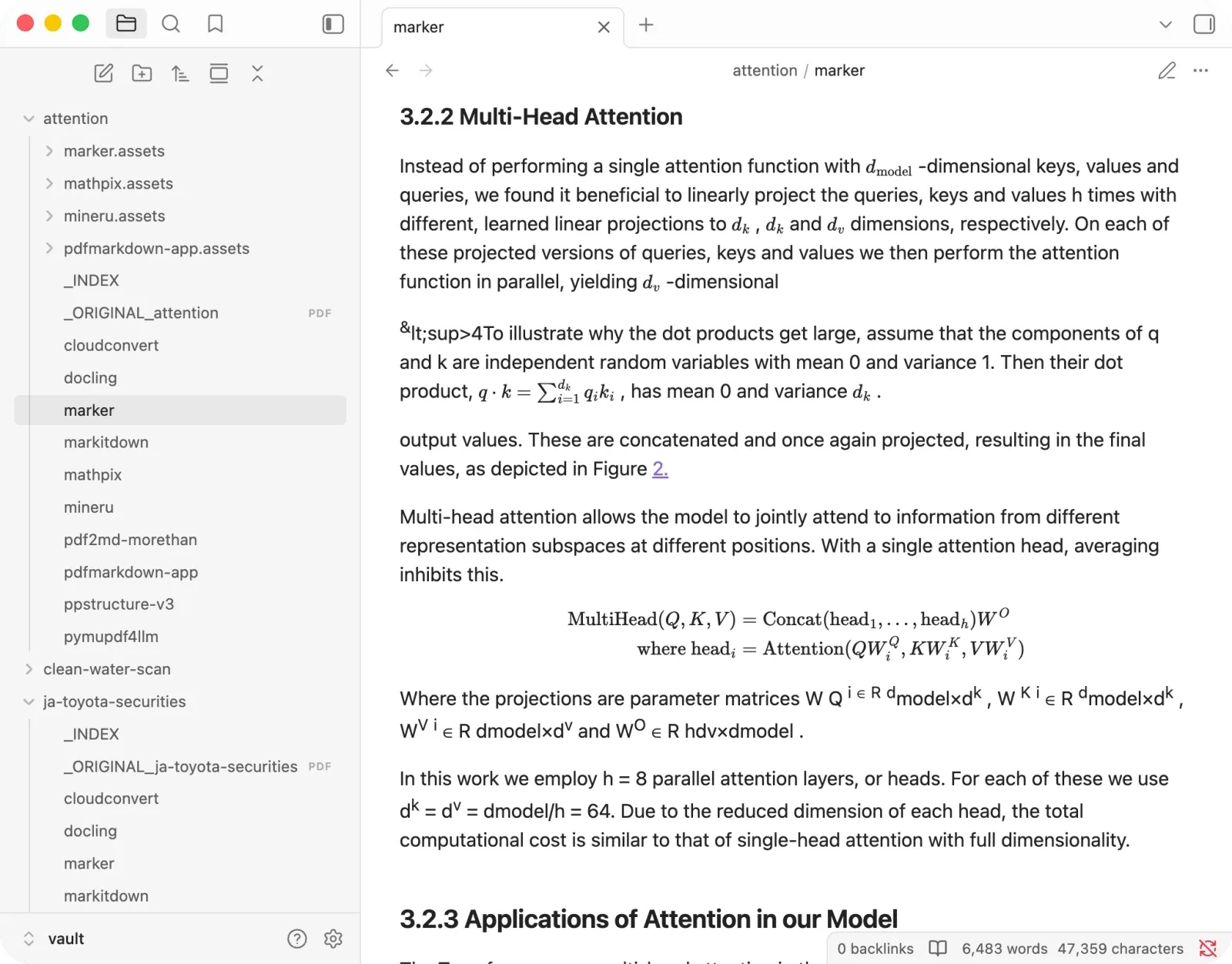
Where it stumbles is layout and references:
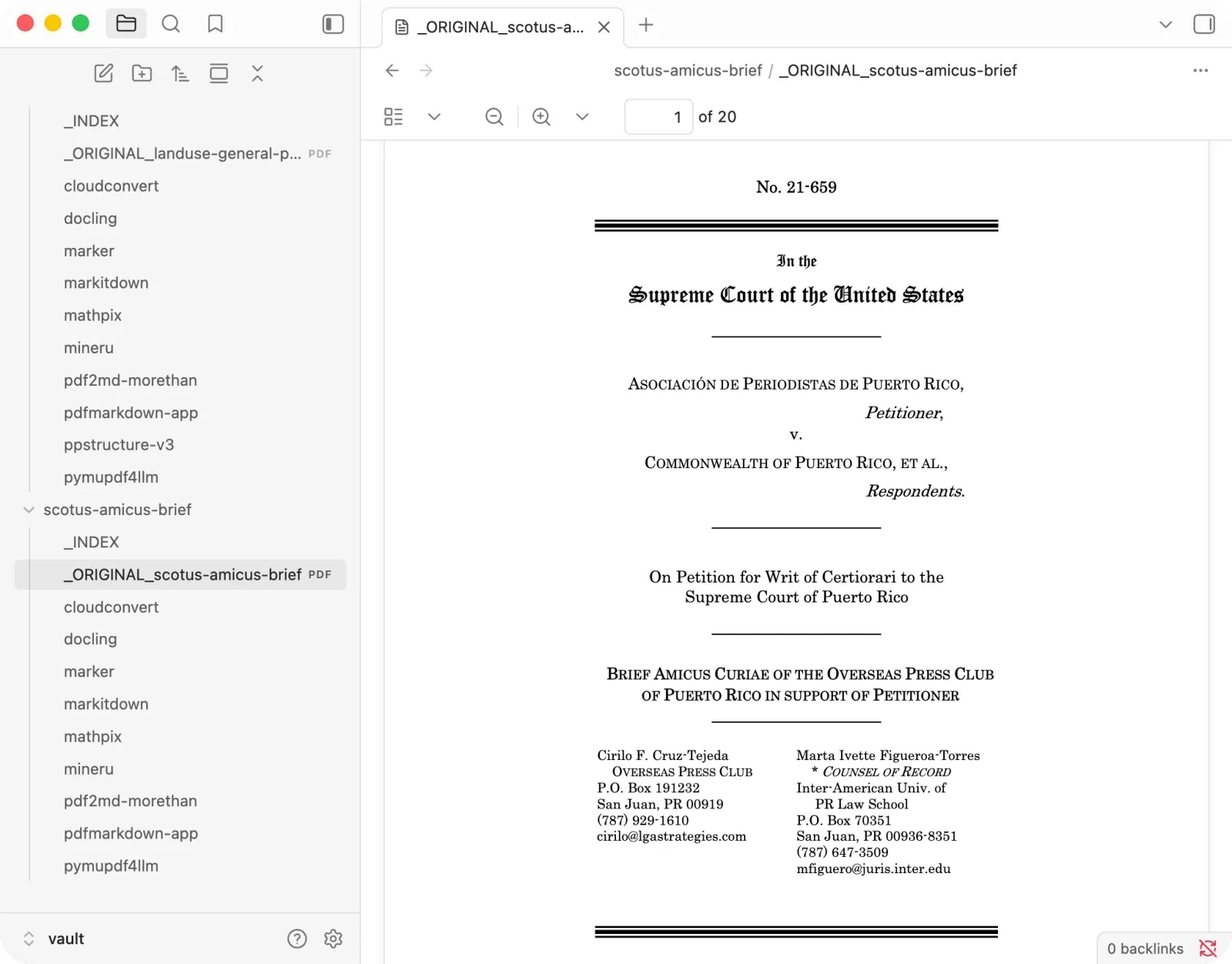
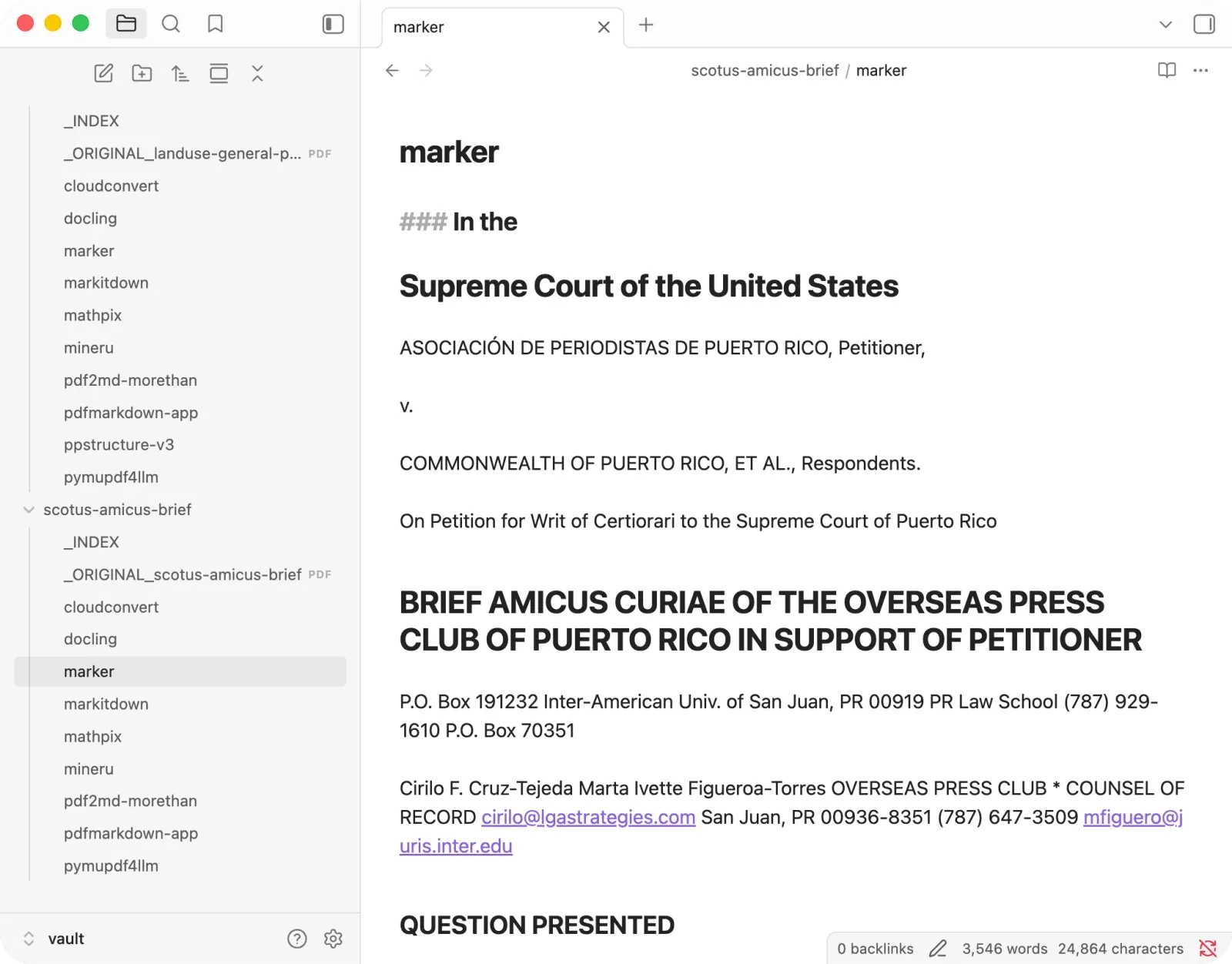
- Two-column blocks: it interleaved the attorney signature block into one scrambled address.
- Reference lists: it rendered the Table of Authorities as a data table that split each case name from its page number.
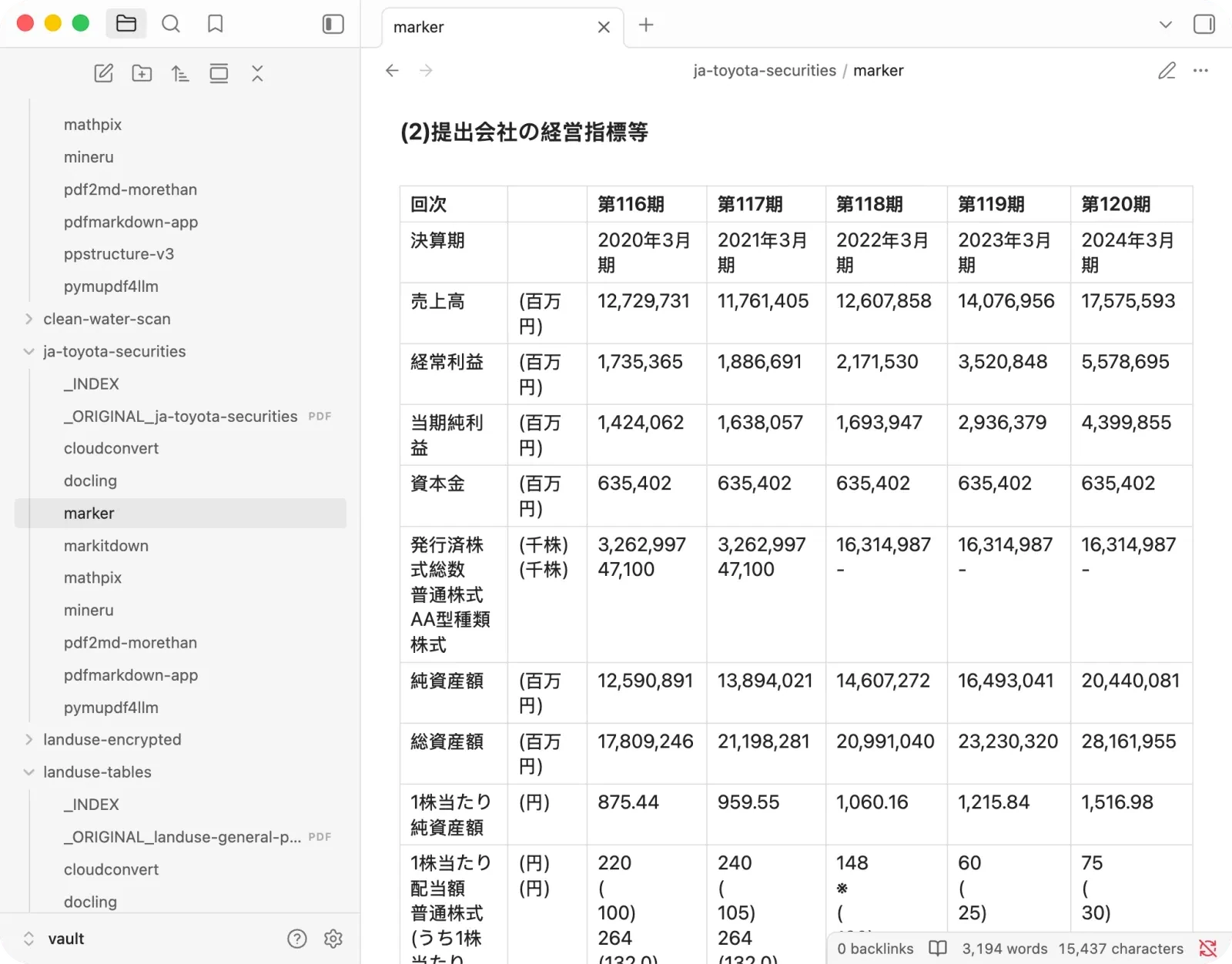
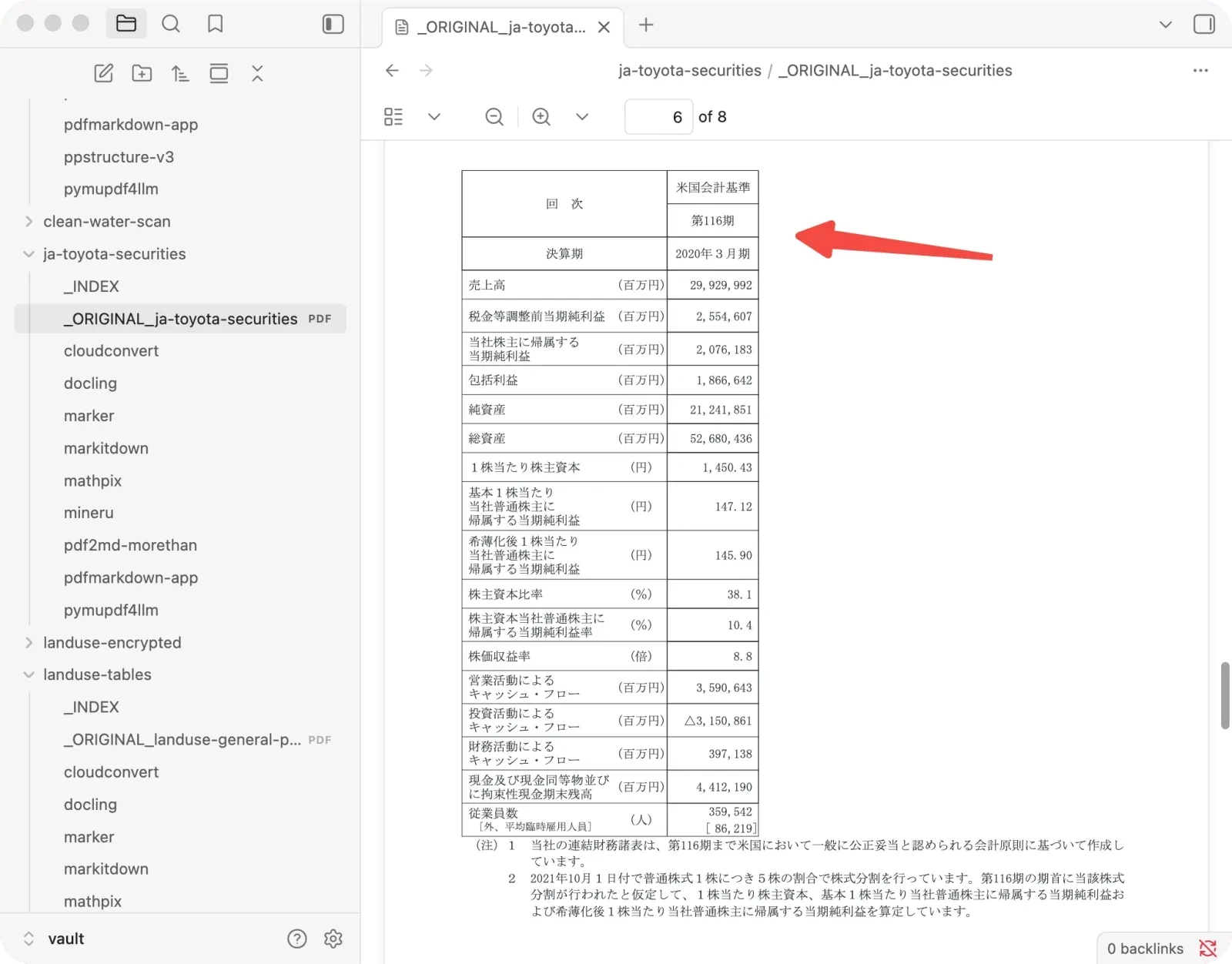
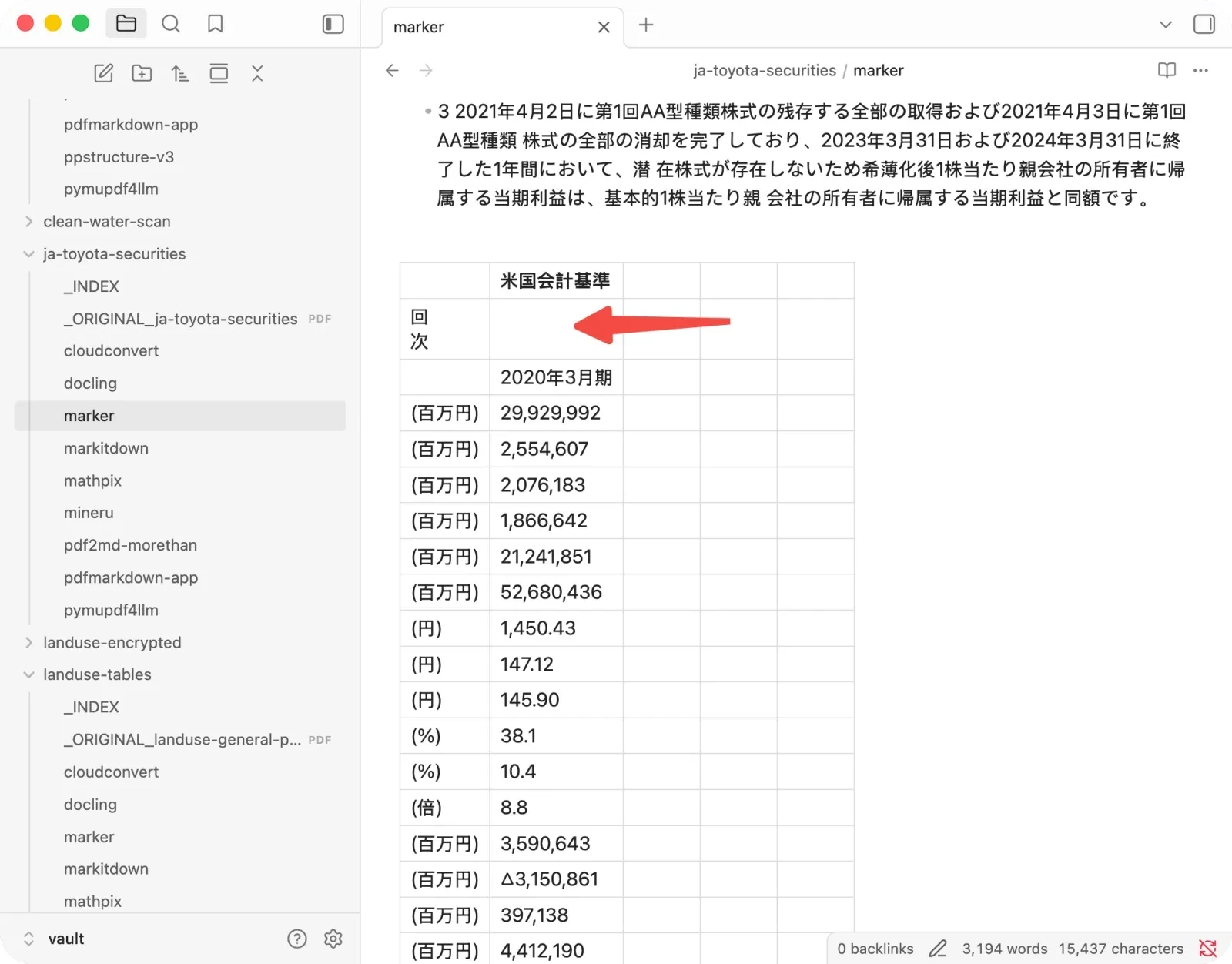
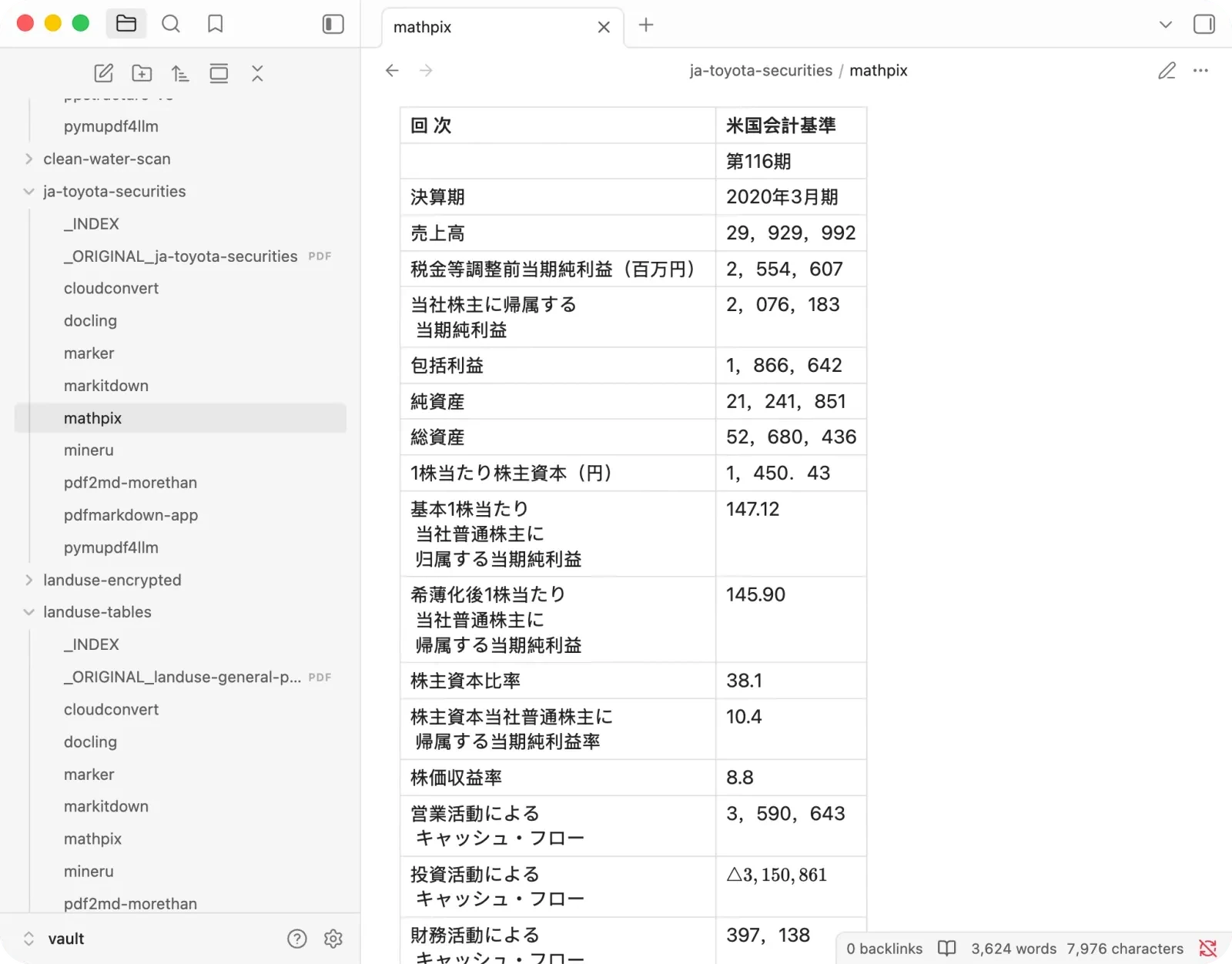
- Table labels: it stripped the row labels off Toyota’s US-GAAP table, leaving a column of numbers (29,929,992, and so on) with nothing to say the first is net sales.
+ Best for papers and mixed documents where formulas and figures matter, as a safe open-source default.
− Watch out for multi-column layouts, reference and citation lists, and the occasional dropped table row label.
Docling: honest, and allergic to math
IBM’s Docling has clean text and tables, and when it can’t handle something it says so instead of faking it. It never produced a single silent error in the whole test.
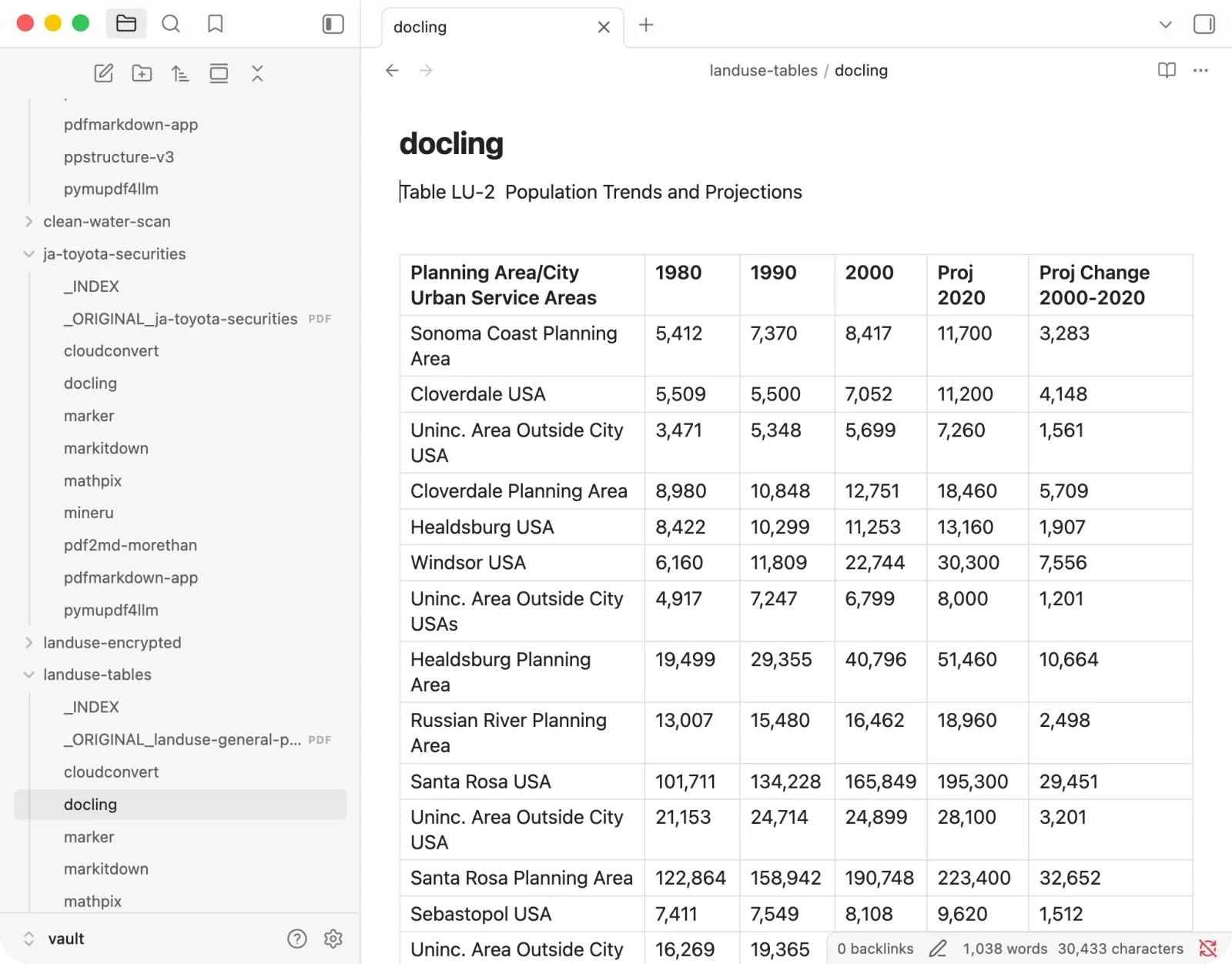
The weak spots are real:
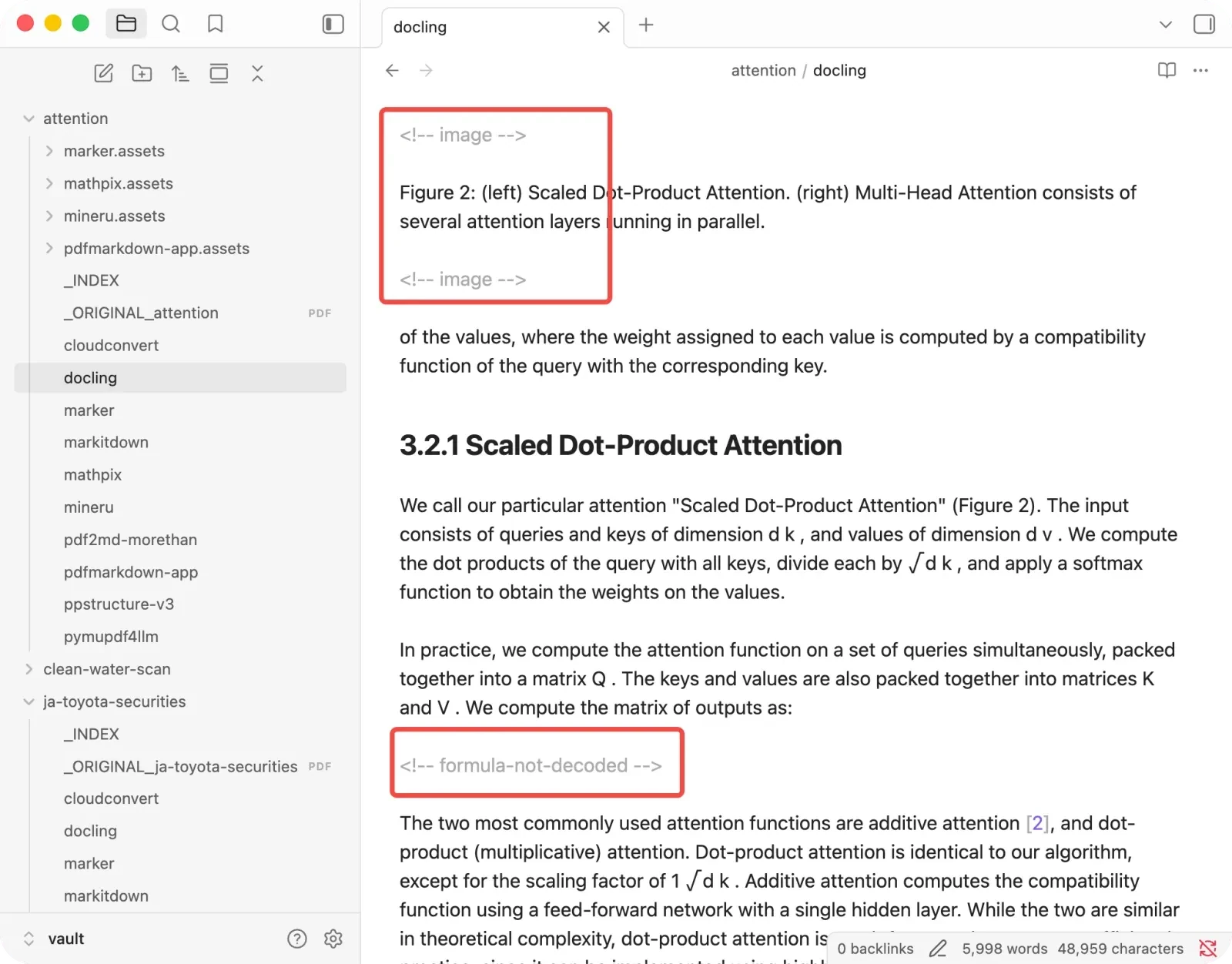
- Formulas and images: it drops both, but marks them as undecoded rather than inventing garbage. Honest, but a gap for anything with figures or math.
- Structure: it mangled a table of contents into a duplicated three-column table.
+ Best for text-heavy and table-heavy documents where you value honest failure.
− Watch out for math-heavy papers.
PyMuPDF4LLM: fast, until layout carries meaning
PyMuPDF4LLM is a quick developer library, and on simple single-column PDFs it is clean and very fast. The trouble is layout:
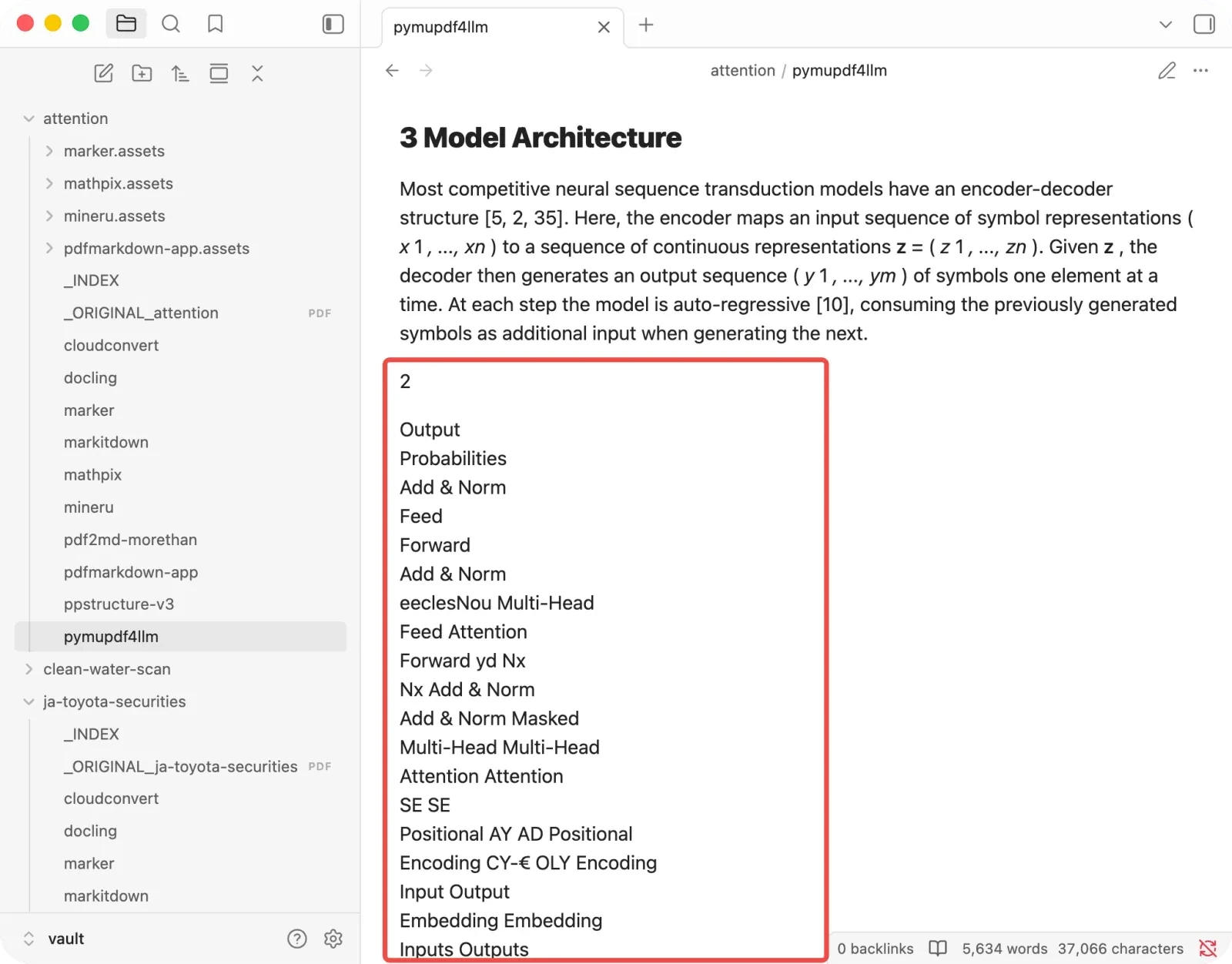
- On the research paper its reading order collapsed at the Figure 1 page boundary, severing whole sections.
- It dropped most of the display formulas.
+ Best for simple, single-column PDFs at scale where speed matters.
− Watch out for figures that break the column flow.
MarkItDown: no headings, anywhere
Microsoft’s MarkItDown has one disqualifying habit for AI work: on every document I tested, it emitted zero Markdown headings. Section titles come out as plain text, so you lose the outline a RAG pipeline needs to chunk and retrieve.
I traced that behavior through its PDF conversion path in a separate Microsoft MarkItDown review, with the source code and five-document results side by side.
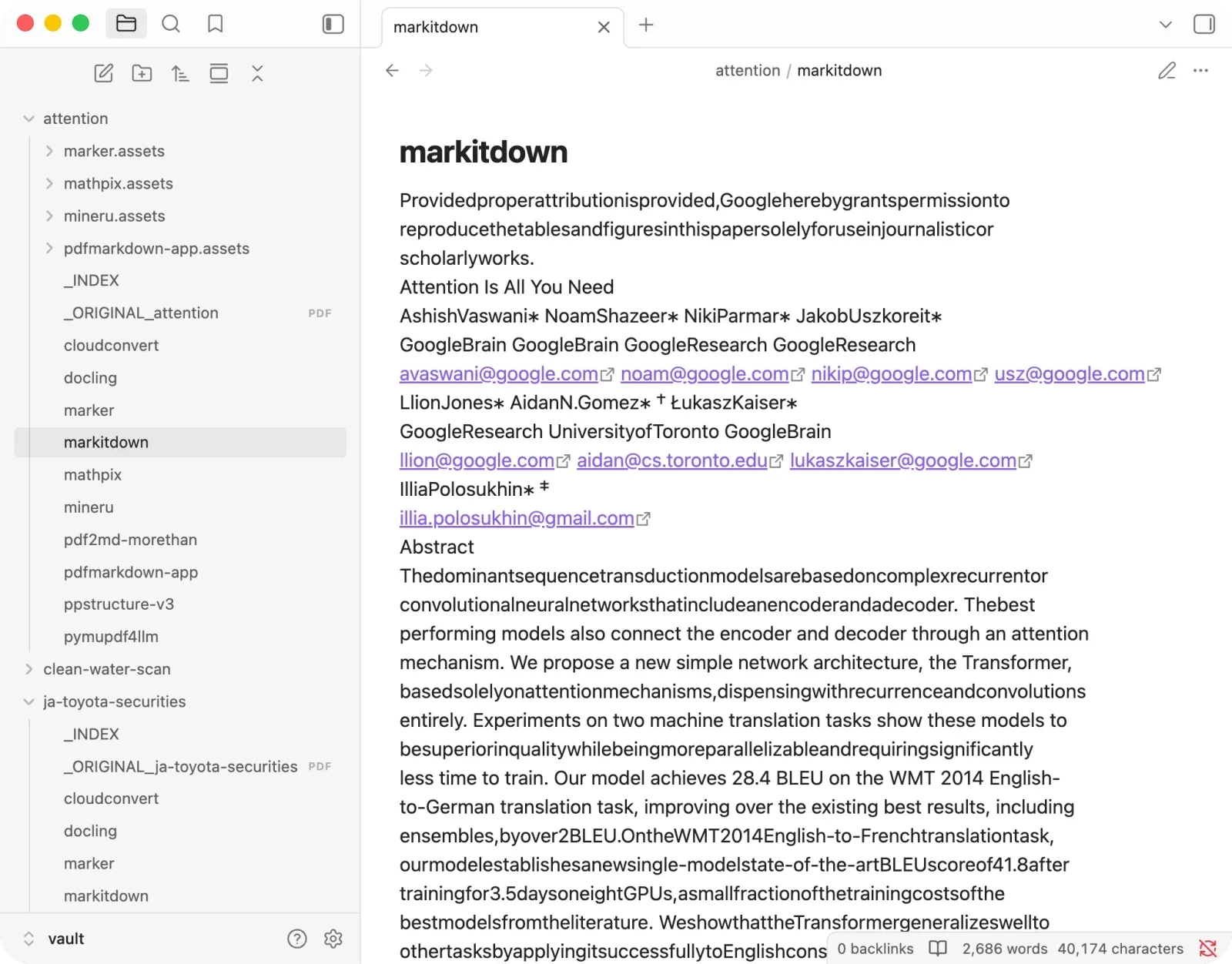
And everything else it touches breaks too:
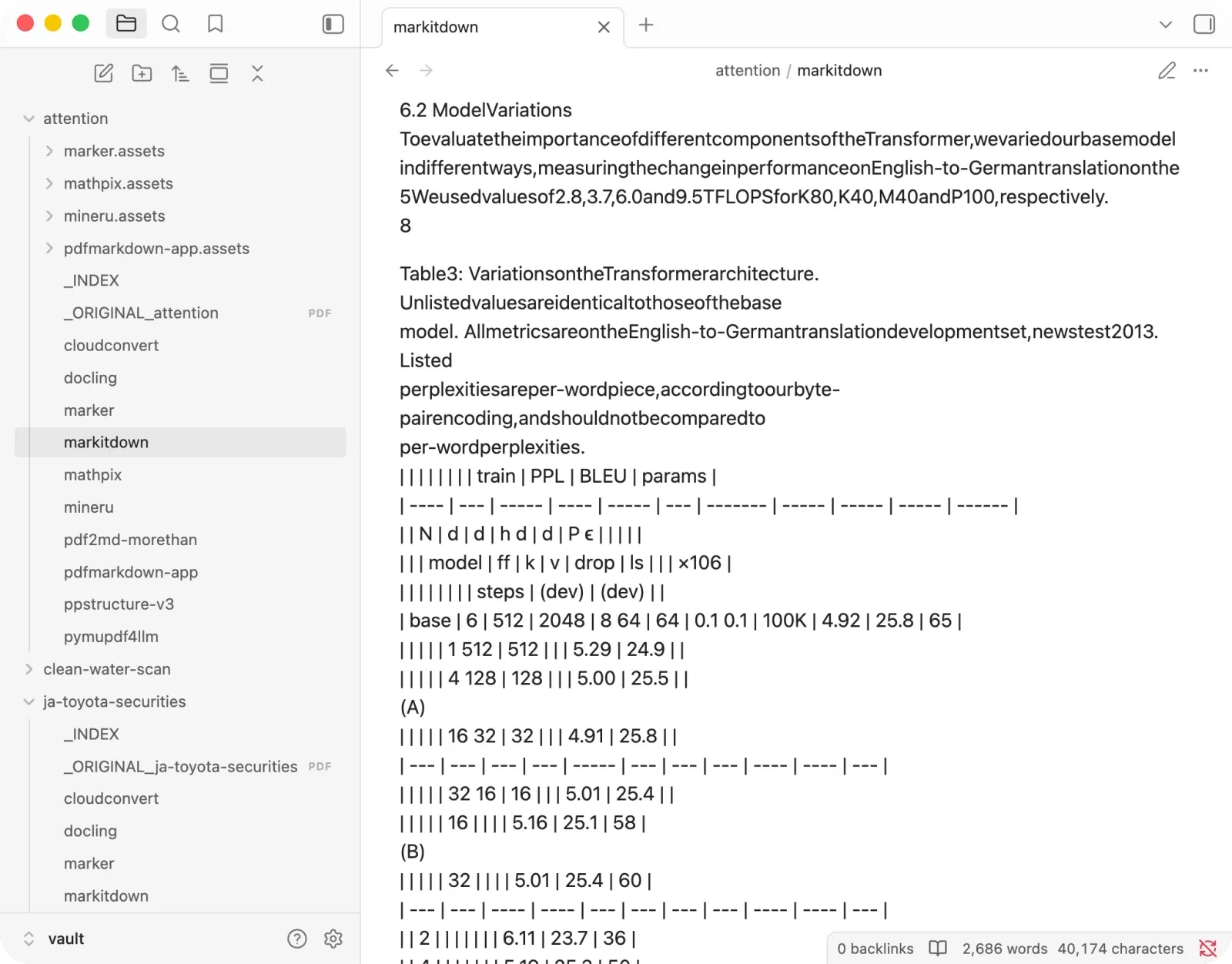
- Tables shatter into fragments, and on justified prose it even invents tables out of the spacing.
- Formulas fall apart completely: roots left dangling, subscripts scattered, nothing you could read back.
- Images are dropped entirely.
- Scans aren’t handled out of the box either: you have to wire in an external OCR model yourself (a GPT vision model, or something like PaddleOCR).
+ Best for plain-text dumps and multi-format ingestion pipelines.
− Watch out for anything that needs structure for RAG.
Mathpix: beautiful output, with a knife in it
Mathpix produced the single cleanest result in the test, a perfect score on the paper, with every table, formula and figure correct.
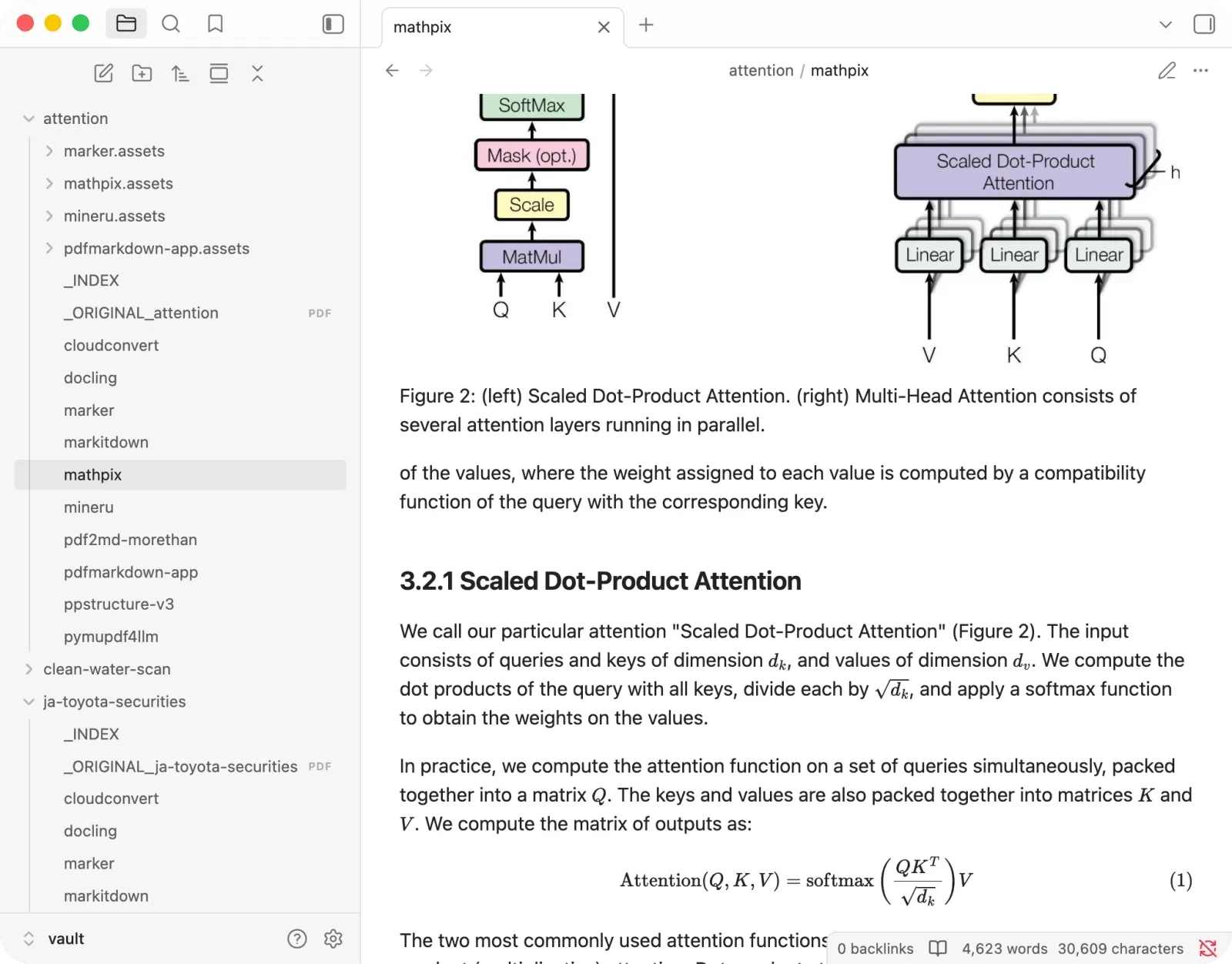
But it hides a knife, and it did it twice:
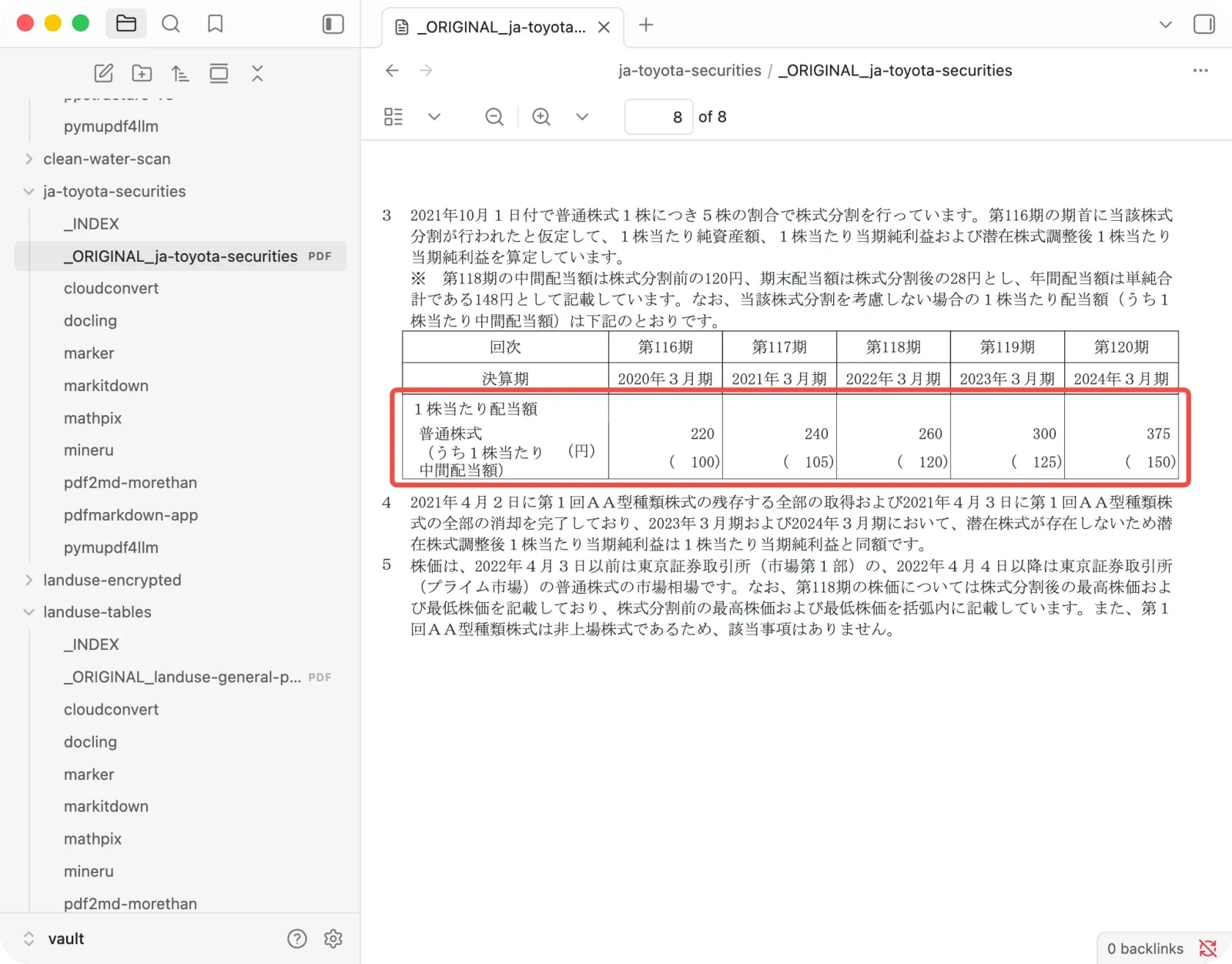
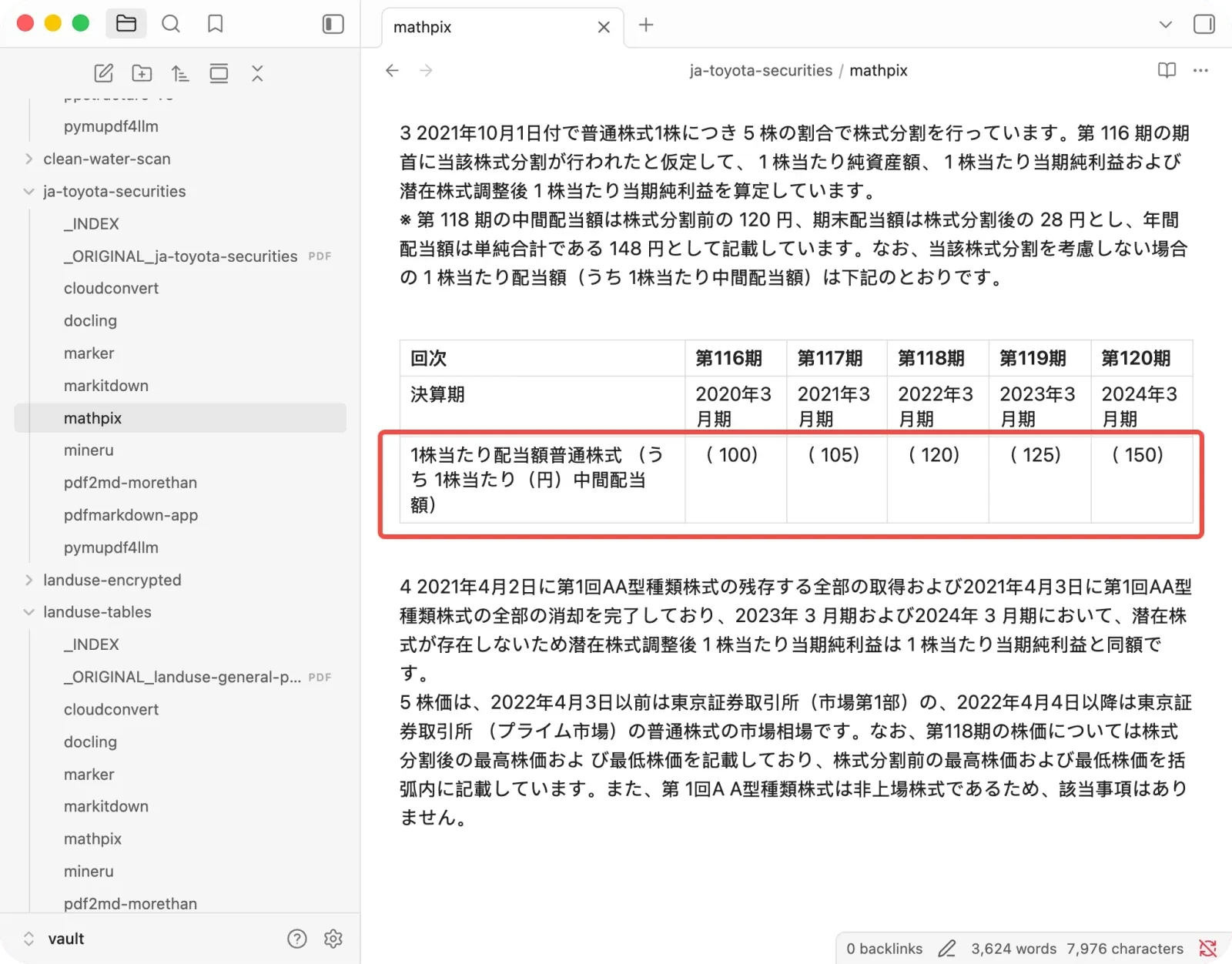
- On the financial report it dropped the actual annual dividend figures (220, 240, 260, 300, 375 yen) and kept only the interim dividend in parentheses, so an AI reads 100 where the real number is 220.
- On the land-use data tables it replaced a total of 87,416 with 100.0%.
Both outputs look completely normal. It is also an online paid tool, and the free tier caps out around ten pages.
+ Best for short, formula-heavy papers you will double-check.
− Watch out for dense numeric tables, and the page limit.
CloudConvert: valid tables that are secretly unusable
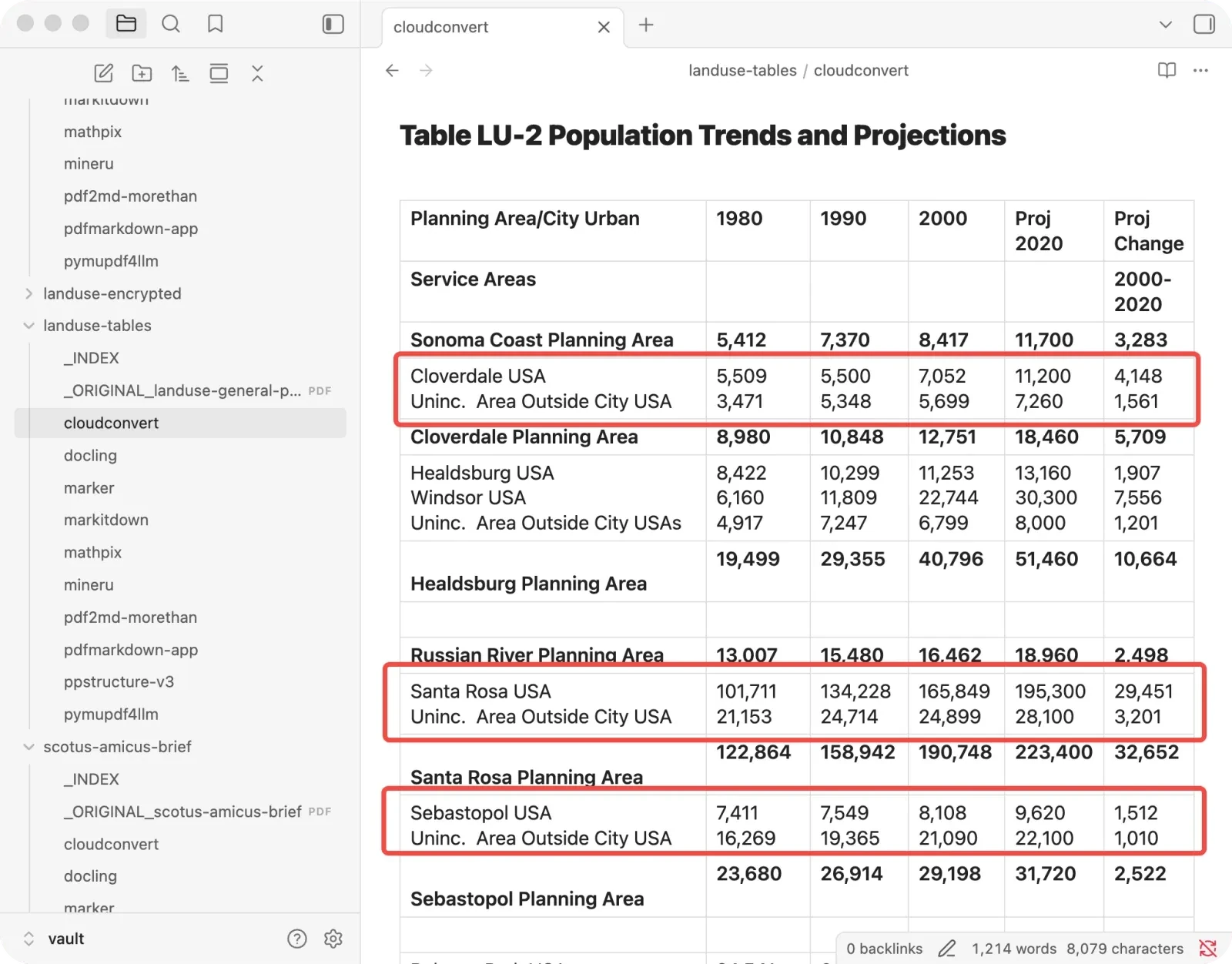
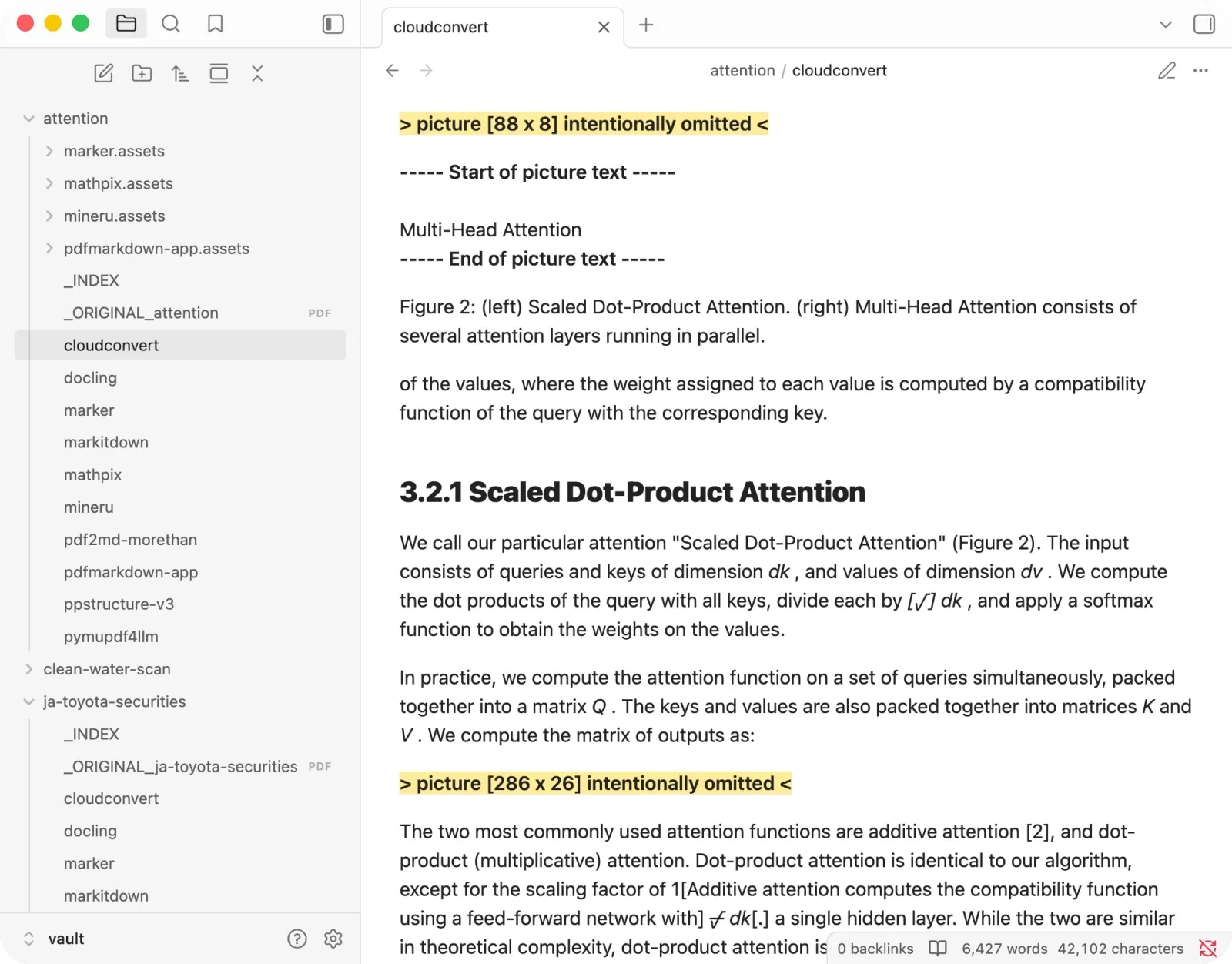
CloudConvert emits proper Markdown tables, which sounds good. On dense ones it crams several data rows into a single cell, so the table is valid Markdown and useless as data because you can’t tell which number belongs to which row. On the land-use plan, three of five tables collapsed this way.
And beyond tables:
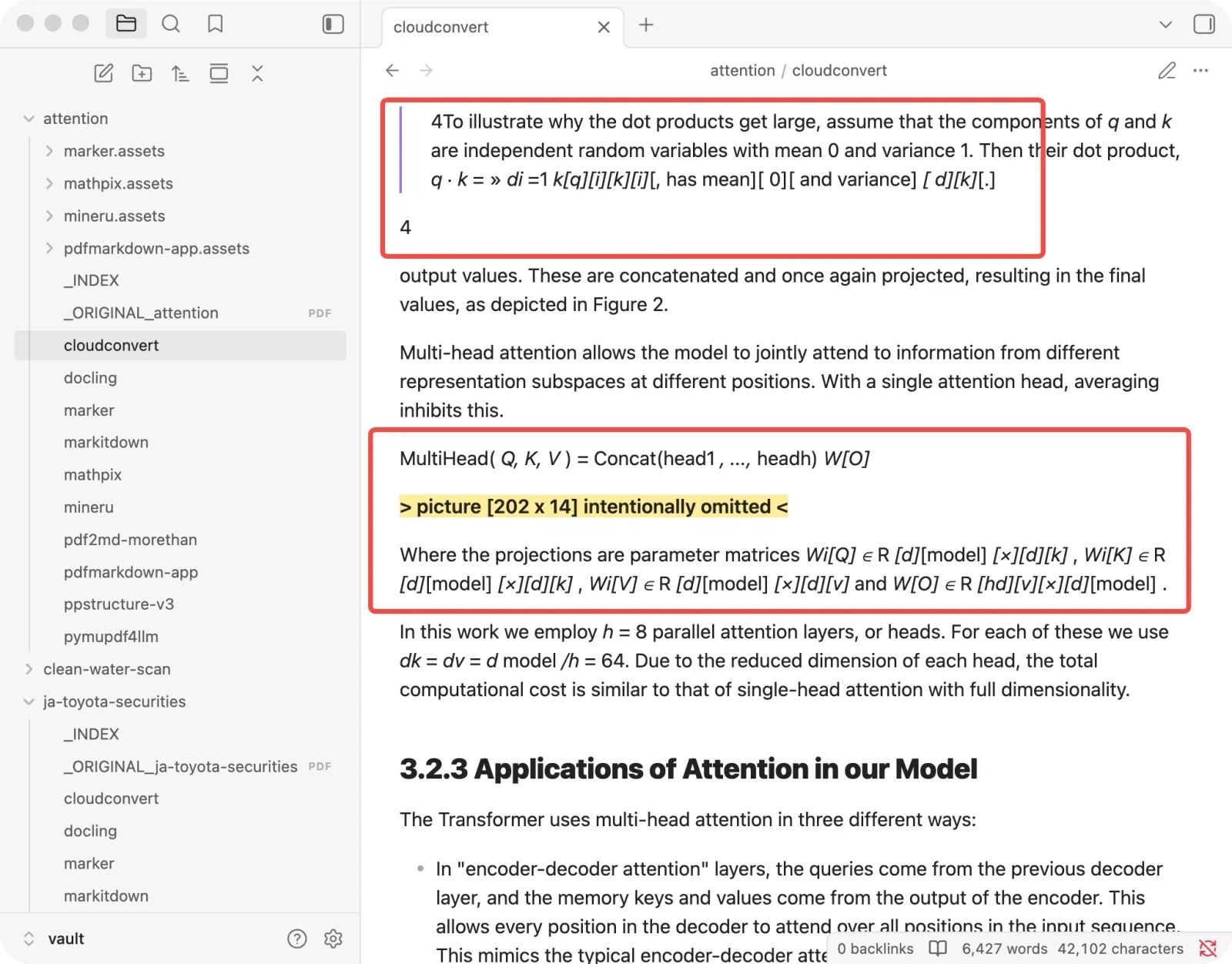
- Formulas come out badly mangled.
- Figures are dropped entirely.
+ Best for occasional simple conversions.
− Watch out for dense financial or statistical tables.
pdf2md: the one that quietly cuts your numbers off
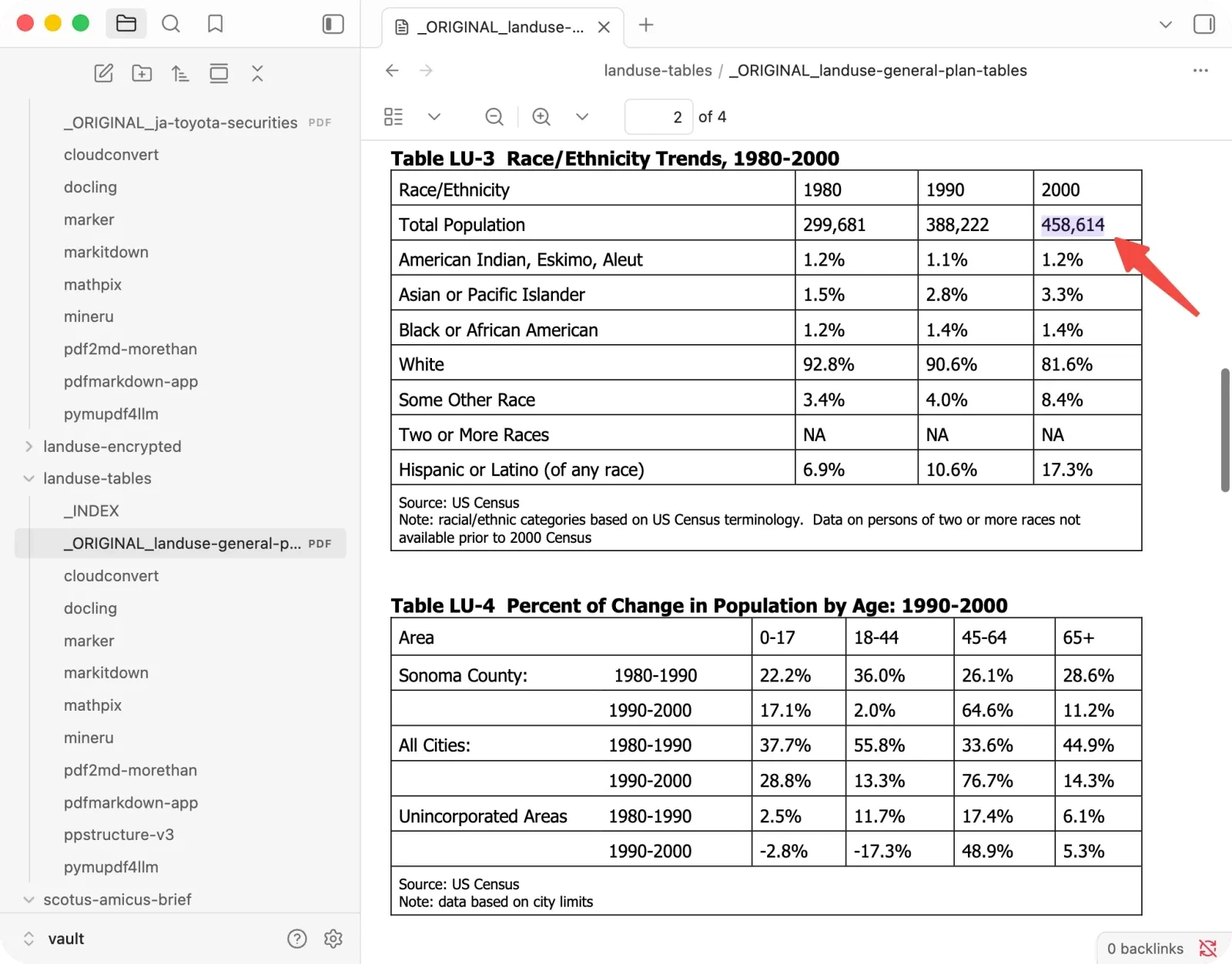
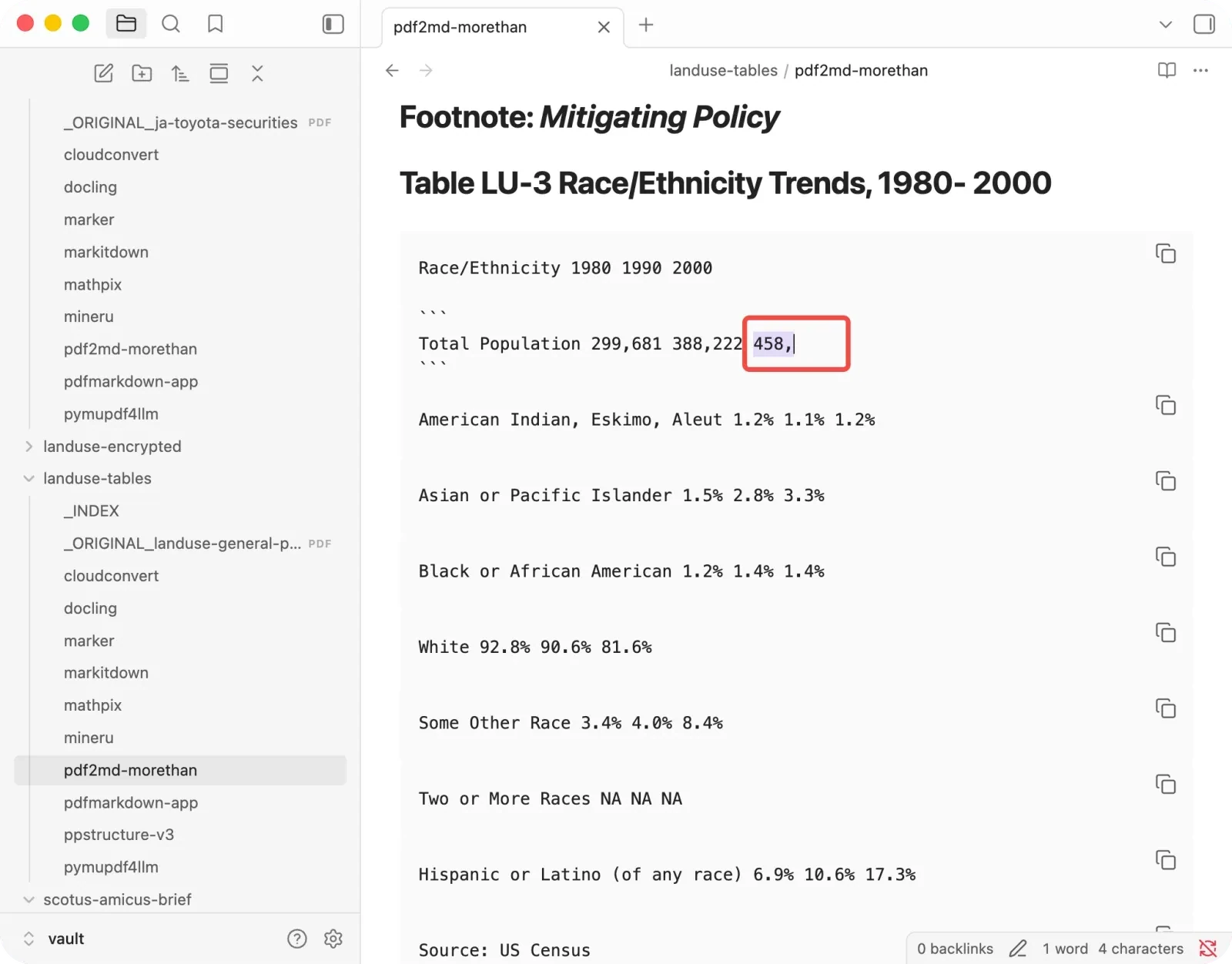
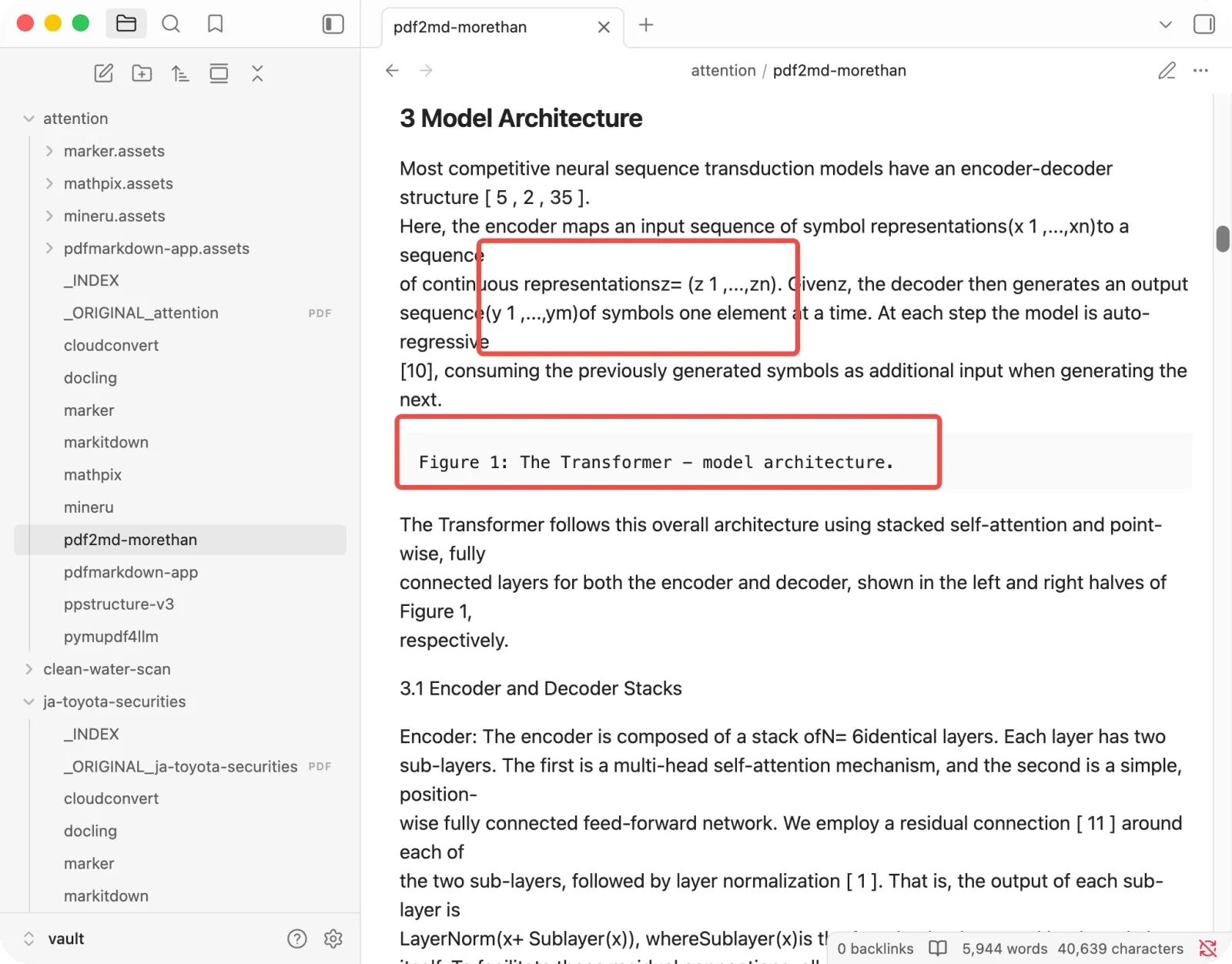
The scariest result, because its damage is the kind you might not notice. I also ran a separate PDF2MD alternatives test with the same real PDFs if you want the direct replacement shortlist. On the land-use tables:
- It truncated numbers at the thousands separator:
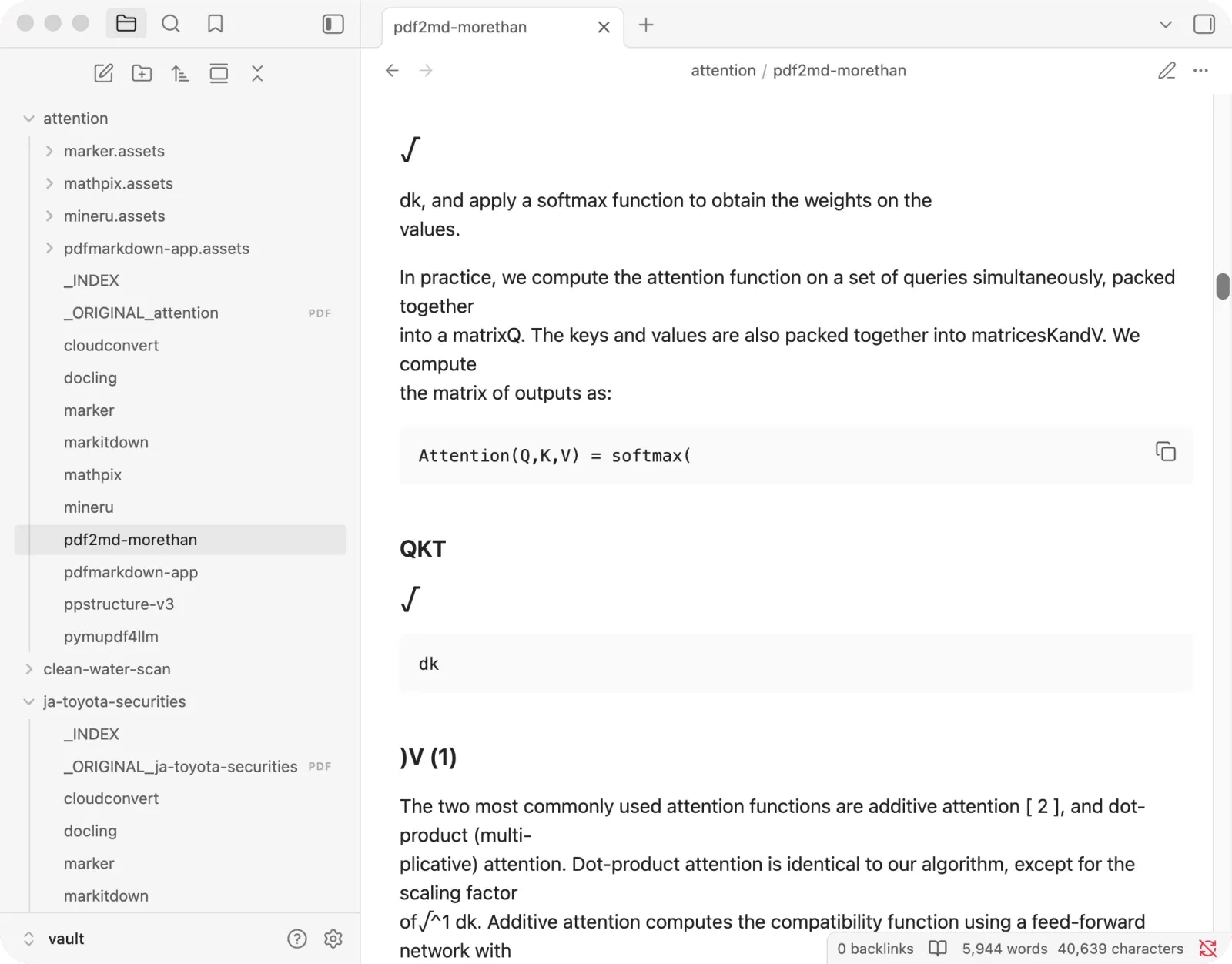
458,614came out as458,and-3,647became-3,. The dangling comma is a faint tell a human might catch, but an AI reading “458” as a county population will not. - It makes no real tables, shatters every formula, and drops images entirely — structure just isn’t there.
- It promoted junk into headings: a copyright notice, an arXiv watermark, and formula fragments became more than thirty headings.
+ Best for quick throwaway text you'll eyeball yourself.
− Watch out for any numbers you won't re-check.
pdfmarkdown.app: mine, including where it loses
I’ll be straight about my own tool. It stayed in the top tier across all five document types, and it never produced a single silent error. A few places where it held together while others broke:
- The Toyota tables: minus signs, bracketed temp-worker counts, and parenthetical dividends all correct, exactly where Mathpix and pdf2md failed.
- The legal brief: the only tool here that got all five reading-order seams right, with footnotes at the bottom, paragraphs rejoined across page breaks, and the two-column signature block intact.
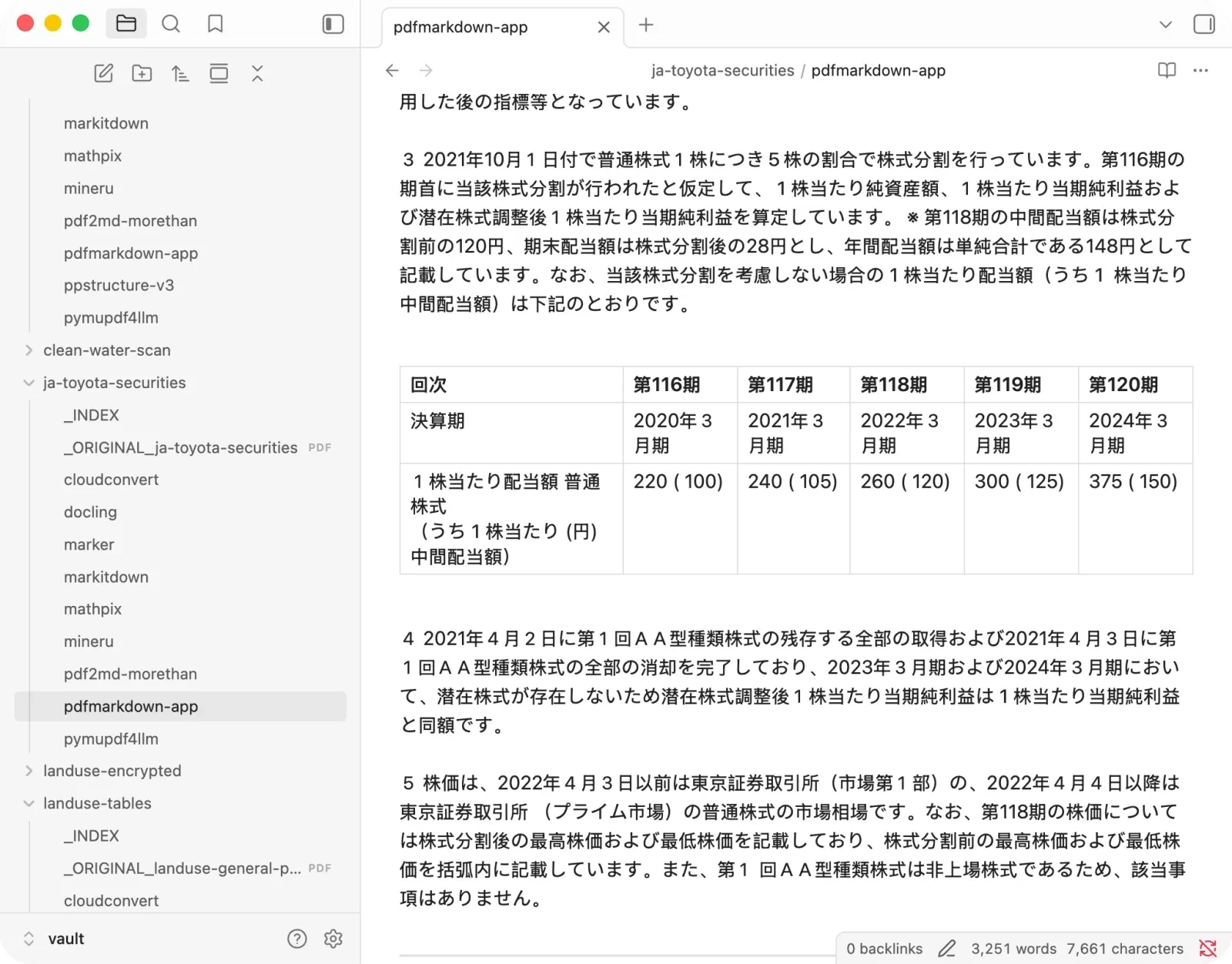
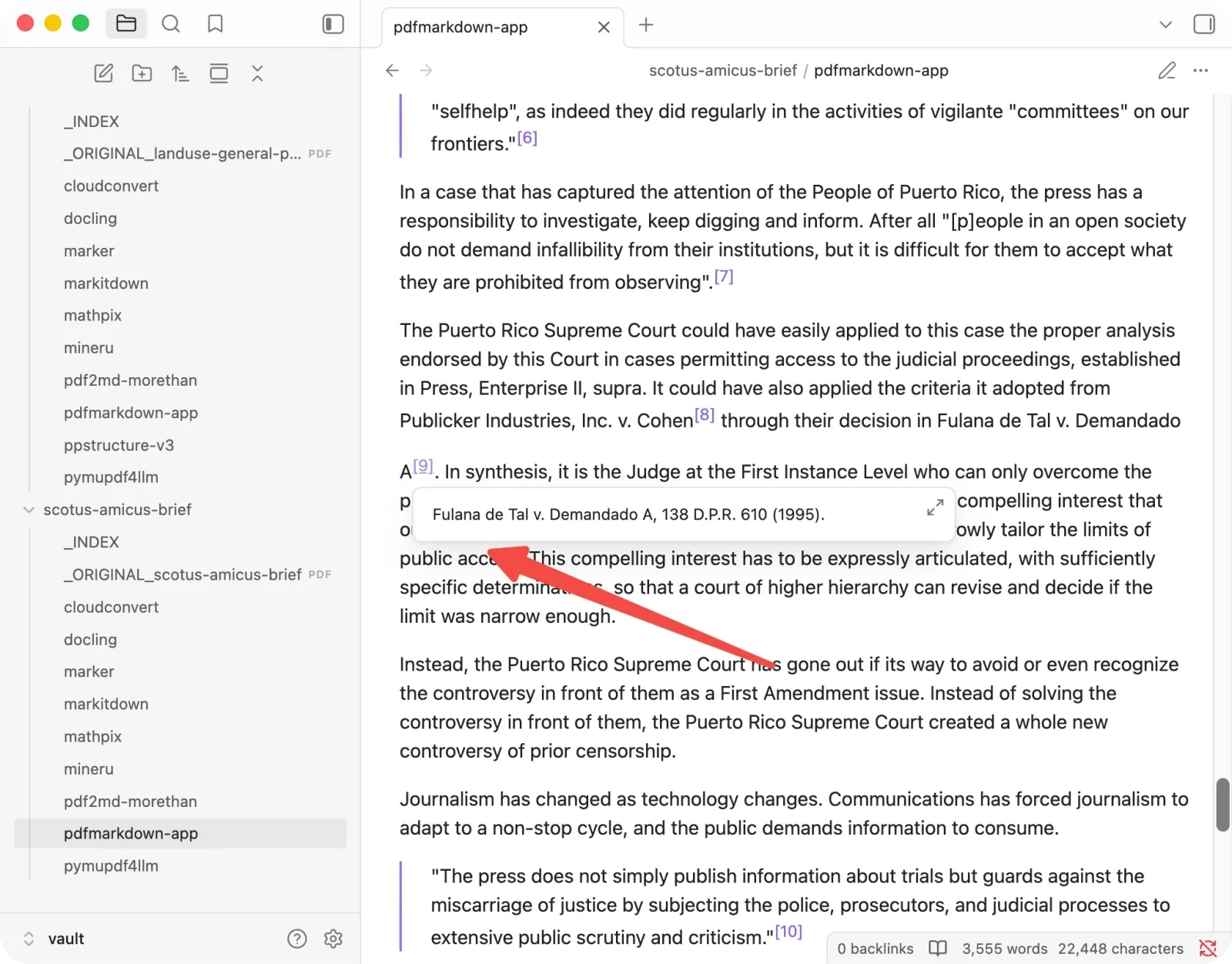
Figures, formulas, and dense tables, the three things that break most tools, all came through cleanly. The figure crops in particular were the most complete of anything I tested: both panels of a two-part diagram captured together with their caption, no cut-off edges. That is the one part of this I have obsessed over the most, and I wrote up how it works in how to pull figures out of a PDF without breaking them.
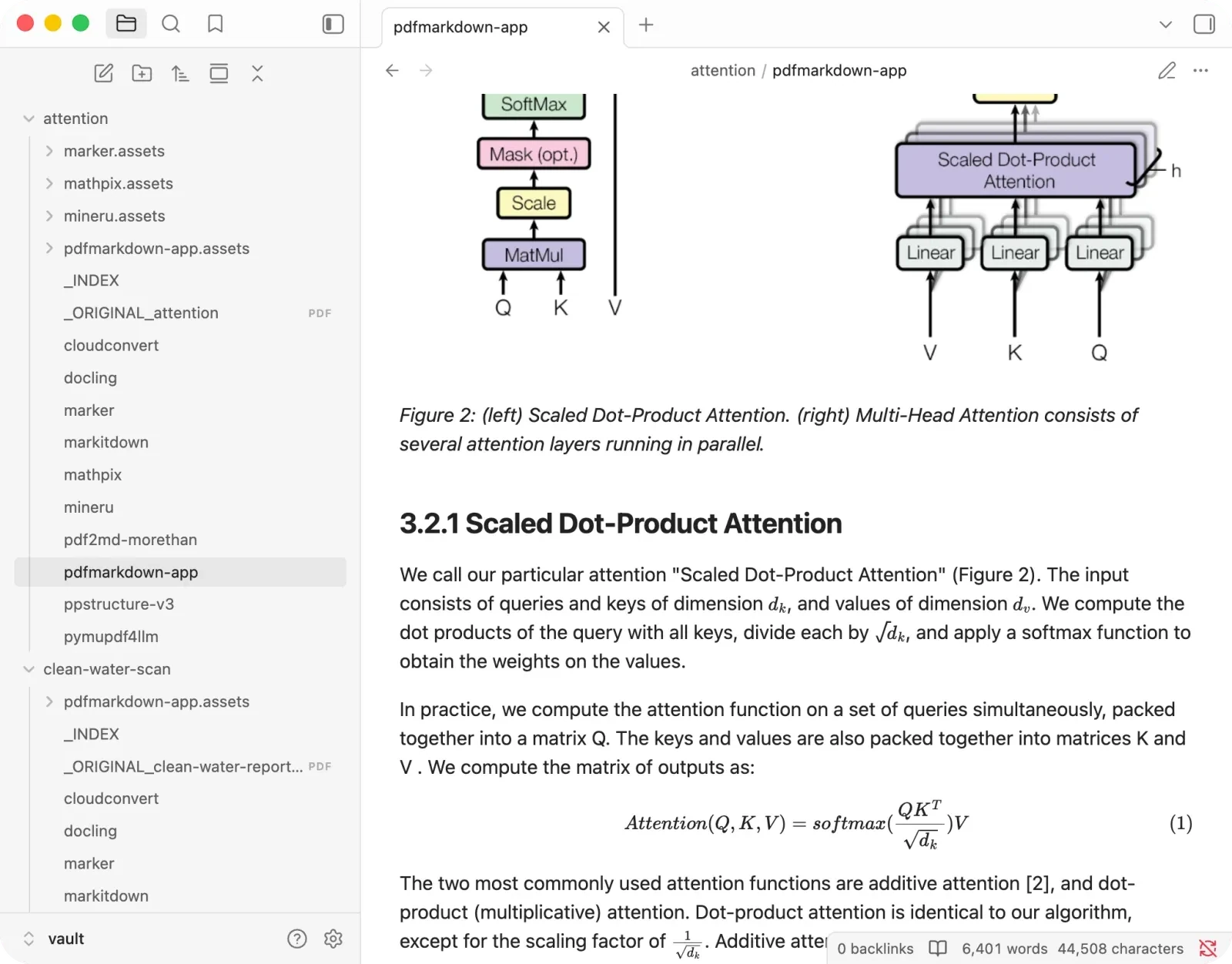
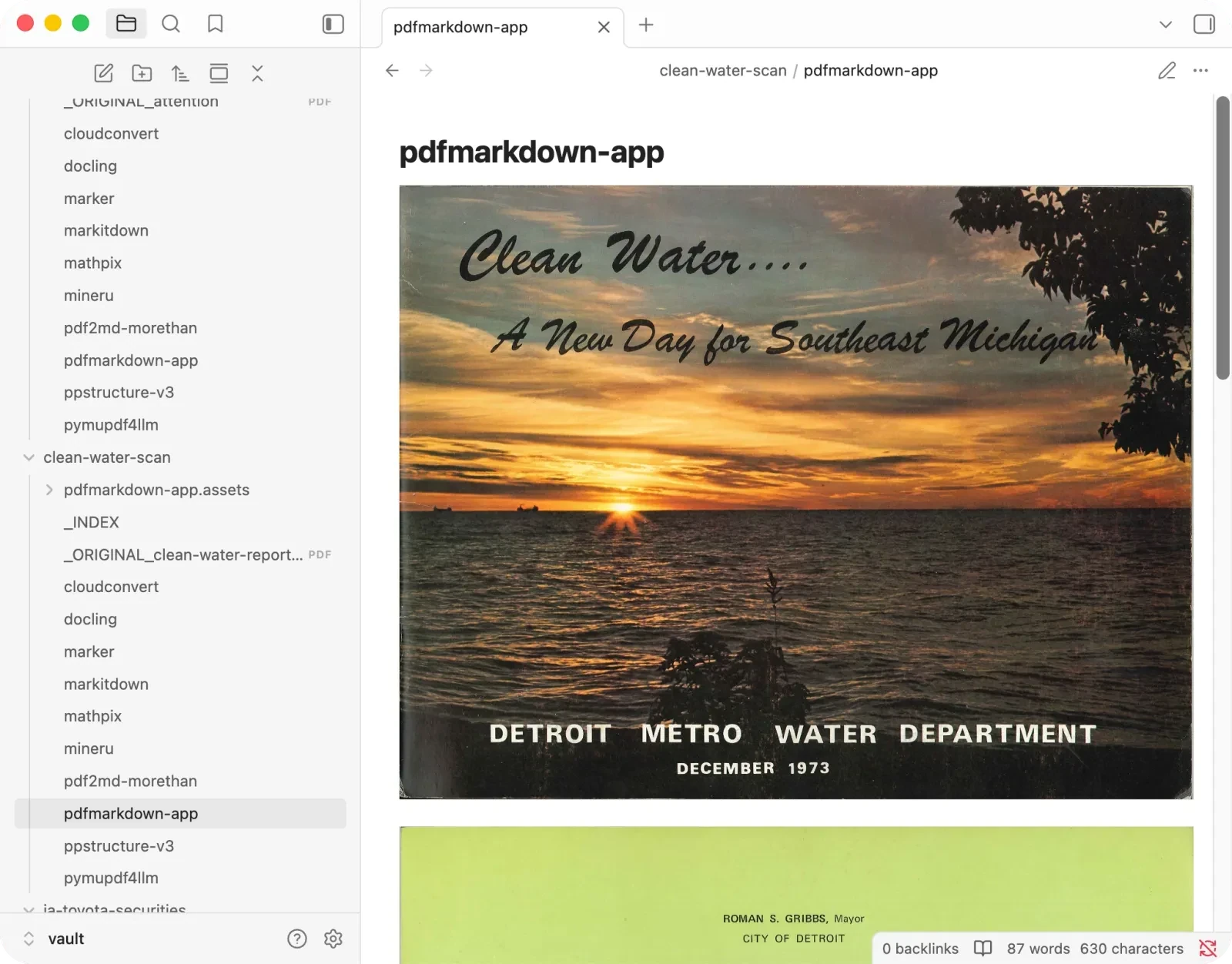
Where it loses: on the pure research paper, MinerU and Mathpix edged it by a couple of points. And on the scan it kept the cover as an image (which I think is correct, it is a photo) but did not OCR the cursive title printed on top of it, while MinerU read that text.
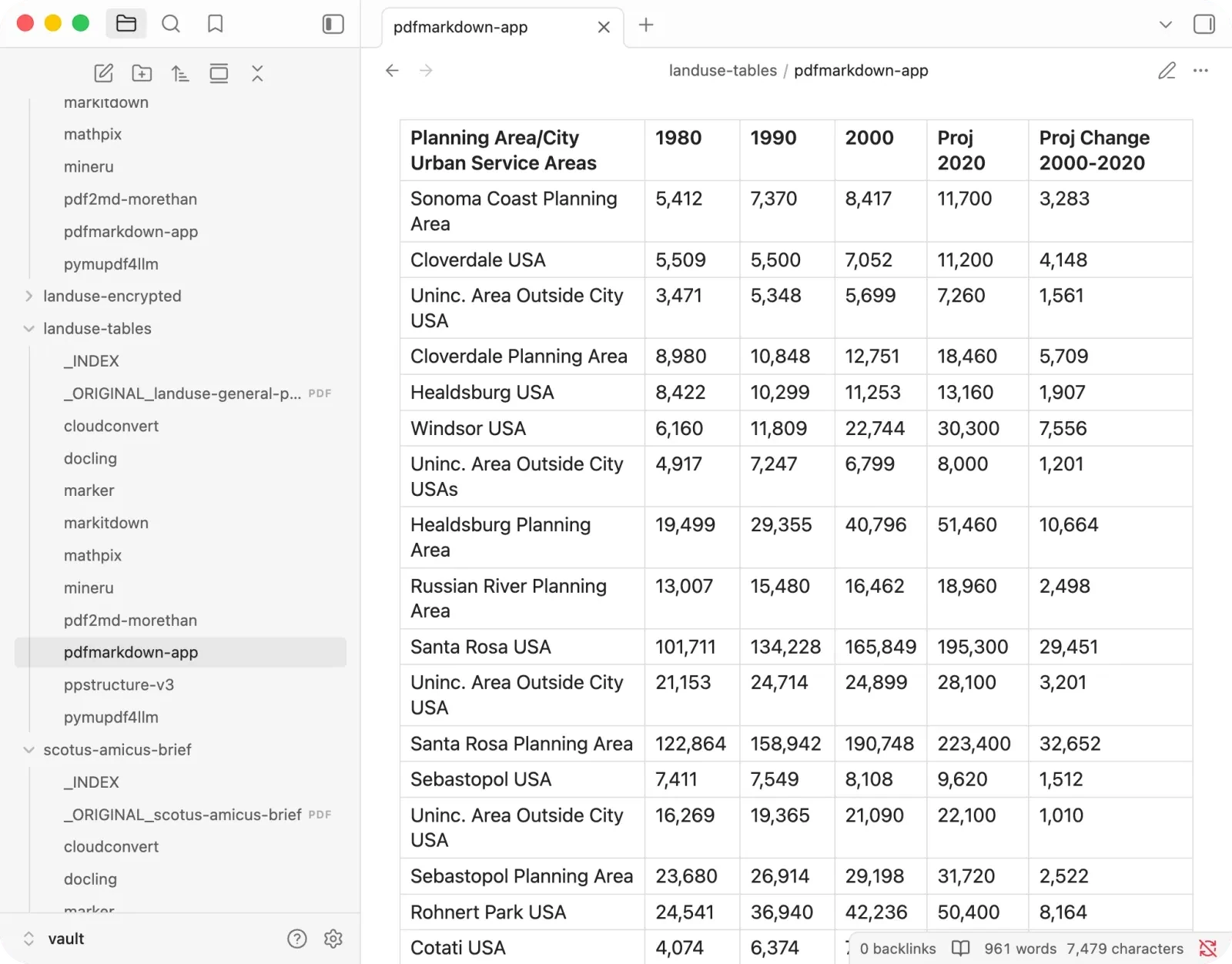
The honest gap is dense, multi-level tables like the one above, where a specialist like MinerU reads the layout better. On formulas it actually held its own here, matching MinerU on all five in the paper; the place I have seen it slip is deeply nested LaTeX and large matrices, on documents harder than anything in this set.
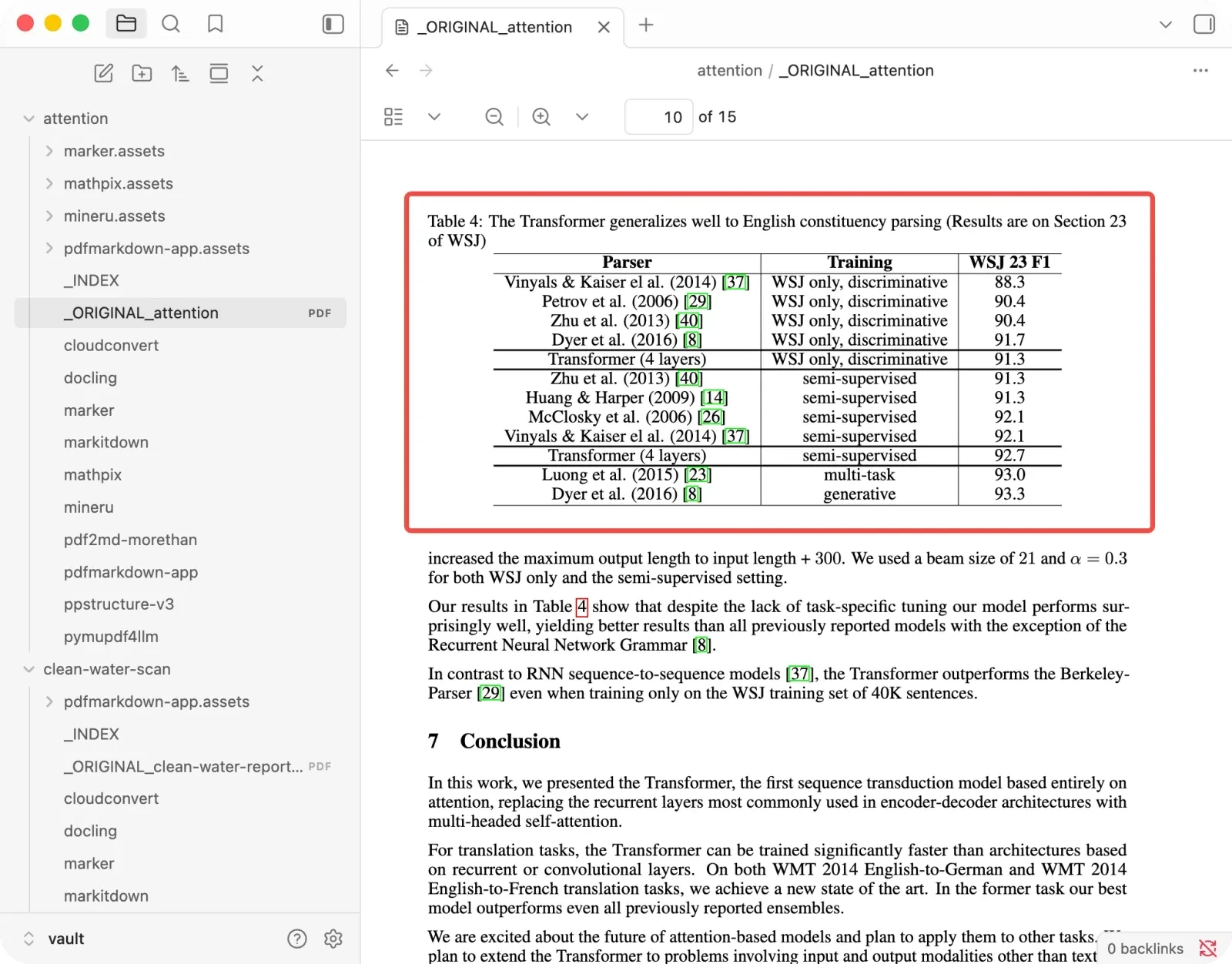
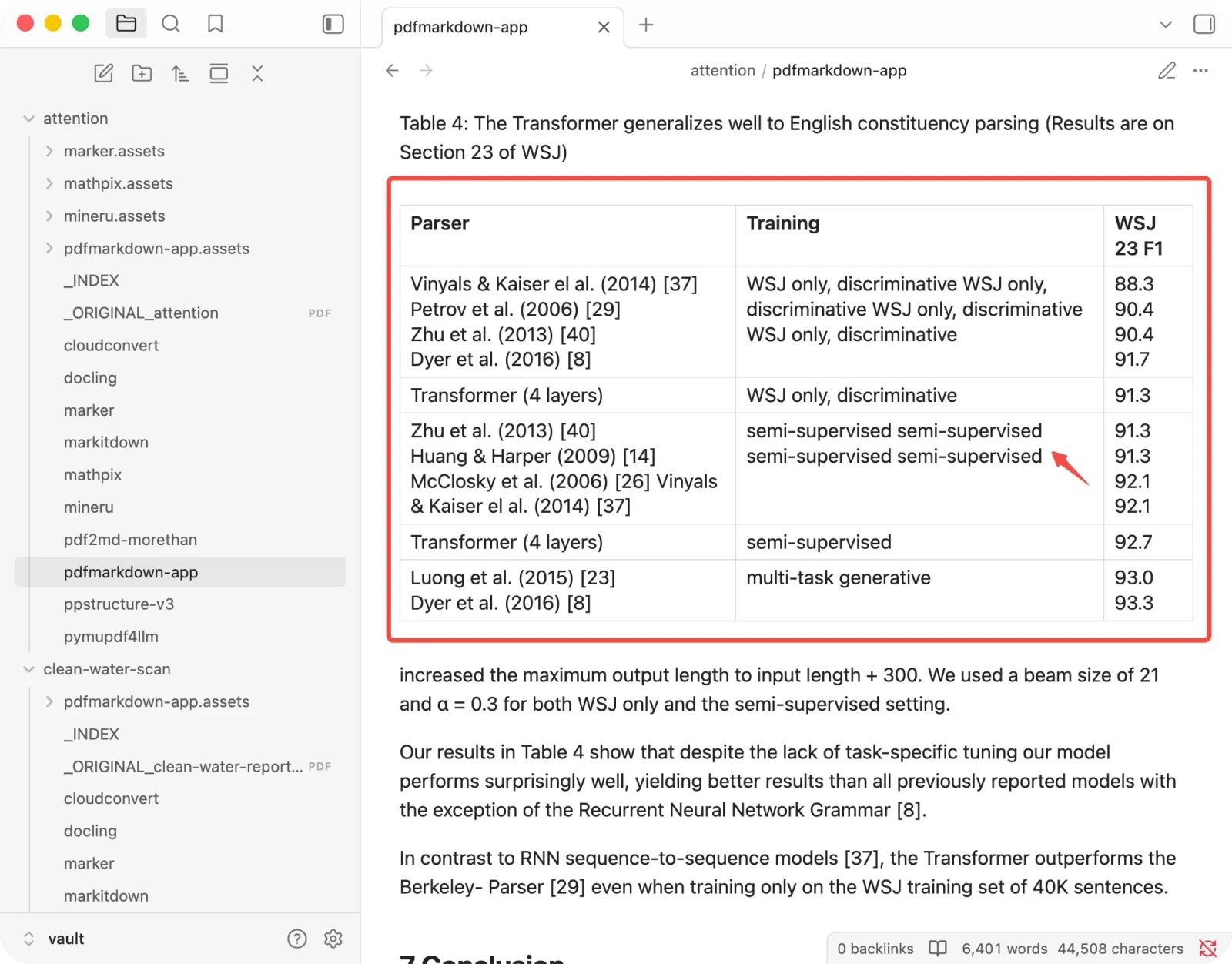
Those are exactly the cases that need a heavier vision model, which is what I’m building next: a VLM-backed mode for hard formulas and dense tables.
+ Best for everyday PDFs (reports, papers, contracts, scans, whatever mix you have) that you want to convert right in your browser, without installing anything or signing up, and especially the private or confidential ones.
− Watch out for on especially complex formulas and tables it is not as sharp as MinerU yet, and it is a tool, not a code library, so it is not the pick for automated batch jobs on a server.
How I tested this
I wanted evidence, not vibes, so two things are worth knowing before you trust the numbers later on.
The documents were chosen to be hard. Five of them, each a different kind of difficult. The originals and every tool’s raw output are in the benchmark repo:
- Research paper: tables, math, figures and footnotes.
- Japanese financial report: dense numeric tables with minus signs and bracketed figures.
- US Supreme Court brief: pure prose, footnotes, citations, and a two-column signature block.
- Land-use plan: nothing but data tables.
- 1973 scanned booklet: a cover photo with cursive text over it, and a two-column roster.
The goal was not an average PDF. It was to pick documents that expose where tools break.
The scoring is built for AI, not for looks. Since the output usually gets fed to an LLM, I scored what a model actually needs. The recovery score is simple: for each document I wrote a fixed checklist before grading, and the score is the share of those checks that came through correctly, times 100. Things a document doesn’t have (formulas in a legal brief, say) drop out of the denominator rather than counting as failures.
It also helps to separate the ways a number can go wrong, because they are not equally dangerous:
- Visibly broken: pdf2md cutting
458,614down to458,. Ugly, but you can see it. - Plausibly wrong: Mathpix keeping the interim dividend and dropping the real one, so
100reads as the figure when it is actually220. Looks perfectly normal. - Missing: a value or whole section simply gone.
- Label stripped: Marker’s
29,929,992with no “net sales” beside it, so the number survives but its meaning doesn’t.
The plausibly-wrong kind is the one I track as a silent error, because it is the only one a reader can’t catch. It gets its own column and never averages into the recovery score.
To keep the ruler even, Claude did the grading one criterion at a time across all nine tools at once, then I checked it by hand against the source PDFs, and a second skeptical pass argued against my own numbers and corrected several. Every score traces back to a specific line in an output file, and the full test set, answer keys, and scoring scripts are all in the repo linked above, so anyone can reproduce or challenge a number.
A bonus round: encrypted PDFs
A lot of the documents worth protecting are literally protected, so I tried one more file: an AES-256 password-protected copy of the land-use tables. A truly encrypted PDF needs its password to open at all, so the real question is whether a tool gives you a way to supply it. I checked each one’s code and docs.
- pdfmarkdown.app notices the file is encrypted and shows a password prompt; type the password and it converts right in your browser, with the file and the password both staying on your machine.
- PyMuPDF4LLM and Docling can open encrypted PDFs if you pass the password in code (PyMuPDF’s
authenticate(), Docling’s--pdf-passwordin recent versions). - In the versions I tested (July 2026), Marker, MinerU and MarkItDown gave no way to supply an open password, so you would have to decrypt the file first with a separate library (like qpdf or pikepdf) and feed them the unlocked copy.
- Mathpix and CloudConvert just error out on an encrypted upload, and pdf2md stalled.
One nuance: many “encrypted” PDFs are only permission-restricted (an owner password, but an empty open password), and most of these tools open those without asking. It is the files with a real open password where the differences above matter.
I’m not scoring this, since it’s a yes/no capability rather than a quality question. But it’s worth knowing before you’re on a deadline with a sensitive file, and it is one more reason a confidential document is simplest in a tool that just opens it where it already is.
The scores, and how to read them
Here are the numbers behind everything above. Read them as a map of strengths and weak spots, not a leaderboard.
| Tool | Paper | Fin. | Legal | Tables | Scan | Avg | Silent |
|---|---|---|---|---|---|---|---|
| MinerU | 99 | 95 | 67 | 100 | 71 | 86 | 0 |
| Marker | 95 | 87 | 82 | 96 | 71 | 86 | 0 |
| Docling | 63 | 80 | 90 | 92 | 61 | 77 | 0 |
| PyMuPDF4LLM | 61 | 90 | 90 | 82 | 58 | 76 | 0 |
| MarkItDown | 51 | 65 | 70 | 66 | 33 | 57 | 0 |
| Mathpix | 100 | 84 | 85 | 80 | 59 | 82 | 2 |
| CloudConvert | 62 | 90 | 90 | 70 | 55 | 73 | 0 |
| pdf2md | 55 | 79 | 80 | 50 | 46 | 62 | 1 |
| pdfmarkdown.app | 97 | 90 | 91 | 100 | 83 | 92 | 0 |
Recovery score 0–100 per document type (higher = more came through correctly). Silent = numbers changed to look right but wrong; lower is safer. Open-source first, then online; pdfmarkdown.app (mine) last.
A few honest words about this table. It is five hard documents, not a representative sample, so the scores run tough and the exact ranking is a snapshot, not a verdict. Choosing the test set is itself a bias I won’t pretend away. What the numbers are good for is spotting each tool’s strengths and its cliffs, which is why the examples above matter more than any average. There is no Swiss Army knife here, mine included. The best converter is the one that fits the documents you actually have.
If you remember one thing, make it a habit rather than a tool: test whatever you pick on a document where you already know the numbers, then go find those numbers in the output. That five-minute check tells you more than any comparison table, this one included.
What this benchmark doesn’t measure
To keep me honest, here’s what these numbers are not:
- It’s five hard documents, not a representative sample. Real-world “average” PDFs are easier than these; the scores would run higher and closer together on ordinary files.
- I didn’t formally measure speed, memory, or cost. Where I mention speed, treat it as an impression, not a benchmark.
- Best available mode per tool, no per-document tuning. I used each tool’s highest-quality generally-available mode (for MinerU, its top-end VLM), but never tweaked settings for individual documents. Most tools don’t offer a higher-quality tier to choose.
- One scan, one language mix. OCR results come from a single scanned booklet, so read the scan column as a signal, not a verdict.
- Tools change. Open-source projects and paid services ship updates; a weak spot here may be fixed by the time you read this.
- A 1 to 3 point gap is noise. Only large gaps and the silent-error column should drive a decision. And a good recovery score is not the same as a good final answer from your RAG system; it’s a necessary input, not the whole pipeline.
FAQ
What is the best PDF to Markdown converter in 2026?
There isn’t one. It depends on your documents. For everyday files with nothing to install, I’d use pdfmarkdown.app. If you can run open source, MinerU is the strongest for papers and reports, just not on footnote-heavy ones.
Which converters changed numbers without warning?
Only two of the nine:
- Mathpix dropped real dividend figures on the financial report and swapped a table total on the data tables.
- pdf2md quietly altered one figure in the financial report. (Its more visible habit, chopping numbers off at the comma, at least leaves a dangling comma you can spot.)
The other seven either got the numbers right or failed visibly.
Is Mathpix good for PDF to Markdown?
Its per-page quality is the best I tested, a perfect score on the research paper. Two caveats:
- It silently altered numbers on dense financial and data tables.
- As an online paid tool, its free tier caps around ten pages.
Which PDF to Markdown tool is best for RAG?
One that keeps headings, reading order, and tables intact, because that structure is what lets an AI find the right passage later. MarkItDown gives you no headings at all, so skip it for this. Among open source, MinerU and Marker are strongest; pdfmarkdown.app was the most consistent here.
Can these tools handle scanned PDFs?
Unevenly. On the 1973 scan, MinerU read the most text including the cursive title, while several tools barely produced anything. If your inputs are scans, test on a scan specifically.
What is the best open-source PDF to Markdown tool?
Of the open-source options I tested (MinerU, Marker, Docling, PyMuPDF4LLM and MarkItDown):
- MinerU had the highest recovery on papers and complex tables in this test, so it’s my default pick, with the caveat that it drops footnote text.
- Marker is the safer all-rounder, strong on formulas and figures.
- Docling is best if you would rather it flag a gap than fake a value.
Which tools process PDFs locally without uploading?
- In your browser, nothing uploaded: pdfmarkdown.app.
- On your own machine: the open-source libraries (MinerU, Marker, Docling, PyMuPDF4LLM, MarkItDown).
- Uploaded to a server: Mathpix and CloudConvert.
How were these scored?
Two axes: a recovery score for how much came through correctly, and a separate silent-error count for values changed to look-right-but-wrong. Graded by Claude one criterion at a time across all tools, then checked by hand against the source PDFs, with a second adversarial review pass.
Test it on your own PDF
Don’t take my word for it. The fastest way to trust any converter is to run it on a document where you already know the numbers, then search the output for those numbers before you feed it to an AI.
Try pdfmarkdown.app on your own PDF — it runs in your browser, with no signup and nothing uploaded for conversion.